Saboor880 9 Junior Poster

Hello! I have installed android studio 3.0.1 in my laptop . I had some android projects in my desktop computer (with older version of android studio) But after installing latest version(3.0.1) of android studio in my laptop, i copied projects from my desktop to my laptop and opened that projects in my new android studio(3.0.1) But there appears an error: "Gradle project sync failed. Basic functionality(e.g editing, debeugging ) will not work properly"

And in the console a message appears: ""Unable to resolve dependency for: 'app @UnitTest/compileClassPath: could not found any version that matches com.android.support: support-v4:27.+.

I can't understand this error and tried to find solutions on internet but all in vain.

I opened gradle.wrapper.properties file and saw the distributionUrl= https\://services.gradle.org/distributions/gradle-4.1-all.zip
As according to distributionUrl the gradle version is 4.(i-e latest) then why i am seeing this error.

I also opened build.gradle file, in this file under dependencies section following is written:

  dependencies {
 compile 'com.android.support:support-v4:27.+'
     }

how can I solve this? Please guide me . I am also giving photos of my "sdk tools" and project structure
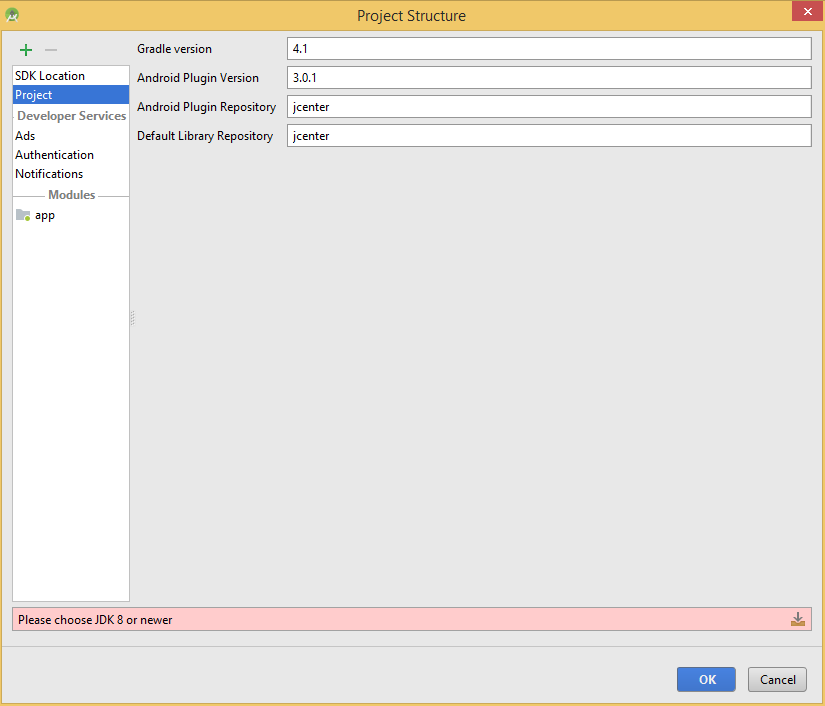
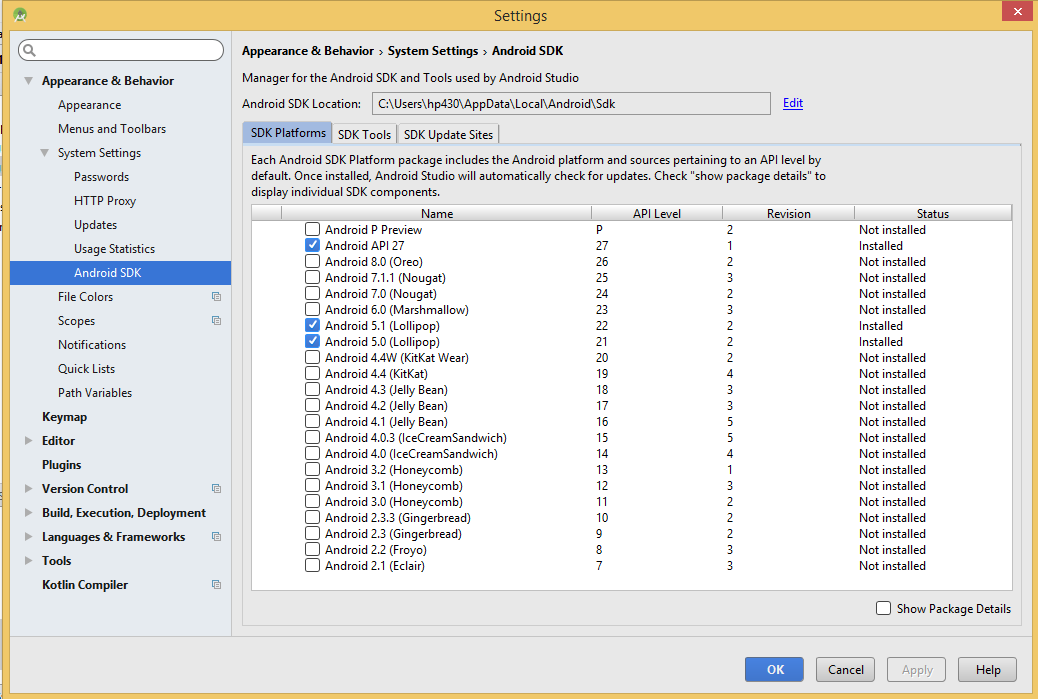
project_structure.PNG sdk_tools.PNG

Dani AI

Generated

Short diagnosis: the Gradle distribution (the wrapper) is separate from where Android libraries are resolved. The sync error means Gradle could not find the Android Support libraries for the 27.x line — usually because the build is not looking in Google's Maven repository or the matching SDK/platform packages are missing.

Common fixes to apply (order matters):

  • Ensure the project-level Gradle repositories include Google’s Maven repository before jcenter(). For Android Studio 3.x the top-level build.gradle should look like:
buildscript {
  repositories {
    google()
    jcenter()
  }
  dependencies {
    classpath 'com.android.tools.build:gradle:3.0.1'
  }
}

allprojects {
  repositories {
    google()
    jcenter()
  }
}
  • Confirm module compileSdkVersion is 27 and that Android 8.1 (API 27) is installed via SDK Manager.
  • In SDK Manager (SDK Tools) make sure the Google Repository and Android Support Repository (or their modern equivalents) are installed.
  • Turn off Gradle “Offline work” so artifacts can be downloaded (Settings > Build, Execution, Deployment > Gradle).
  • Avoid wildcards: use an explicit 27.x support-library version (for example, 27.1.1) to reduce resolution surprises.
  • Replace deprecated compile with implementation when using the Android Gradle plugin 3.x (this is a warning, not the cause of this lookup failure).

Extra troubleshooting: verify local.properties points to the correct SDK path, check proxy/firewall settings, try Invalidate Caches / Restart, or delete the Gradle cache (.gradle/caches) to force re-download. Note that support libraries were later migrated to AndroidX; migration is recommended long-term but is not required to resolve a legacy 27.x dependency.

Be a part of the DaniWeb community

We're a friendly, industry-focused community of developers, IT pros, digital marketers, and technology enthusiasts meeting, networking, learning, and sharing knowledge.