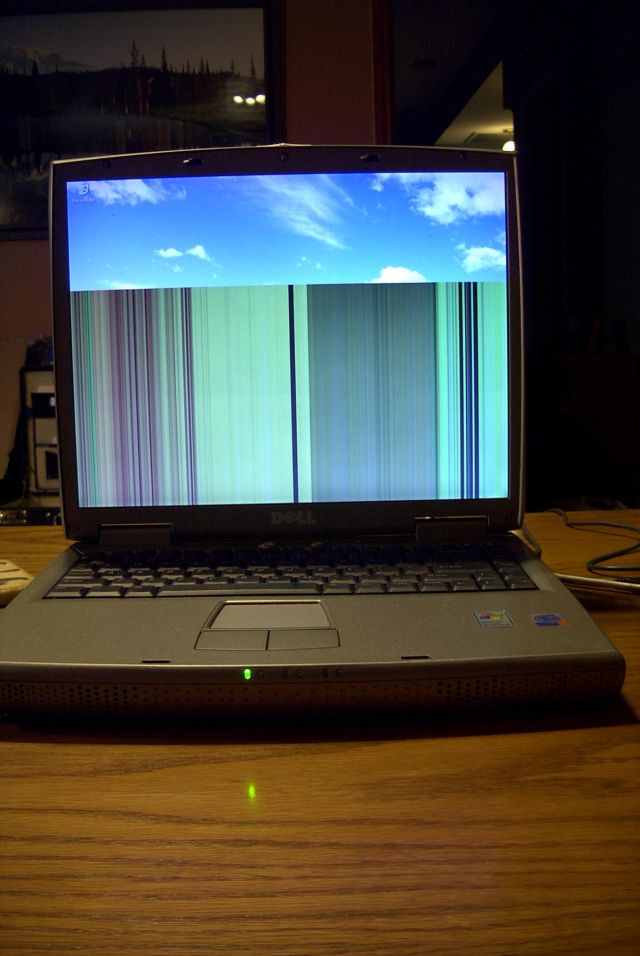
While mailing my laptop I think my laptop got a shock... The top one third of the screen shows the screen as it should. However the remaining screen shows vertical lines. Any help would be appreciated.

Dani AI

Generated

Short diagnosis for : vertical bars across most of the panel are almost always a hardware problem, not a software or single-pixel fault. Typical causes are a damaged LCD panel (column/driver failure), a loose or broken video ribbon (LVDS) cable that runs through the hinge, or less commonly a GPU/motherboard fault. This is different from a handful of dead pixels.

Quick, safe checks to isolate the fault:

  • Connect an external monitor and mirror the laptop display. If the external output is clean, the problem is in the LCD or its cable. If the same lines appear on the external, the GPU/logic board is suspect.
  • Watch the screen during BIOS/POST before Windows loads; seeing the lines there rules out driver/software issues.
  • Gently move the lid and wiggle the hinge while watching the lines. If they change or flicker, that strongly points to a loose/damaged cable where it passes through the hinge.
  • Inspect the glass for pressure marks or hairline cracks and try a power-reset (shut down, remove battery and AC, hold power 30s, reboot).

Repair notes and next steps:

  • If the external monitor is normal and the lines change with lid movement, reseating or replacing the LVDS cable (or the small connector on the panel) often fixes it. If the lines are static and confined to a region of the panel, the LCD itself likely needs replacement.
  • If the external monitor shows the same artifact, expect motherboard/GPU repair or replacement — usually pricier.
  • Replacing the panel requires the LCD part number (on the back of the panel) and modest disassembly; many people find a replacement panel cheaper than a new laptop, but labor varies.

Cautions: back up data first, check warranty/repair policies (shipping damage may not be covered), and avoid disassembly if not confident — disconnect battery and observe ESD precautions or use a professional. As suggested, replacing the screen is often the pragmatic fix; as noted, older CRTs were easier to repair, but for laptops the diagnostic steps above narrow the problem quickly.

Recommended Answers

All 3 Replies

Get a new laptop?

I'm not much of a fan for LCD's but I guess you can't buy a laptop without an LCD :P

I don't think there's anything you can do to fix this problem... you're pixels are either dead or.... something.

You might check into buying a new screen? or just getting a new laptop

thats why I like CRT's i know how to fix them :mrgreen:

:confused: heh, yeah... I'm not sure that I know how to fix them, but they're a but load easier to work with and a lot less complex

Be a part of the DaniWeb community

We're a friendly, industry-focused community of developers, IT pros, digital marketers, and technology enthusiasts meeting, networking, learning, and sharing knowledge.