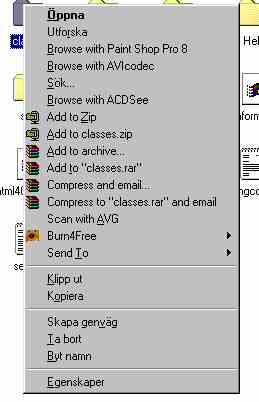
I seem to have changed language some of the buttons are in greek! the folders and icons are ok the keyboard is ok just buttons e.g. when I shut down or right click a folder I can't read all the buttons? anyone have an idea how to get it right (win98)
I have just had to delete and replace shell32.dll due to a not being able to get on the net problem, as well as the language change I lost all program icons in the programs menu on the start menu. not a great problem just meens I have to make some copies and put them back.
Any help will be appreciated.
Thanks Dave

Dani AI

Generated

This is very likely a bad/mismatched copy of shell32.dll rather than a keyboard setting. shell32.dll carries a large set of Explorer UI resources (icons, dialog strings and menu text), so replacing it with a different language or build will make some labels appear in another language and break icon resources. (windows10dll.nirsoft.net)

Try these recovery steps (in order), they’re the least-destructive first and work on Win98SE:

  1. Restore a registry/file backup with Registry Checker. Boot to the “Safe mode — Command prompt only” / MS‑DOS prompt (hold Ctrl at boot) and run:

    scanreg /restore

    choose a date from before you replaced the DLL. ScanReg can also let you extract individual .cab backups if present. (support.microsoft.com)

  2. If no registry backup helps, replace shell32.dll from your original Windows 98 SE CD (use the same language/SE build). From a command prompt (use the CD drive letter in place of D:), rename the current file and expand the CD copy:

    ren C:\WINDOWS\SYSTEM\SHELL32.DLL SHELL32.OLD
    expand D:\I386\SHELL32.DL_ C:\WINDOWS\SYSTEM\SHELL32.DLL

    (On Win9x the system DLLs live in C:\Windows\System rather than System32.) (learn.microsoft.com)

  3. If Setup/repair still fails with “illegal function” or other entry‑point/exports errors, that usually means other system files are mismatched or the CD/source media is damaged — try copying the I386 folder to the hard drive and run Setup from there, or copy shell32.dll from a known‑good machine with the identical Win98SE language/build. If those fail, back up personal data and consider a full reinstall. Mismatched shell DLLs commonly cause entry‑point/illegal‑operation faults, so always use the original CD or a same‑locale copy — avoid random “DLL download” sites. (learn.microsoft.com)

Notes: ’s keyboard check was a good quick test, but this symptom and ’s suggestion point toward the replaced shell DLL — follow the scanreg/expand steps first before a full reinstall.

Recommended Answers

All 4 Replies

You need to find the keyboard settings which are in the control panel.

Hope this helps.

Thanks for the reply, I have looked at the keyboard settings and it is set to British uk

Dave

I seem to have changed language some of the buttons are in greek! the folders and icons are ok the keyboard is ok just buttons e.g. when I shut down or right click a folder I can't read all the buttons? anyone have an idea how to get it right (win98)
I have just had to delete and replace shell32.dll due to a not being able to get on the net problem, as well as the language change I lost all program icons in the programs menu on the start menu. not a great problem just meens I have to make some copies and put them back.
Any help will be appreciated.
Thanks Dave

I'd reckon you downloaded that file from the wrong place, friend! It's not Greek, by the way, it's a Scandinavian language by the looks of things. You should have simply run Setup off your Windows CD to install Windows over the top of itself. Might still work - try it ;)

Sounds like your right I tried to re-install windows over the top but it got part way and gave me an illegal function error!
Thanks Dave

Be a part of the DaniWeb community

We're a friendly, industry-focused community of developers, IT pros, digital marketers, and technology enthusiasts meeting, networking, learning, and sharing knowledge.