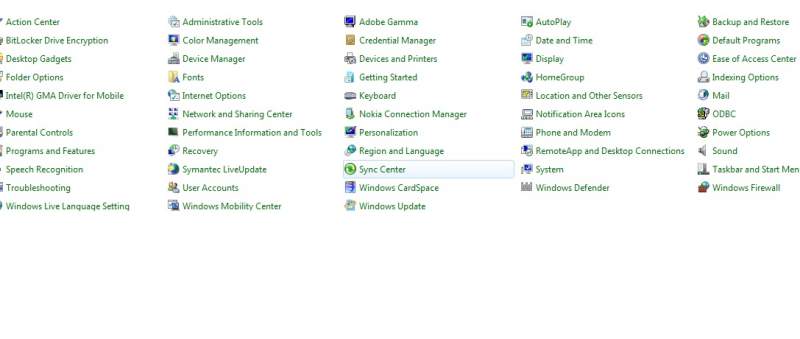
hi friends i have recently installed windows 7.but when i go to control panel i did not see add/Remove Programme .Kinldy let me know the idea .any help would be highly appreciated.:(

Dani AI

Generated

Short answer: and are on the right track — Windows 7 reorganised where you manage installed apps. If the entry still looks missing, try these quick ways to open it and some simple fixes.

Press the Windows key + R, type appwiz.cpl and press Enter to open the classic uninstall dialog directly. Or press the Windows key and search for "uninstall" or "remove" to surface the Control Panel entry. If you prefer browsing, change Control Panel to icon view so every item is visible.

If nothing opens or the list is empty: check that the file C:\Windows\System32\appwiz.cpl exists. Run an elevated command prompt and execute sfc /scannow to repair protected system files. If SFC reports unfixable files, try a System Restore or run the repair/installation media. Also test with a new user account — a per-user profile problem can hide installed items for one user only.

A final note of caution: be careful when removing entries that look like updates or Windows components; use the separate "turn Windows features on/off" control if you only need to add/remove Windows components. Thanks to and for the initial pointers — the steps above should help if the Control Panel item is just hard to find or if your system needs a quick repair.

Recommended Answers

All 2 Replies

its now called programs and features

Control Panel\Programs\Programs and Features

Just type programs and features in the search bar

Be a part of the DaniWeb community

We're a friendly, industry-focused community of developers, IT pros, digital marketers, and technology enthusiasts meeting, networking, learning, and sharing knowledge.