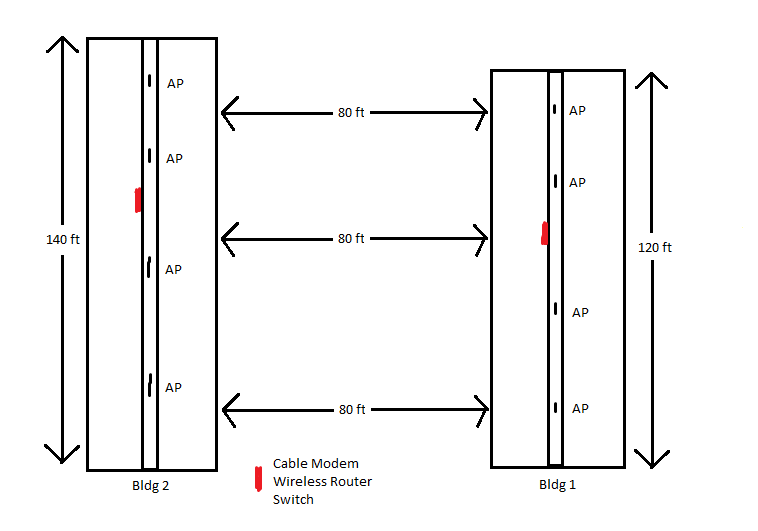
I have a hotel that has to buildings each building has its own wireless network. I would like to change a few things to the network.

  • Upgrade Equipment
  • Create a Simpllar setup
  • Make each network secure
  • Make it all one network

I don't know if it is possible to make it one big network but do let me know the pros and cons if I decide to go this route.

The current network was not setup by me. There is a 10 port switch that goes to a Netgear Fast Ethernet switch then to the wireless router. I think i actually need only one switch per network if i am wrong let me know.

This is what I was thinking for parts if i should get something else let me know.

Because this is a wireless network for a hotel. How do I set it up so that computers cannot see what who is connected to the network and cannot share files.
Wireless_Setup

Dani AI

Generated

A concise, practical plan that fills gaps in the thread and gives an actionable path forward for (and builds on 's high‑level points).

Start with the design decision: treat the two buildings as one managed Wi‑Fi system logically, but keep traffic segmented. Physically tie the buildings with a reliable wired backhaul (fiber or good quality Ethernet/point‑to‑point link). Use managed, PoE switches at each building and business‑class dual‑band APs that support VLAN tagging and per‑SSID controls. Centralize DHCP and routing on a single firewall/router (or one per building with site‑to‑site routing) so VLANs can be enforced and audited.

Quick implementation checklist

  • Perform a basic RF/site survey and identify AP locations and backhaul route.
  • Replace consumer gear with: managed PoE switches, APs that support per‑SSID VLANs and client isolation, and a firewall/router that can handle VLANs, captive portal, and per‑VLAN firewall rules.
  • Create VLANs and SSIDs: Management, Staff (802.1x), Guest (captive portal + rate limiting + client isolation), Services (printers/CCTV). Map each SSID to its VLAN on the APs.
  • Enforce isolation at multiple layers: enable AP “client isolation” (stops wireless clients seeing each other), use switch port security / private VLANs for wired rooms, and put strict inter‑VLAN rules on the firewall to prevent lateral access.
  • Use strong Wi‑Fi security (WPA2‑AES or WPA3 where supported) and 802.1x/RADIUS for staff devices; captive portal / PSK for guests if needed.

Troubleshooting & operational tips

  • If you want a single SSID for roaming, enable coordinated settings across APs and consider fast‑roaming (802.11r/k/v) if supported. Test roaming and backhaul capacity with multiple clients (iperf).
  • Channel plan 2.4GHz carefully (minimal APs on 2.4GHz) and prefer 5GHz for capacity. Lower TX power to avoid co‑channel interference where APs overlap.
  • Monitor logs, enable DHCP snooping/ARP inspection on switches, and schedule firmware updates. Start by deploying in one building, validate isolation and performance, then replicate.

This approach gives the “one network” user experience while keeping security, performance and manageability under control.

  1. I suggest a controller based solution like the Cisco 2500 series Wireless Controller. A controller will give you a single device to manage. You configure the controller, the controller then tells the access points what to do. There is an option in the Cisco controller to NOT allow the clients to talk to each other. The controller would also take care of you channel and power levels for the access points.

  2. To prevent guests from talking (Hacking) to each other, you need a switch that will do private VLAN's. Private VLAN's will prevent a client from talking to anther client once it's on the LAN, including hardwired clients.

  3. Meraki.com has a solution that does not use a controller. You buy their access points, connect them to the internet and they register back home. You then configure them through a website. This may cost more, but you don't have to worry about softare upgrades and controller failures.

I hope this helps

www.goatnetworking.com

Be a part of the DaniWeb community

We're a friendly, industry-focused community of developers, IT pros, digital marketers, and technology enthusiasts meeting, networking, learning, and sharing knowledge.