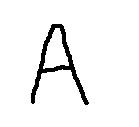
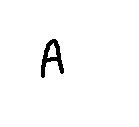
hello every one
I need some help in image size normalization
i want all images to be almost the same size.. with no content distortion..i care too much to keep to keep the features of the image the same ..

thanks

Dani AI

Generated

Content-aware size normalization (normalize the glyph, not the whole image) preserves shape and stroke details that matter for recognition or matching. For a single letter the usual approach is: detect the glyph region, crop with a small consistent margin, optionally deskew, scale the crop to fit a target height/width while preserving aspect ratio, then center-and-pad to a fixed canvas. This keeps the "A" geometry consistent across samples and complements 's point that OCR engines often prefer original-quality regions — normalization is primarily for template matching, classifiers, or training data rather than replacing original input for production OCR.

A practical pipeline:

  1. convert to grayscale and denoise; 2) binarize (adaptive threshold) and find contours or connected components; 3) pick the glyph contour (largest area or by aspect ratio), compute bounding box + margin; 4) deskew if needed (use image moments or Hough for rotation); 5) resize the crop preserving aspect ratio (use area/Lanczos for downsampling); 6) pad to a fixed canvas size and center the glyph; 7) optionally re-binarize and apply small morphological ops to stabilize stroke width.

Important notes: choose interpolation carefully (area/Lanczos for downsample, bicubic for upsample). For binary outputs, threshold after resizing to avoid uneven stroke thickness. Keep a consistent margin (e.g., 5-15% of glyph height). If normalized images are for ML, consider consistent background, stroke-width normalization (morphology or skeletonization), and fixed orientation.

Example (OpenCV) that implements the core steps:

import cv2
import numpy as np

def normalize_glyph(img, target=(64,64), margin=4):
    if img.ndim == 3:
        gray = cv2.cvtColor(img, cv2.COLOR_BGR2GRAY)
    else:
        gray = img.copy()
    blur = cv2.GaussianBlur(gray, (3,3), 0)
    th = cv2.adaptiveThreshold(blur, 255, cv2.ADAPTIVE_THRESH_GAUSSIAN_C,
                               cv2.THRESH_BINARY_INV, 11, 2)
    contours, _ = cv2.findContours(th, cv2.RETR_EXTERNAL, cv2.CHAIN_APPROX_SIMPLE)
    if not contours:
        return cv2.resize(gray, (target[1], target[0]), interpolation=cv2.INTER_AREA)
    c = max(contours, key=cv2.contourArea)
    x,y,w,h = cv2.boundingRect(c)
    x = max(0, x-margin); y = max(0, y-margin)
    w = min(gray.shape[1]-x, w+2*margin); h = min(gray.shape[0]-y, h+2*margin)
    roi = gray[y:y+h, x:x+w]
    tH, tW = target
    scale = min(float(tH)/roi.shape[0], float(tW)/roi.shape[1])
    newW, newH = int(roi.shape[1]*scale), int(roi.shape[0]*scale)
    resized = cv2.resize(roi, (newW, newH), interpolation=cv2.INTER_AREA)
    top = (tH-newH)//2; bottom = tH-newH-top
    left = (tW-newW)//2; right = tW-newW-left
    padded = cv2.copyMakeBorder(resized, top, bottom, left, right,
                                cv2.BORDER_CONSTANT, value=255)
    return padded

Recommended Answers

All 3 Replies

File size? Resolution? By distort I assume you mean scale? If you want to maintain the aspect ratio and not distort you could size it evenly but then you would have to crop images that "dont fit" your model of size.

You haven't provided nearly enough information to help you with this problem. Please upload ~5 sample images and the code you have so far and we can take a look!

sorry , i didn't realize that my description was not enough
since we use this expression "image normalization" in image processing field ..
"Size normalization is an important pre-processing
technique in character recognition"
and i thought it is clear..

I'm providing you now with two images for the same English letter "A"
I want the "A" in them to be the same size ..

i will supply you with my code as soon as possible
thanks

Image normalization isn't important in pre-processing images for OCR I would think. I do a lot of OCR / Barcode recognition code in scanned documents and we always take the original, unmodified image and perform any OCR on that. After that we step the quality down and PDF/Archive the documents.

From what I can tell one image is a bitmap and one image is a jpeg. They are both 139x127. One is 53kb and one is 2kb. You need to perform OCR on the letter "A" and scale the OCR'd region. Do you have code to detect the letter already? That would be the next step...

Be a part of the DaniWeb community

We're a friendly, industry-focused community of developers, IT pros, digital marketers, and technology enthusiasts meeting, networking, learning, and sharing knowledge.