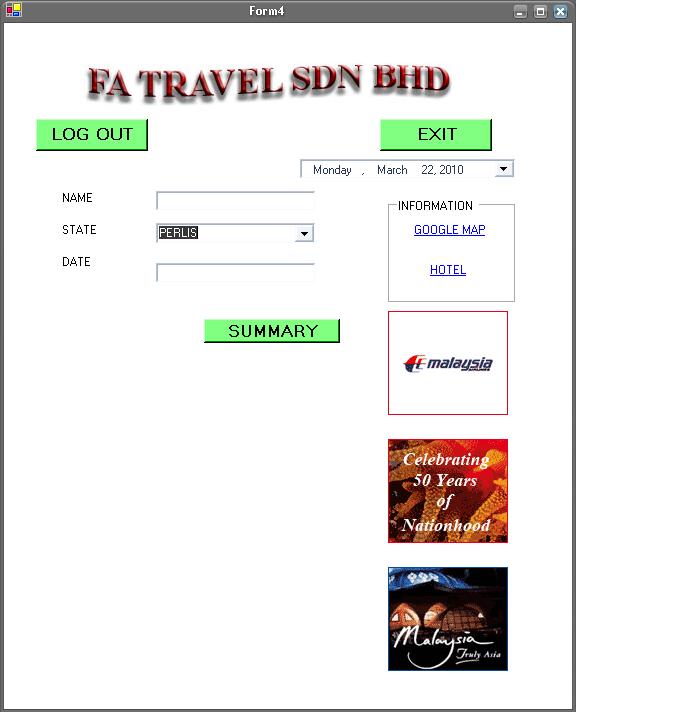
i have problem with my database.i using combobox to select elements. i have store the data using ms excess.the problem is when i select one of the element in the combobox.For example when i choose Perlis from the combobox, i hit summary button, there is no output on the label just under summart button.
Imports System.Data.OleDb
Public Class Form4
    Inherits System.Windows.Forms.Form
    Dim cn As OleDbConnection
    Dim cmd As OleDbCommand
    Dim dr As OleDbDataReader
    Dim icount As Integer
    Dim str As String

Private Sub Form4_Load(ByVal sender As System.Object, ByVal e As System.EventArgs) Handles MyBase.Load

    End Sub

    Private Sub ComboBox1_SelectedIndexChanged(ByVal sender As System.Object, ByVal e As System.EventArgs)

    End Sub

    Private Sub Label4_Click(ByVal sender As System.Object, ByVal e As System.EventArgs)

    End Sub

    Private Sub Button3_Click(ByVal sender As System.Object, ByVal e As System.EventArgs) Handles Button3.Click
        Me.Close()
    End Sub

    Private Sub Button4_Click(ByVal sender As System.Object, ByVal e As System.EventArgs) Handles Button4.Click
        Dim Form1 As New Form1
        Form1.Show()
        Me.Hide()
    End Sub

    Private Sub Button2_Click(ByVal sender As System.Object, ByVal e As System.EventArgs)
        Dim Form5 As New Form5
        Form5.Show()
        Me.Hide()
    End Sub

    Private Sub Button1_Click(ByVal sender As System.Object, ByVal e As System.EventArgs)
        Dim Form6 As New Form6
        Form6.Show()
        Me.Hide()
    End Sub

    Private Sub Button5_Click(ByVal sender As System.Object, ByVal e As System.EventArgs) Handles Button5.Click
        Dim con As New OleDbConnection
        Dim com As New OleDbCommand

        con.ConnectionString = "tblPlace"
        com.Connection = con
        com.CommandText = "SELECT * FROM tblPlace"
        con.Open()

        Dim da As New OleDbDataAdapter(com)
        Dim ds As New DataSet
        da.Fill(ds, "tblPlace")

        Dim theDataRowArray() As DataRow = Nothing

        If ComboBox1.SelectedItem = "sabah" Then
            theDataRowArray = Me..Tables("tblPlace").Select("state='PERAK'", "state", DataViewRowState.CurrentRows)
            If (theDataRowArray.Length = 1) Then
                lblSummary.Text = CStr(theDataRowArray(0)("<column1state>")) 'here instead of <clomun3name> put the name of the third column
            Else
                lblSummary.Text = "Nothing Found!"
            End If

        End If

        con.Close()

    End Sub

    Private Sub ComboBox1_SelectedIndexChanged_1(ByVal sender As System.Object, ByVal e As System.EventArgs) Handles ComboBox1.SelectedIndexChanged

    End Sub

    Private Sub PictureBox3_Click(ByVal sender As System.Object, ByVal e As System.EventArgs) Handles PictureBox3.Click

    End Sub
End Class