Hi,
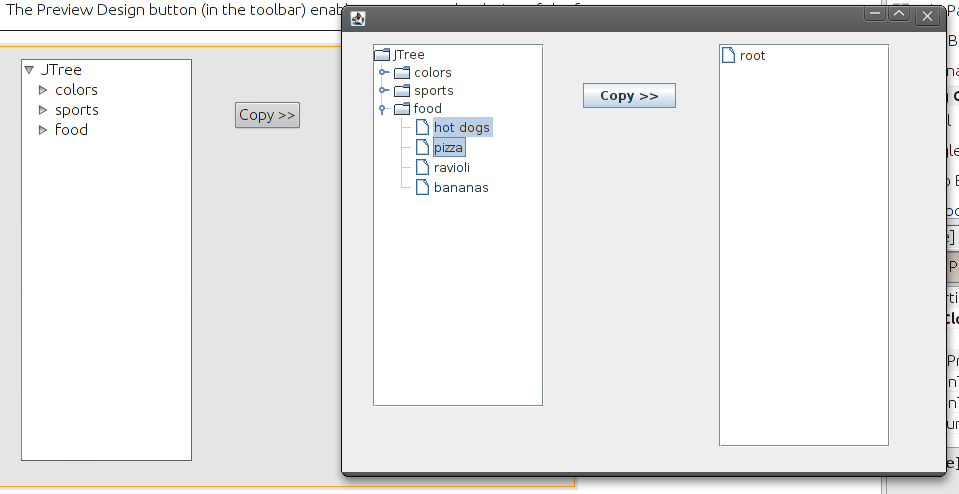
I am trying to copy the selected jTree elements on the left to the jTree on the right. However, I had been unable to acomplish it even when I had been looking at some books, google, forums... I had attached a screenshot.
Thanks.
Hi,
I am trying to copy the selected jTree elements on the left to the jTree on the right. However, I had been unable to acomplish it even when I had been looking at some books, google, forums... I had attached a screenshot.
Thanks.
As hinted, the correct way is to copy data into new node objects and update the target tree's model. A DefaultMutableTreeNode may have only one parent, so reusing the same node instance for two trees will not work. Work on the TreeModel (DefaultTreeModel) and perform changes on the Event Dispatch Thread.
A minimal pattern:
private DefaultMutableTreeNode cloneNode(DefaultMutableTreeNode src) {
DefaultMutableTreeNode copy = new DefaultMutableTreeNode(src.getUserObject());
for (int i = 0; i < src.getChildCount(); i++) {
copy.add(cloneNode((DefaultMutableTreeNode) src.getChildAt(i)));
}
return copy;
}
// copy selected nodes from leftTree to root of rightTree
TreePath[] paths = leftTree.getSelectionPaths();
if (paths != null) {
DefaultTreeModel dstModel = (DefaultTreeModel) rightTree.getModel();
DefaultMutableTreeNode dstRoot = (DefaultMutableTreeNode) dstModel.getRoot();
for (TreePath p : paths) {
DefaultMutableTreeNode srcNode = (DefaultMutableTreeNode) p.getLastPathComponent();
DefaultMutableTreeNode cloned = cloneNode(srcNode);
dstModel.insertNodeInto(cloned, dstRoot, dstRoot.getChildCount());
rightTree.scrollPathToVisible(new TreePath(cloned.getPath()));
}
} Notes and gotchas:
That is the only way to go?
huuuh, and your question(s) is(are), because you have various methods how to do it (inside examples)
We're a friendly, industry-focused community of developers, IT pros, digital marketers, and technology enthusiasts meeting, networking, learning, and sharing knowledge.