Hello everyone,

I am current upgrading some of the functions on an inventory system.
Current system accepts manual data input from the user and stores them in a SQL database.
One of the inputs is control number which is a primary key in one of our table so it needs to be unique. Since it is manually entered into the system, we have to keep track of all of control numbers so there is no redundant control number which is difficult since we have hundreds of items with unique control number that are entered into the system everyday.
Yes, it is waste of time.

So I want our newly upgraded system to have a function where the control number is automatically generated so the control numbers are controled by the system. I know there something similar in MS Access 2007 but I cant seem to find it on Visual Studio.

Format (2 Characters followed by 8 numeric numbers)
Example: AA12345678, AA12345679, AA12345680

I would appreciate if anyone can tell me how to go about it, better if i can see some codes.
Thanks guys

Dani AI

Generated

Best practice: have the database generate the control number so the value is assigned atomically and cannot collide under concurrent inserts. 's VB routine is a clear example of the desired formatting/rollover logic, but that kind of client- or app-side incrementing should be moved into the database for safety. 's link is a useful pointer for format ideas.

Simple, robust approach (fixed 2-letter prefix)
Create an IDENTITY primary key and expose a computed, persisted control column that pads the numeric portion to eight digits and prepends a 2-character prefix stored in the row:

CREATE TABLE dbo.Inventory (
  ItemId BIGINT IDENTITY(1,1) PRIMARY KEY,
  Prefix CHAR(2) NOT NULL DEFAULT 'AA',
  ControlNumber AS (Prefix + RIGHT('00000000' + CAST(ItemId AS VARCHAR(8)), 8)) PERSISTED
  -- other columns...
);

This guarantees uniqueness, is transactional, and lets the app read the generated ControlNumber immediately after insert.

Rollover of the two-letter prefix after 99,999,999
If the letters must advance (AA -> AB ... AZ -> BA) when the numeric part overflows, keep the same identity and add a tiny scalar function that converts a 0-based block index to two letters, then compute the formatted value from the ID:

CREATE FUNCTION dbo.IntTo2Letters(@idx BIGINT) RETURNS CHAR(2) AS
BEGIN
  DECLARE @first INT = (@idx / 26) % 26;
  DECLARE @second INT = @idx % 26;
  RETURN CHAR(65 + @first) + CHAR(65 + @second);
END;

Then use a computed column like:

ControlNumber AS (
  dbo.IntTo2Letters( (ItemId-1) / 100000000 )
  + RIGHT('00000000' + CAST(((ItemId-1) % 100000000) + 1 AS VARCHAR(8)), 8)
) PERSISTED

Operational notes
Always return the generated ControlNumber from the same INSERT (use OUTPUT or SCOPE_IDENTITY()) so the application never has to guess. Add a unique index on ControlNumber as a last guard; handle unique-violation errors gracefully. For older SQL Server versions that lack SEQUENCE objects, the identity+computed or a small counter table updated inside a transaction are safer than "read max, then write" patterns.

Recommended Answers

All 4 Replies

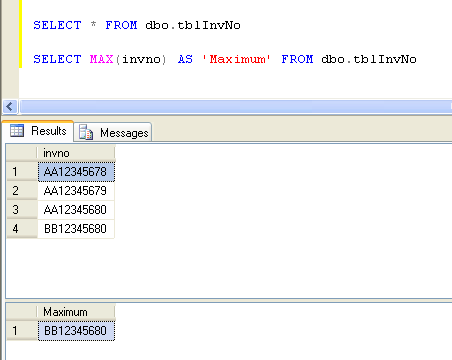
ok.. let's assume that you have a table "tblInvNo" which stores your invoice numbers.. (just for demo)

there is only one column in this table , and that is invno (of type nvarchar)

Let's say the content of Table "tblInvNo" are

AA12345678
AA12345679
AA12345680
BB12345680


As you can see the maximum invoice number here is "BB12345680" .

you can get the max invoice number by following sql Query:

SELECT MAX(invno) FROM dbo.tblInvNo

After you get this max invoice number use the following function to calculate next invoice number:

Public Function IncrementInvoice(ByVal strInvoiceNumber As String) As String

        If strInvoiceNumber.Length <> 10 Then
            Return "Error"
        End If

        Dim strAlphaPart(1) As Char
        strAlphaPart(0) = strInvoiceNumber(0)
        strAlphaPart(1) = strInvoiceNumber(1)

        Dim IntPart As Int64
        IntPart = strInvoiceNumber.Substring(2, 8)


        If IntPart = 99999999 Then
            If strAlphaPart(1) = "Z" Then
                strAlphaPart(0) = Chr(Asc(strAlphaPart(0)) + 1)
                strAlphaPart(1) = "A"

                IntPart = 1

                Return strAlphaPart(0) & strAlphaPart(1) & IntPart.ToString.PadLeft(8, "0")
            Else
                strAlphaPart(1) = Chr(Asc(strAlphaPart(1)) + 1)
            End If

        Else
            IntPart += 1
            Return strAlphaPart(0) & strAlphaPart(1) & IntPart.ToString.PadLeft(8, "0")
        End If

    End Function
'outputs example:
        strTemp = IncrementInvoice("AA99999998") 'Output will be: "AA99999999"
        strTemp = IncrementInvoice("AA00000005") 'Output will be: "AA00000006"
        strTemp = IncrementInvoice("AZ00000007") 'Output will be: "AZ00000008"
        strTemp = IncrementInvoice("AZ99999999") 'Output will be: "BA00000001"

i hope this helps

http://www.daniweb.com/web-development/aspnet/code/368870

Please go through above link....
but the code is in asp.net...
You can change is as per you in vb.net....

Thanks for your help but I am not really familiar with ASP.NET.
Webside is the weakest link for me. but im pretty sure I'll be able to use it as reference in the near future.
Thanks again

Great! I'll try it when I get in the office later this afternoon.
I see that you've attached a thumbnail but I am unable to open it.
Is it possible if you can email me a copy of it.
Thanks

Be a part of the DaniWeb community

We're a friendly, industry-focused community of developers, IT pros, digital marketers, and technology enthusiasts meeting, networking, learning, and sharing knowledge.