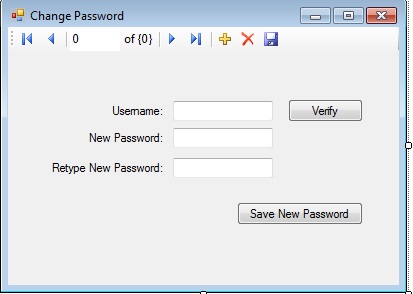
I'm a newbie in vb. My first project is a grading system for a certain school. In my login form, there's a Forgot Password button. In the Forgot Password form, the user is asked to answer a secret question that he filled up upon registration, and if the answer is correct it will lead him to a Change Password form. My problem is, I don't know how to get then delete and then replace the password of a certain user. I attached some screen shots of my work. Please someone help me.. Thank you..

Dani AI

Generated

since you are using MS Access with VB.NET 2008, switch to OleDb and parameterized SQL. OleDb uses positional parameters (the ? placeholders), so add parameters in the exact order they appear in the SQL. Do not reveal an existing password as suggested by ; instead, verify the secret answer and let the user set a new one. Also, avoid naming a column Password (it is reserved in Access) or wrap it in brackets. Configuring parameters and parameter data types. Avoid using reserved words and symbols in Access. Forgot Password Cheat Sheet.

Minimal pattern (after you have validated the secret answer):

Imports System.Data.OleDb
Imports System.Security.Cryptography

Using con As New OleDbConnection("Provider=Microsoft.ACE.OLEDB.12.0;Data Source=..."),
      cmd As New OleDbCommand("UPDATE Users SET PasswordHash=?, PasswordSalt=? WHERE UserName=?", con)

    Dim salt(15) As Byte
    Using rng = RandomNumberGenerator.Create()
        rng.GetBytes(salt)
    End Using

    Dim hash = Pbkdf2(txtNew.Text, salt, 10000) 'tune iterations for ~100-500ms on your machine

    cmd.Parameters.Add("p1", OleDbType.VarWChar, 256).Value = hash
    cmd.Parameters.Add("p2", OleDbType.Binary, salt.Length).Value = salt
    cmd.Parameters.Add("p3", OleDbType.VarWChar, 50).Value = txtUserName.Text

    con.Open()
    Dim updated = cmd.ExecuteNonQuery()
    If updated = 0 Then MsgBox("User not found or validation failed.")
End Using
Private Shared Function Pbkdf2(p As String, s As Byte(), iters As Integer) As String
    Dim kdf As New Rfc2898DeriveBytes(p, s, iters) 'PBKDF2
    Return Convert.ToBase64String(kdf.GetBytes(32)) '256-bit
End Function

Notes:

  • Store only salted password hashes (e.g., PBKDF2 as above). OWASP recommends modern, slow hashes and never storing or emailing plaintext passwords. Password Storage Cheat Sheet. Rfc2898DeriveBytes.
  • Connection string: use Microsoft.Jet.OLEDB.4.0 for .mdb, Microsoft.ACE.OLEDB.12.0 for .accdb.
  • Rate-limit and give generic errors during the reset flow to prevent account enumeration. Forgot Password Cheat Sheet.

Recommended Answers

All 3 Replies

You can do like this if user gives correct answer of that secret question you can show a message box saying your password is....

or you can use following code but in place of old password use the result of your secret answer...

Private Sub btnSave_Click(ByVal sender As System.Object, ByVal e As System.EventArgs) Handles btnSave.Click
        If txtNew.TextLength < 5 Then
            MsgBox("The New Password Should be of Atleast 5 Characters")
            txtNew.Text = ""
            txtRe.Text = ""
        ElseIf txtOld.Text = txtNew.Text Then
            MsgBox("The New Password is Same As Old Password")
            txtNew.Text = ""
            txtNew.Focus()
        ElseIf (txtNew.Text = txtRe.Text) Then

            Try
                Dim con As New SqlConnection("Data Source=XXXX-578AC20261\SQLEXPRESS;Initial Catalog=TT;Integrated Security=True")
                Dim ds1 As New DataSet
                
                Dim da1 As New SqlDataAdapter("select * from Login where UserName='" & Trim(txtUserName.Text) & "'and Password='" & Trim(txtOld.Text) & "'", con)

                If da1.Fill(ds1) Then

                    Dim ra As Integer
                    Dim cb As SqlClient.SqlCommand
                    con.Open()
                    cb = New SqlClient.SqlCommand("Update Login Set password='" + txtNew.Text + "' where UserName='" + txtUserName.Text + "'", con)
                    ra = cb.ExecuteNonQuery()
                    MessageBox.Show("Password Changed Successfully,Now Login into System")
                    con.Close()
                    frmLogin.Show()
                    Me.Hide()
                Else
                    MsgBox("Invalid Password or Username")

                End If

            Catch ex As Exception
                MsgBox(ex.Message)
            End Try
        End If

    End Sub

txtNew is the new password entered by user....
txtRe is the new password re-entered by user....
txtUserName is the username....
txtOld is the old password....

hello here is a project

all do you want in it by me

are you fa3hed an arab man because i am :)

Be a part of the DaniWeb community

We're a friendly, industry-focused community of developers, IT pros, digital marketers, and technology enthusiasts meeting, networking, learning, and sharing knowledge.