Hello Community,
I was making my own custom window and i need help with making it in wpf, i am new to wpf so i don't know much XAML so i was wondering if you can help?, this is what i wan't.
In the example i'm using the minimize button.
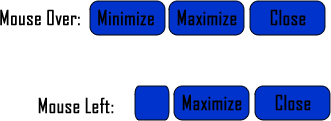
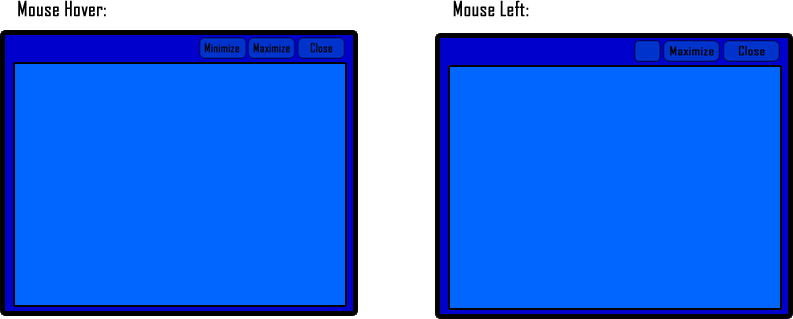
ex_1
ex_2
I hope i made this clear enough.

Please help...

Dani AI

Generated

A compact, practical starting point that implements a borderless, resizable WPF window with working minimize/maximize/close and draggable title area. Following 's prompt for XAML + code and noting is on Visual Studio 2012 Express, target .NET Framework 4.5 (WindowChrome is part of WPF from 4.5 onward). (learn.microsoft.com)

Minimal XAML (core pieces only — copy into MainWindow.xaml):

<Window x:Class="CustomChromeSample.MainWindow"
        xmlns="http://schemas.microsoft.com/winfx/2006/xaml/presentation"
        xmlns:x="http://schemas.microsoft.com/winfx/2006/xaml"
        xmlns:shell="clr-namespace:System.Windows.Shell;assembly=PresentationFramework"
        Title="Custom" Width="800" Height="450"
        WindowStyle="None" ResizeMode="CanResize">

  <shell:WindowChrome.WindowChrome>
    <shell:WindowChrome CaptionHeight="32"
                        ResizeBorderThickness="5"
                        GlassFrameThickness="0" />
  </shell:WindowChrome.WindowChrome>

  <Grid>
    <Grid.RowDefinitions>
      <RowDefinition Height="32"/>
      <RowDefinition Height="*"/>
    </Grid.RowDefinitions>

    <Border Grid.Row="0" Background="#333" MouseLeftButtonDown="TitleBar_MouseLeftButtonDown">
      <StackPanel Orientation="Horizontal" HorizontalAlignment="Right">
        <Button x:Name="MinButton" Width="40" Click="MinButton_Click">_</Button>
        <Button x:Name="MaxButton" Width="40" Click="MaxButton_Click">[]</Button>
        <Button x:Name="CloseButton" Width="40" Click="CloseButton_Click">X</Button>
      </StackPanel>
    </Border>

    <Grid Grid.Row="1">
      <!-- content -->
    </Grid>
  </Grid>
</Window>

Window logic in VB (MainWindow.xaml.vb):

Imports System.Windows
Imports System.Windows.Input

Partial Public Class MainWindow
    Inherits Window

    Public Sub New()
        InitializeComponent()
    End Sub

    Private Sub MinButton_Click(sender As Object, e As RoutedEventArgs)
        SystemCommands.MinimizeWindow(Me)
    End Sub

    Private Sub MaxButton_Click(sender As Object, e As RoutedEventArgs)
        If WindowState = WindowState.Normal Then
            SystemCommands.MaximizeWindow(Me)
        Else
            SystemCommands.RestoreWindow(Me)
        End If
    End Sub

    Private Sub CloseButton_Click(sender As Object, e As RoutedEventArgs)
        SystemCommands.CloseWindow(Me)
    End Sub

    Private Sub TitleBar_MouseLeftButtonDown(sender As Object, e As MouseButtonEventArgs)
        If e.ClickCount = 2 Then
            If WindowState = WindowState.Normal Then
                SystemCommands.MaximizeWindow(Me)
            Else
                SystemCommands.RestoreWindow(Me)
            End If
        Else
            DragMove()
        End If
    End Sub
End Class

SystemCommands provides the built-in handlers for minimize/maximize/close; use them rather than manually changing WindowState when possible. DragMove is the easy way to allow the custom title area to drag the window, but note it can block briefly in some scenarios — alternatives exist if that becomes problematic. (learn.microsoft.com)

Performance notes: avoid setting AllowsTransparency="True" for large UIs — transparency creates a layered window and can cause high CPU and rendering issues; prefer WindowChrome with AllowsTransparency left false and, if a shadow is required, apply a DWM-based shadow (p/invoke) instead of UsesTransparency for better performance. (support.microsoft.com)

This sample covers the typical gaps seen in early attempts: restoring resize hit-testing, making a draggable caption area that supports double-click maximize, and wiring standard system commands so minimize/maximize/close behave like a normal window.

Recommended Answers

All 2 Replies

Provide your XAML and code for this if any and what are you using? Visual studio or blend?

I haven't started making it yet, and i'm using Visual Studio 2012 Express.

Be a part of the DaniWeb community

We're a friendly, industry-focused community of developers, IT pros, digital marketers, and technology enthusiasts meeting, networking, learning, and sharing knowledge.