Function Key(F1,F2...) Press open Window Form Instead of Using Menu Button

Dani AI

Generated

Two reliable options are already mentioned in the thread: handle function keys at the form level (as hinted) or attach the key to a menu command (as suggested). The menu shortcut route is only available for MenuStrip/ToolStrip items, as noted.

Form-level handling (recommended when no menu exists): enable the form to see keys first and detect non-character keys with KeyDown (KeyPress will not fire for F1–F12). Set KeyPreview = true, check e.KeyCode in the KeyDown handler, call e.SuppressKeyPress = true to stop further processing (prevents default beeps/help), then create/show the target form. For more robust interception (before controls and menus), override ProcessCmdKey. Example:

public Form1()
{
    InitializeComponent();
    this.KeyPreview = true;
    this.KeyDown += Form1_KeyDown;
}

private void Form1_KeyDown(object sender, KeyEventArgs e)
{
    if (e.KeyCode == Keys.F1)
    {
        e.SuppressKeyPress = true;   // prevent further processing (Help, beep)
        new MyForm().Show();         // or ShowDialog()
    }
}

(learn.microsoft.com)

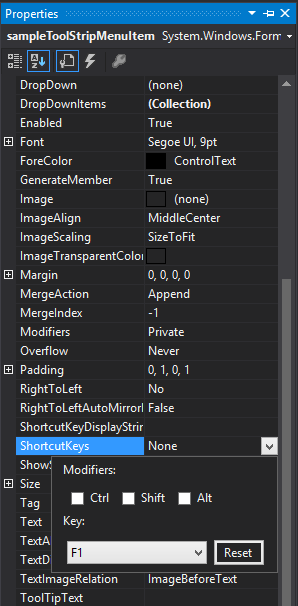
Menu-based shortcut (useful when a menu already exists): assign the menu item’s ShortcutKeys and let its Click handler open the form. This shows the shortcut text on the menu and fires the Click when the key is pressed (applies to MenuStrip/ToolStrip ToolStripMenuItem). Example:

var helpItem = new ToolStripMenuItem("Help");
helpItem.ShortcutKeys = Keys.F1;
helpItem.Click += (s,e) => new MyForm().Show();
menuStrip1.Items.Add(helpItem);

(learn.microsoft.com)

Notes and troubleshooting: F1 commonly raises the control/Form HelpRequested event (so handle or suppress it to avoid duplicate help). Some controls may intercept keys; if form-level handlers aren’t firing reliably, prefer ProcessCmdKey. For system-wide hotkeys when the app is not focused, use Win32 RegisterHotKey/WM_HOTKEY (remember to unregister and avoid OS-reserved keys). (learn.microsoft.com)

Summary: follow ’s form-level approach for simple, app-local handling (KeyPreview + KeyDown or ProcessCmdKey), or use ’s menu shortcut for menu-driven apps (ToolStripMenuItem.ShortcutKeys).

Recommended Answers

All 3 Replies

Implement KeyDown event.

Or if you have a menu already, assign a shortcut key to the menu item.

sss.png

This is only applicable on menustrip and toolstrip.

Be a part of the DaniWeb community

We're a friendly, industry-focused community of developers, IT pros, digital marketers, and technology enthusiasts meeting, networking, learning, and sharing knowledge.