I am using eclipse, Java, and seting up Ajax-DWR. When I run my program nothing happens. I belive This is cause by warning in my xml file. I tried looking on google but didn't found any thing.

files Path, jar files, etc...:

Take a look at the attached image.
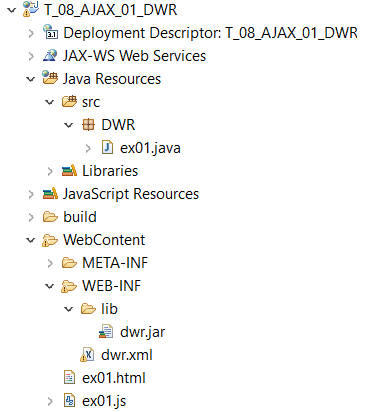
Johe2.png

I am getting a following warning / error in DWR.XML File:
The file cannot be validated as the host "www.getahead.ltd.uk" is currently unreachable.
DWR.XML
<?xml version="1.0" encoding="windows-1252" ?>
<!DOCTYPE dwr PUBLIC "-//GetAhead Limited//DTD Direct Web Remoting 2.0//EN"
    "">
<dwr>
  <allow>
    <create creator="new" javascript="ex01">
      <param name="class" value="DWR.ex01"/>
    </create>
  </allow>
</dwr>
ex01.HTML File
<html>
<head>
  <script type="text/javascript" src="dwr/interface/ex01Script.js"></script>
  <script type="text/javascript" src="dwr/engine.js"></script>
  <script type="text/javascript" src="dwr/util.js"></script>
  <script type="text/javascript" src="ex01.js"></script>
</head>
<body>
  <p> Name: <input type="text" id="demoName"/>
  <input value="Send" type="button" onclick="update()"/> <br/>
  Reply: <span id="demoReply"></span> </p>
</body>
</html>
ex01.JAVA File
package DWR;

public class ex01 {
public String sayHello(String name) {
    return "Hello, " + name;
    }
}
ex01.JS File
    function update() {
        name = dwr.util.getValue("demoName");

        ex01Script.sayHello(name, updateData);
    }

    function updateData(data) {
        dwr.util.setValue("demoReply", data);
    }

Dani AI

Generated

Short version: Eclipse is trying to fetch the DWR DTD from a remote host and can't reach it, so the XML validator reports the file "cannot be validated." That message is a design-time/IDE validation warning — it usually does not stop DWR from running in Tomcat, but it will prevent the XML validator in Eclipse from completing. See practical fixes below.

  • Map the DTD locally (recommended). Save a copy of the DWR DTD into your workspace (for example under WEB-INF/dtd/) and configure Eclipse’s XML Catalog to resolve the external system id to that local file. In Eclipse: Window → Preferences → XML → XML Catalog → Add. Use the system/public id from your DOCTYPE as the key and point Location to the local file (you can also add the mapping at the project level). This stops Eclipse from going out to the network.

  • Or change the DOCTYPE to a local system reference (quick test). For example:

    <!DOCTYPE dwr SYSTEM "WEB-INF/dtd/dwr20.dtd">

    (Place the DTD at that path in the project.)

  • Or disable validation for the file/project while you work: Project → Properties → Validation (or Window → Preferences → Validation) and turn off the XML Validator or disable automatic validation for this project.

Extra checks: confirm your DWR JS files (engine.js, interface scripts) are actually served by the running app (open their URLs in a browser). If Ajax calls still fail after fixing validation, check web.xml servlet mapping and server logs for runtime exceptions.

As noted, the IDE error comes from an unreachable remote host. For the fastest fix is to add a local DTD mapping in the XML Catalog — it resolves the warning without changing runtime behavior.

Recommended Answers

All 3 Replies

the host "www.getahead.ltd.uk" is currently unreachable

what is it aboiut that mesage that you don't understand?

if its unreachable than how can I fix it or work around it?

It's probbaly unreachable becuase it doesn't exist... .ltd.uk does not look like a normal UK URL. They normally end with .co.uk

Be a part of the DaniWeb community

We're a friendly, industry-focused community of developers, IT pros, digital marketers, and technology enthusiasts meeting, networking, learning, and sharing knowledge.