I have been having a bit of trouble with my users trying to install my program, I will list the error messages first and then let you know what my settings are for the click-once deployment. I don't see any errors when I install it on the computer I have been working on, it is only when another computer tries it.
ERROR DETAILS
Following errors were detected during this operation.
* [6/25/2007 1:50:18 PM] System.Deployment.Application.InvalidDeploymentException (ManifestParse)
- Exception reading manifest from file:// path would be here: the manifest may not be valid or the file could not be opened.
- Source: System.Deployment
- Stack trace:
at System.Deployment.Application.ManifestReader.FromDocument(String localPath, ManifestType manifestType, Uri sourceUri)
at System.Deployment.Application.DownloadManager.DownloadDeploymentManifestDirectBypass(SubscriptionStore subStore, Uri& sourceUri, TempFile& tempFile, SubscriptionState& subState, IDownloadNotification notification, DownloadOptions options, ServerInformation& serverInformation)
at System.Deployment.Application.DownloadManager.DownloadDeploymentManifestBypass(SubscriptionStore subStore, Uri& sourceUri, TempFile& tempFile, SubscriptionState& subState, IDownloadNotification notification, DownloadOptions options)
at System.Deployment.Application.ApplicationActivator.PerformDeploymentActivation(Uri activationUri, Boolean isShortcut)
at System.Deployment.Application.ApplicationActivator.ActivateDeploymentWorker(Object state)
--- Inner Exception ---
System.Deployment.Application.InvalidDeploymentException (SignatureValidation)
- Manifest XML signature is not valid.
- Source: System.Deployment
- Stack trace:
at System.Deployment.Application.Manifest.AssemblyManifest.ValidateSignature(Stream s)
at System.Deployment.Application.ManifestReader.FromDocument(String localPath, ManifestType manifestType, Uri sourceUri)
--- Inner Exception ---
System.Security.Cryptography.CryptographicException
- No signature was present in the subject.
- Source: System.Deployment
- Stack trace:
at System.Deployment.Internal.CodeSigning.SignedCmiManifest.Verify(CmiManifestVerifyFlags verifyFlags)
at System.Deployment.Application.Manifest.AssemblyManifest.ValidateSignature(Stream s)
Properties:
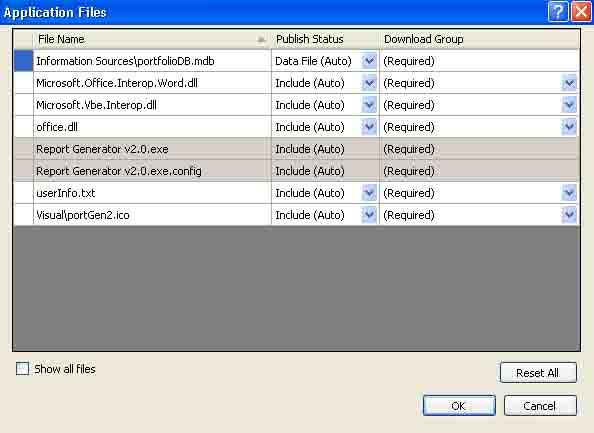
It is published to a server, with full trust and ClickOnce Security Settings enabled, It is signed, The Application Files looks like this:
It Automatically generates and opens a deployment web page after every publish, If there is anything else you need to know, just ask. Thanks in advance!