Hi.
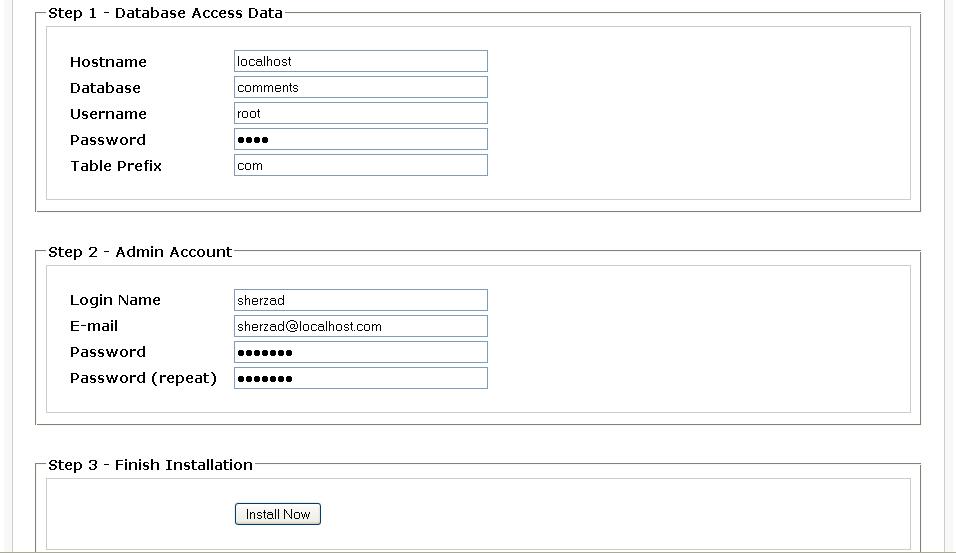
I want to know the best method of making auto installer for our application, like a page appears and asking for the mysql server information such as username and password and also database and so on, and also default account for the application?

something similar to moodle and etc CMS. for further see the attachment.
Dani AI

Generated

— useful topic. is right that installers typically persist DB settings and then create the schema and admin account; below is a concise, safer, OO pattern that fills the gaps (validation, error handling, permissions and reuse across apps).

Recommended installer flow (minimal, robust):

  • show form → validate fields (host, port, db, user, pass, table_prefix, admin creds) and CSRF token.
  • test DB connection using PDO with exceptions and ATTR_EMULATE_PREPARES off.
  • option: create database if the supplied DB user has privileges; otherwise require pre-created DB.
  • import schema SQL (replace table-prefix placeholders), run inside a transaction where possible.
  • insert default config and admin row using password_hash() for the password.
  • write a PHP config file outside the webroot (or set 0600 perms) using file_put_contents(..., LOCK_EX) then chmod.
  • create an install lock file and remove/disable installer UI to prevent re-run.

OO skeleton (illustrates the pieces to implement):

class Installer {
  private $configPath;
  private $pdo;

  public function __construct($configPath) { $this->configPath = $configPath; }

  public function testConnection(array $db) {
    $dsn = "mysql:host={$db['host']};port={$db['port']};charset=utf8mb4";
    $this->pdo = new PDO($dsn, $db['user'], $db['pass'], [
      PDO::ATTR_ERRMODE => PDO::ERRMODE_EXCEPTION,
      PDO::ATTR_EMULATE_PREPARES => false,
    ]);
  }

  public function writeConfig(array $cfg) {
    $php = "<?php\nreturn " . var_export($cfg, true) . ";\n";
    file_put_contents($this->configPath, $php, LOCK_EX);
    chmod($this->configPath, 0600);
  }

  // createDatabase(), importSql(), createAdmin(), lockInstall() to implement similarly
}

Security & troubleshooting notes:

  • Never store plaintext admin passwords; use password_hash() and prepared statements.
  • Prefer a DB user with limited privileges; creating databases often requires higher rights—document that for installers.
  • If SQL import fails, check for DELIMITER or stored procedures (use CLI mysql or a proper parser), charset (use utf8mb4), max_allowed_packet, and run inside a transaction when possible.
  • If config file cannot be written, provide a downloadable sample config and clear manual instructions.
  • Always remove or disable the installer after success and log detailed errors to server logs (not to the UI).

Recommended Answers

All 6 Replies

the only method i have seen is the code writing the database credentials to a php file. then using those, have the code create a database, then the necessary tables with the prefix. once that is done, then put the admin info into the right database table.

Could you be please tell how should I google to find the solution that I need, it is because it is almost half of the day I am searching but I can not find what I need?

i will create some example code, but i need the html for the form to do so. I really don't have time to code the forms.

can you post the html?

Here it is the html form, if there is any error those should be listed on top of the page, and if everything fine, then another page will be displayed.

i will create some example code, but i need the html for the form to do so. I really don't have time to code the forms.

can you post the html?

is that your install file or an example one?

just I need example, and I need it to be done in OO form and be secure, I mean to be able to use it simply with other php application.

Be a part of the DaniWeb community

We're a friendly, industry-focused community of developers, IT pros, digital marketers, and technology enthusiasts meeting, networking, learning, and sharing knowledge.