Can We Change Structure of aspx page using theme ?

Dani AI

Generated

Short answer: no—ASP.NET themes control look and control properties, not page markup or layout. , if your goal is to rearrange or swap sections of an .aspx page you should use master pages, user controls or dynamically load different controls; themes (App_Themes) are for CSS, images and control skins only. was right to question using themes instead of plain CSS: use CSS for layout and themes/skins to supply consistent styles and server-control defaults.

Practically: put theme files in App_Themes\YourTheme (CSS files, images, .skin files). Skins set server-control properties (only for server controls). Set a theme at PreInit in code-behind so it takes effect:

protected void Page_PreInit(object sender, EventArgs e)
{
    Page.Theme = "YourTheme";
}

A sample .skin entry:

<asp:Button runat="server" SkinID="Primary" CssClass="btn" BackColor="#007ACC" />

If you need to change actual page structure, convert the HTML template into a master page (instead of copying index.html into default.aspx as suggested). Move the template HTML into a .master, add ContentPlaceHolder controls where page content belongs, reference your CSS (either in App_Themes or a shared Content folder), and then base pages use that master. To pick a different layout at runtime set the master page file during PreInit:

protected void Page_PreInit(object sender, EventArgs e)
{
    Page.MasterPageFile = "~/Masters/SiteA.master";
}

Troubleshooting tips: skins only affect controls with runat="server"; anonymous HTML elements must be styled with CSS. Theme changes must be done in PreInit or they won’t apply. Watch resource paths (images/CSS) when moving templates into the project. In short: use themes for consistent styling, CSS for layout tweaks, and master pages/user controls (or dynamic LoadControl) when you need to change page structure.

Recommended Answers

All 2 Replies

Member Avatar for Member #905211

Is there a reason you want to use Themes instead of CSS?

First of all download html template from...
http://www.csstemplatesforfree.com/


after downloading the template unzip it on desktop
now create new website...
go to SolutionExplorer...
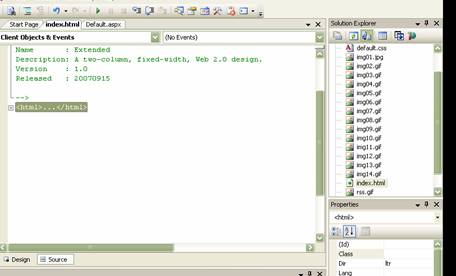
right click->Add existing item->locate that folder->there will be one index.html file in that folder->also open the images that folder have...->and also the default.css file in that downloded folder....


now in your solution explorer double click index.html file->now copy the code of that html file starting from <HTML> to </HTML>
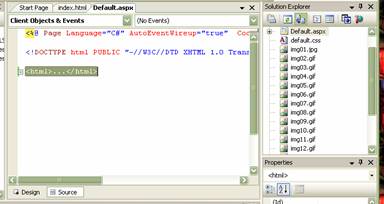
and now go to default.aspx in source code paste this copied data between <HTML> </HTML> tag of aspx page....

Mark this thread as solved if you have got what i said.....

Be a part of the DaniWeb community

We're a friendly, industry-focused community of developers, IT pros, digital marketers, and technology enthusiasts meeting, networking, learning, and sharing knowledge.