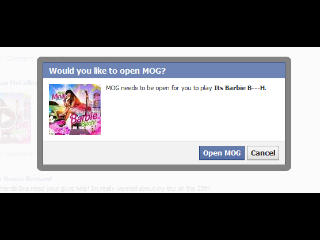
im wanting to make a 'pop up' form, kinda like facebook does when you delete your history and cookies and it tells you you need to sign back in, or when you click on a music link and it pops up the form, but it not a new window, its in the same page. how would i do that?

Dani AI

Generated

— what you want is a same-page "modal" (Facebook-style overlay). and pointed toward dialog/lightbox solutions; here are concise, practical options and a tiny example to get started.

Three realistic paths: use a UI library (Bootstrap modal or jQuery UI) if you want tested behavior and accessibility; use the native HTML <dialog> when you target modern browsers (MDN: <dialog>); or build a minimal overlay + JS for full control. For accessibility patterns see the WAI-ARIA modal dialog guidance (Modal dialog). For a drop-in widget reference see jQuery UI Dialog.

A compact custom pattern (HTML + CSS + JS):

<button id="openModal">Open form</button>

<div id="overlay" class="hidden"></div>

<div id="modal" role="dialog" aria-modal="true" aria-labelledby="modalTitle" class="hidden">
  <button id="closeModal" aria-label="Close">x</button>
  <h2 id="modalTitle">Sign back in</h2>
  <form id="loginForm" action="/login" method="post">
    <input name="email" type="email" placeholder="Email" required>
    <input name="password" type="password" placeholder="Password" required>
    <button type="submit">Sign in</button>
  </form>
</div>

<style>
.hidden { display: none; }
#overlay { position: fixed; left: 0; top: 0; right: 0; bottom: 0; background: rgba(0,0,0,0.5); z-index: 1000; }
#modal { position: fixed; left: 50%; top: 50%; transform: translate(-50%,-50%); z-index: 1001; background: #fff; padding: 1rem; max-width: 90%; }
</style>

<script>
const openBtn = document.getElementById('openModal');
const overlay = document.getElementById('overlay');
const modal = document.getElementById('modal');
const closeBtn = document.getElementById('closeModal');

function show(){ overlay.classList.remove('hidden'); modal.classList.remove('hidden'); document.body.style.overflow='hidden'; modal.querySelector('input,button').focus(); }
function hide(){ overlay.classList.add('hidden'); modal.classList.add('hidden'); document.body.style.overflow=''; openBtn.focus(); }

openBtn.addEventListener('click', show);
closeBtn.addEventListener('click', hide);
overlay.addEventListener('click', hide);
document.addEventListener('keydown', e => e.key === 'Escape' && hide());
</script>

Key points: trap focus inside the dialog for keyboard users, close on Esc and overlay click if appropriate, prevent body scrolling while open, make the modal responsive, and submit via AJAX if you want no page reload. If speed and accessibility matter, choose a maintained library; if you need small footprint and custom styling, use the lightweight pattern above (or the native <dialog> with a polyfill for older browsers).

Recommended Answers

All 2 Replies

Member Avatar for Member #120589

That's js. Loads of js scripts out there to do that. Have a search for lightboxes, popup dialogs...

Be a part of the DaniWeb community

We're a friendly, industry-focused community of developers, IT pros, digital marketers, and technology enthusiasts meeting, networking, learning, and sharing knowledge.