hello guys, good morning
one of our servers recently upgraded to Ubuntu 14.04 so for this PHP upgraded to 5.5.9
all scripts on this server stopped working because they use a functions not supported by newer version of PHP,
I need to downgrade PHP to 5.3 so I can make all scripts work again.
I dont care for security resons for updating PHP, so its ok to back to older version of PHP.
I used this tutorial but still my php 5.5

sudo apt-get purge php5
wget -O php5_3.tar.gz http://us1.php.net/get/php-5.3.28.tar.gz/from/this/mirror
tar -xzcf php5_3.tar.gz
cd php5_3
./configure
sudo make
sudo make install
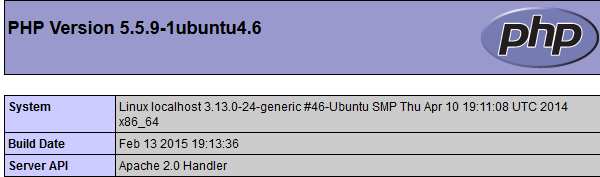
php.jpg

But in ssh when using php -v
its shows like this

php2.jpg

Dani AI

Generated

Quick diagnosis and practical next steps (short version)

The most likely reason you still see PHP 5.5 after compiling 5.3 is that a source build usually installs under /usr/local by default while the distribution package lives in /usr/bin; the system (and Apache) keeps using the packaged PHP unless you explicitly replace or reconfigure the webserver to use your build. Check what the webserver is actually running with a phpinfo() page and inspect which CLI binary the shell is using. (gnu.org)

Quick checks to run (safe, non-destructive)
(put these in a terminal and/or create a small test page for phpinfo())

which php
ls -l /usr/bin/php /usr/local/bin/php
php -m | grep -i mysql

Create a small file containing:

<?php
phpinfo();
?>

and view it in a browser to see the Server API / Loaded Configuration File (that tells you whether Apache/Nginx is using the packaged module, FPM, or your compiled binary). (php.net)

Options and recommendations

  • Long‑term: update the code to use mysqli or PDO (this is the correct fix; the mysql extension was deprecated and will be removed in future PHP versions). As said, migrating is the sustainable path. (wiki.php.net)
  • Short term: if logs are full of deprecation notices you can temporarily reduce reporting of E_DEPRECATED in the appropriate php.ini or per‑site config (not a security fix; it only hides the warnings while you migrate). (php.net)
  • If you must run PHP 5.3 for legacy apps, do NOT overwrite the system PHP without care — instead run the old runtime isolated (php-fpm instance bound to a socket or use a container/VM). That lets you host multiple PHP versions side‑by‑side safely. (php.net)

Minimal decision checklist

  1. Run the commands above to confirm which binary and SAPI are active.
  2. If Apache/Nginx still uses the distro package, either install a matching module for your build (advanced) or run your compiled PHP as php‑fpm and point the webserver to it.
  3. Plan code migration to mysqli/PDO; treat suppressing E_DEPRECATED as a temporary stopgap only. (gnu.org)

If you post the outputs of the checks above (which php, ls -l, php -m and a snippet of phpinfo()), there’s a clear, low‑risk path to either make the compiled PHP active for the webserver or to run an isolated PHP 5.3 environment.

Recommended Answers

All 3 Replies

Member Avatar for Member #120589

How about updating the few scripts that don't work? There can't be that many surely? Which functions are affected?

as for error.log its show me a whole file with all functions like mysql_connect , mysqli_connect
I really dont know which function is not working.

Member Avatar for Member #120589

Neither of those should cause a problem - even mysql_connect, but the migration (5.4->5.5) file states:

The original MySQL extension is now deprecated, and will generate E_DEPRECATED errors when connecting to a database. Instead, use the MySQLi or PDO_MySQL extensions.

Is your error log collecting ALL errors or just fatal ones? If all, then I imagine that the vast majority of them you can ignore (NOTICES and WARNINGS).

Be a part of the DaniWeb community

We're a friendly, industry-focused community of developers, IT pros, digital marketers, and technology enthusiasts meeting, networking, learning, and sharing knowledge.