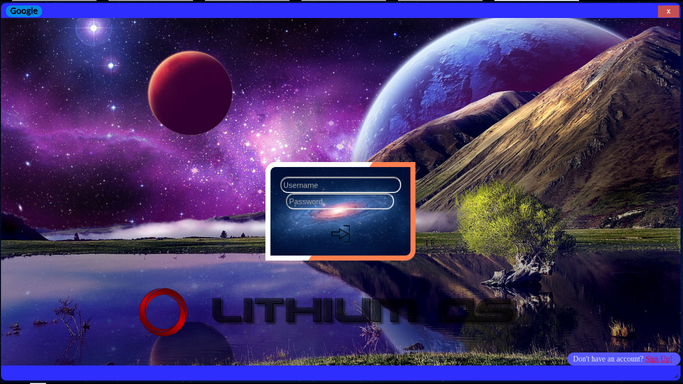
So I'm making an OS in javascript/html. I made the login screen (although it's as secure as a calculator, it looks quite nice). I made the Operating System Interface using a little JavaScript and CSS, and put an iframe in the window. However, whenever I load the interface, it looks like this:

This is my code:

<!DOCTYPE html>
<HTML>

<HEAD>
    <script type="text/javascript" src="//ajax.googleapis.com/ajax/libs/jquery/1.3.2/jquery.min.js"></script>
    <script type="text/javascript" src="//ajax.googleapis.com/ajax/libs/jqueryui/1.7.2/jquery-ui.js"></script>
    <link rel="stylesheet" type="text/css" href="//ajax.googleapis.com/ajax/libs/jqueryui/1.7.1/themes/base/jquery-ui.css" />

    <TITLE>Go Fullscreen!!!</TITLE>
    <STYLE>
        body,
        input {
            font-family: Calibri, Arial;
            margin: 0px
            height: 100%;
            margin: 0;
            overflow: hidden;
            background: url("SPACE-2.jpg") no-repeat center center fixed;
            -webkit-background-size: cover;
            -moz-background-size: cover;
            -o-background-size: cover;
            background-size: cover;
        }

        h1 {
            margin: 0 0 0 20px
        }

        html,
        body,
        #container {
            height: 100%
        }

        body>#container {
            height: auto;
            min-height: 100%
        }

        .demo {
            width: 80%;
            height: 80%;
            padding: 0px;
            background-color: #2E2EFE;
            position: absolute;
            text-align: right;
            border-radius: 10px;
        }

        #frame {
            width: 100px;
            height: 100px;
        }

        #shelf {
            position: absolute;
            bottom: 0px;
            width: 100%;
        }

        #text {
            position: absolute;
            left: 10px;
            top: 5px;
            font-size: 12pt;
            text-shadow: .5px .5px #000000;
        }

    </STYLE>

</HEAD>

<BODY>
    <div id="container">
        <div class="demo">
            <div id="bar"><div id="text">Google</div><img src="x.png" style="position: absolute; right: 2px; top: 2px;" /></div>
            <webview id="frame" src="http://www.google.com/" frameborder="0"></webview>
        </div>
    </div>

    <div id="shelf">fdsa</div>
</BODY>
<SCRIPT>
    $(function() {
        $('.demo').draggable().resizable();
    });
</SCRIPT>

</HTML>

Dani AI

Generated

Short summary: the iframe showing up blank usually comes from one (or more) of these: using a Chrome-only <webview> on a regular webpage, the target site actively blocking embedding via response headers, mixed‑content/protocol issues, your host (e.g. Cloud9) blocking outbound requests, or a CSS/layout problem that collapses the frame. and were on the right track — the browser and response headers are the place to look first.

Quick, practical checks:

  • If this is a normal website, don’t use <webview> — use <iframe> (or, if you really are building a Chrome App/Electron app, use the correct webview APIs).
  • Open DevTools (F12) → Console and Network. Look for framing errors or mixed‑content warnings and inspect the response headers for X-Frame-Options or Content-Security-Policy / frame-ancestors.
  • From a terminal you can check headers directly, for example:
    curl -I https://www.google.com

    Look for X-Frame-Options or frame-ancestors entries — those mean the site refuses to be embedded.

If the site blocks framing: host a same‑origin test page to confirm your iframe markup/CSS works; open the external site in a new tab/window instead; or use a server‑side proxy to re‑serve content (note: proxying can break scripts, violate terms, and pose security risks). If you need to display external content inside an app, prefer an API or a sanctioned embedding method.

CSS and environment tips: check for syntax errors or typos (missing semicolons can invalidate later rules), confirm the iframe has an explicit non‑zero width/height and correct z‑index, and test whether your hosting platform (Cloud9) allows outbound HTTP(S) by curling a simple site from its terminal. Provide a minimal live repro (small public CodePen/GitHub Pages) if you still need help — that makes replication much faster, as suggested.

Recommended Answers

All 19 Replies

Member Avatar for Member #120589

The image link goes to a request for permission to see it. Not sure why you couldn't attach the image to the post (paperclip button on the editor).
webview is for a chrome app? There doesn't seem to be any js for it.

(this is my other account, I can't log into my old one)

I'm also not sure what you're after. You're talking about an iFrame, but have inserted a webview element into your HTML with an iFrame attribute. As far as I see (I'm not an Android developer) WebView is to load in an URL, but this goes via an XML layout file and Java. Did you do some resarch about this? Also your CSS does not make much sense to me.

The css was thrown together by a bunch of css generators, I have fixed that since. as for the webview, I used to have this code as a chrome app, but I migrated it to just a website about a week ago. If you put iframe where the webview is, it still doesn't work.

okay, I've dumped the code above in a pen (which you could also do by the way instead of letting people guess from an image) and gave the iframe a yellow background color so we can see where it is (not sure wht you had it only 100px by 100px, but aynway)
http://codepen.io/gentlemedia/pen/qamWBz

The reason why google.com doesn't get displayed into the iframe is because it's a HTTPS url. Replace it with an HTTP url and you will see it gets displayed. I did a Google search and found out that because of security reasons browsers block by default iframes with HTTP urls in HTTPS sites and the otherway around (your situation) seems by now also blocked by default.

i replaced the https with http, and it did nothing...

here is a screenshot of the updated verson, with the iframe showing the login page as an example.

screenshot-2016-09-26-at-1-24-.png

What and where did you change something? If I change that Google (https) url with the url (just http) of my own webpage, then it will get displayed. See that pen of mine!

And just sharing an image and no new or updated code, I can not see what you mean and tell what's wrong.

I saw the pen, whatever you're doing there works for you but it still doesn't work for me. Changing http to https or vice versa does NOTHING for me.
Here's my code:

<!DOCTYPE html>
<HTML>

<HEAD>
    <script type="text/javascript" src="//ajax.googleapis.com/ajax/libs/jquery/1.3.2/jquery.min.js"></script>
    <script type="text/javascript" src="//ajax.googleapis.com/ajax/libs/jqueryui/1.7.2/jquery-ui.js"></script>
    <link rel="stylesheet" type="text/css" href="//ajax.googleapis.com/ajax/libs/jqueryui/1.7.1/themes/base/jquery-ui.css" />

    <TITLE>Go Fullscreen!!!</TITLE>
    <STYLE>
        body,
        input {
            font-family: Calibri, Arial;
            margin: 0px
            height: 100%;
            margin: 0;
            overflow: hidden;
            background: url("SPACE-2.jpg") no-repeat center center fixed;
            -webkit-background-size: cover;
            -moz-background-size: cover;
            -o-background-size: cover;
            backg round-size: cover;
        }

        h1 {
            margin: 0 0 0 20px
        }

        html,
        body,
        #container {
            height: 100%
        }

        body #container {
            height: auto;
            min-height: 100%
        }

        .demo {
            width: 80%;
            height: 80%;
            padding: 0px;
            background-color: #2E2EFE;
            position: absolute;
            border-radius: 10px;
        }

        #frame {
            position: absolute;
            width: 100%;
            height: 92%;
            top: 30px;
        }

        #shelf {
            position: absolute;
            bottom: 2px;
            left: 4px;
            width: 100%;
        }

        #text {
            position: absolute;
            left: 10px;
            top: 5px;
            font-size: 14pt;
            text-shadow: .5px .5px #000000;
            background-color: #008ae6;
            border-radius: 10px;
        }

        #closebutton {
            position: absolute;
            right: 3px;
            top: 5px;
            height: 24px;
            width: 42px;
        }
    </STYLE>

</HEAD>

<BODY>
    <div id="container">
        <div class="demo">
            <div id="bar"><div id="text">&nbsp; Google &nbsp;</div><img src="Close.png" id="closebutton"/></div>
            <iframe id="frame" src="http://google.com/" frameborder="0"></iframe>
        </div>
    </div>

    <div id="shelf"></div>
</BODY>
<SCRIPT>
    $(function() {
        $('.demo').draggable().resizable();
    });
</SCRIPT>

</HTML>
google.com is not http as you have now, but https. Try just with another URL that is not https!

I HAVE TRIED HTTP AND HTTPS!!! IT DOESN'T WORK EITHER WAY!!!

there you go. downvote me for yelling. good job.

Downvote? Not from me. But you can send 2 messages about yourself with those 2 posts. One you use all caps and might be too sensitive. It takes a lot of patience to code and write a complex system. Not everyone is up to that.

What I'm seeing more and more are students that want the answer. If you don't tell them they write you're not helping.

Downvote? Yes from me. If you ask for help on a forum and you can't bring up some patience and start yelling, what would you've expected?

You yell that you've tried http and https, but in your iframe src I see google.com as http which doesn't exist, so it will redirect automatically to google.com as https and like I said browsers will block by default iframes that want to load URLs with https.
So I was asking you to try it with another URL that is not https such as http://pxtoem.com/, because that should just work fine.

If that is not working either for you then show us something real online with Codepen, Jsfidlle or even Dropbox (), so that we can replicate your issue instead of yelling that you've tried.

commented: https is the way. May as well say it. +11

So... aside from etiquette issues, has anyone considered that google may be actively blocking the use of their site inside a frame? Has any other site been able to load into the iframe? If so, it's google that's actively blocking you.

Just a consideration :-/

I tried it before with daniweb url (also https) and it didn't load either, so I tried now with css-tricks.com (also https) which to my surprise does load, so that source I linked to is not totally right.

So lookng at the console this is what it says about google.com (and also daniweb.com):
Refused to display 'https://www.google.com' in a frame because it set 'X-Frame-Options' to 'SAMEORIGIN'.

So indeed a site can set via a http header wether it can be displayed in a frame on another domain or not and has nothing to do with http or https itself.
https://developer.mozilla.org/en-US/docs/Web/HTTP/Headers/X-Frame-Options

Although if browsers notice a http site loads in a frame a https web page with mixed active content, then that web page gets blocked by default.
https://developer.mozilla.org/en-US/docs/Web/Security/Mixed_content#Mixed_active_content

Member Avatar for Member #120589

I think that etiqette aside is very forgiving. Although these discussions may eventually help other users, posters who display this sort of unacceptable behaviour should be ignored. Else they'll keep on thinking that the world owes them a living. My 2p.

My point in typing in all caps is that I have made it extraordinarily clear to you that I have changed the http to https and vice versa, but you keep telling me to do that. I think it might be that c9.io doesn't like outward connections; I recall having this problem a while ago with something else.

Assuming you see this, I was scrolling through my old daniweb account to show some guys how goofy I used to be. I was ~13 at the time if that makes the "students" part any better lol. Thank you for your patience, I can see now that I was largely unintelligent.

I appreciate the credit given with "complex system" but I was just a script kiddie writing JS on my high school chromebook.

Downvote? Not from me. But you can send 2 messages about yourself with those 2 posts. One you use all caps and might be too sensitive. It takes a lot of patience to code and write a complex system. Not everyone is up to that.

What I'm seeing more and more are students that want the answer. If you don't tell them they write you're not helping.

First of all, welcome back to Daniweb.

Not knowing something makes you ignorant, not unintelligent. We are all ignorant about many things. Being proud of your ignorance and willing to stay that way, however, IS a bad thing. Looking back at some of your posts I see that:

  1. You were asking questions
  2. You showed what work you had already done
  3. You were posting answers/feedback

The first point showed not only that you were aware of what you didn't know but were also willing to learn. To me that is a sign of intelligence.

The second point showed you weren't just looking for someone to do the work for you.

The third point showed you were also willing to spend the time to help others.

Sounds like the ideal Daniweb member.

Again, welcome back.

Be a part of the DaniWeb community

We're a friendly, industry-focused community of developers, IT pros, digital marketers, and technology enthusiasts meeting, networking, learning, and sharing knowledge.