Tell us what your favorite keyboard that you use or want is and why.

Dani AI

Generated

A lot of useful opinions in this thread — tastes range from plain, durable boards to gaming rigs and tiny laptop keyboards. and lean toward simple, “typewritery” layouts; flags ergonomics; , , and are into gaming features; and like compact laptop-style keys; shows wireless can “just work.” Below are practical points to turn those preferences into a smart purchase or fix.

Decide the primary task first: heavy typing, casual use, or gaming. Layout matters (full-size vs tenkeyless vs 60%/compact) — pick what fits your desk and number-pad needs. Switch feel is more important than brand: clicky (audible click), tactile (a felt bump), or linear (smooth) — try switches in person or with a cheap switch tester before committing. For gaming look for good rollover/N-key support and low latency; for office work prioritize comfort (key travel, angle, wrist support) and quieter switches. Wired gives the simplest, lowest-latency experience; wireless trades convenience for battery management and occasionally higher latency.

Practical maintenance and troubleshooting: if keys stick, power off, remove keycaps with a puller and blow out debris with compressed air; clean residue with a lightly damp cloth or isopropyl on a swab, and avoid pouring liquids into a keyboard. To extend wireless battery life, disable backlight and extra lighting effects, use rechargeables or an internal battery with good capacity, and check receiver placement if you see lag. Don’t dismantle sealed units if under warranty.

Quick buying checklist

  • Primary use (typing vs gaming)
  • Layout (full, TKL, compact)
  • Switch type (try before you buy)
  • Connection (wired vs wireless)
  • Features needed (macros, backlight, onboard memory)
  • Build, replaceable keycaps and warranty

This approach makes it easier to move from the “I like this” posts here into a choice you’ll enjoy for years.

Recommended Answers

All 21 Replies

Standard keyboards are the best in my opiinon. I dont like all that xtra garbage on it.........

mine is an old hp (that is dark blue and beige) and has wrist support and some other buttons, as well as 2 usb ports. Looks really nice, 8 years old!! But still works great!!

My toshiba laptop keyboard - even has a number pad (an absolute necessity) and soft bouncy keys!

Microsoft LS4000.
Ergonomic, essential for preventing RSI with long term use.
Firm action, good tactile feedback.
Well built, built to last.
Rather heavy and large, so stable on your desk.

Standard keyboards are the best in my opiinon. I dont like all that xtra garbage on it.........

agreed. I use an ancient one i got with a 486 - has a nice metal bace and tough keys bit has gone yellow now (originally beige) (i dont use the windows keys or combinations of more than 3 keys so i am ok) - its really good. I like typewritery ones (clicky). They rule.

These softtouch keyboards/Compact keyboards are crap imho. I like a standard layout, nice cliky one.

another one of my favorites is another hp that came bundled with my xb3000 laptop expansion base. its wireless, low energy with high battery life, comfy key designs, and a plain black look with hp and a couple of other logos and buttons printed on it. it looks really nice.

i used to end up spending like £5 a month on batteries for mine so i binned it

The Keyboard I really want is the Logitech G15 Gaming Keyboard with LCD Display
or the Logitech G11 Gaming Keyboard. Both are just too expensive for now, but I will hopefully buy one (or get one as a gift) soon!! They will be great for pc games, especially the G-Keys.

I agree with the G15! I got the rev. 2 which doesn't have as many G keys and is shorter, which is perfect for me. I love the orange backlight and the stationary LCD display. Keys have just enough pressure required so you can tell what you are pushing. Love the gaming switch!

I also like my Eee PC's keyboard the more I use it. Being so tiny, I wasn't sure if I would like it but the keys are just the right size and is surprisingly easy to type on!

[IMG][/IMG]

i will get one soon, after i upgrade my secondary pc.

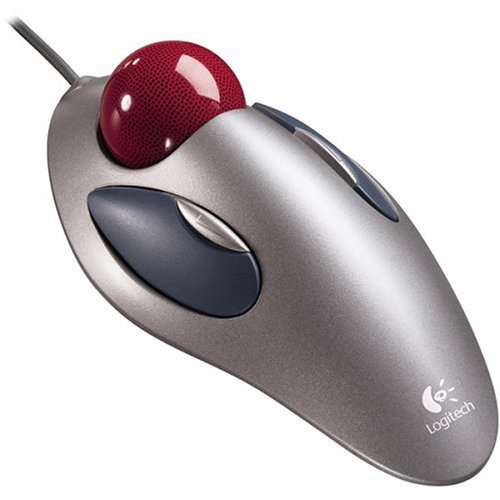
for mice, i would say the logitech marble mouse trackball is the best i've used. once you get used to a trackball, you can never go back to a regular mouse.

we sell those at my work. I never used it though. I agree with you though. My first laptop was a thinkpad (ball) so now i cannot get used to trackpads

This is quite a coincidence, because I have ended up with a new keyboard by accident this weekend. Let me explain.

I don't very often have to work overtime on a project (thank goodness) But every now and then one slips a little too far and we end up in 'code like hell' mode. So I had to remember to take my box home with me to put some hours in on Saturday. In my haste I grabbed my rig forgetting that at home I don't have a USB keyboard and mouse and my work rig doesn't have any PS/2 ports. Doh! so I was forced to get a cheap USB keyboard and mouse in a hurry. Speed was of the essence so I browsed Argos and saw Trust were doing a wireless Keyboard/Mouse bundle for £19.99. So I reserved it and had it home and unpacked by 09.04am (I love the modern age) There's nothing particularly special about it but what impressed me the most was how I could just whack the batteries in to the keyboard and mouse (supplied), then at the windows logon I just whacked the little USB bluetooth dongle thingy in the front of the PC and after some breif and furious hard-drive activity the keyboard and mouse came alive and did their thing ..... Now I'm old enough to remember when *nothing* was that simple in the I.T. world, so I almost whooped for joy when it 'just worked.'

So I have this keyboard now by accident of my own absent mindedness. Considering what little thought went into the purchase I have been lucky. The keyboard has a nice weightiness too it, making it feel solid and well made, also it doesn't slide around the desk as I pound away at the keys. The keys have a nice shallow travel so they respond to a nice light touch which suites me very well. The design is nice and contemporary with no silly frills. A nice set of chrome quick launch buttons down each side and that's it. So I would recommend it to anyone thinking of going wireless.

a maplin usb keyboard by genius cost me under a fiver, i think its still well under a tenner, even without staff discount

the G15 rules. I just purchased this keyboard a few weeks ago (i got the new mouse too), and the gkeys rule. I love to game, and programming the gkeys for complex combos are great. You will not go wrong with this keyboard.....although I had a tough time giving up my ancient toshiba ergronimic. But hey, sometimes change can be good! If you get the G15 you will not be disappointed!!

woops! in a hurry, i meant ergonomic!

Tell us what your favorite keyboard that you use or want is and why.

I like 86 key
have 12
I have 2 dual input 22"monitors but
they dont switch mouses and keyboards
my 86's are
Cherry brand
paid $8 each
Logitech is as good is i have found
been using their trackballs for 20 years
also Kensington tb, no scrollingwheel tho

for a 102 nothing beats a model 80 ibm
typewriter action but not silent

I like the super mini keyboard, at about 8" across, is less than half the size of a standard keyboard. Great for saving space. It's slightly inconvenient though because it doesn't have a numeric keypad and uses function keys to get special characters. Cost less than $10.

commented: wellsaid +1

my favorite also, i have 4 on my bench right now and yes the 10key is there 3 layers down.

Be a part of the DaniWeb community

We're a friendly, industry-focused community of developers, IT pros, digital marketers, and technology enthusiasts meeting, networking, learning, and sharing knowledge.