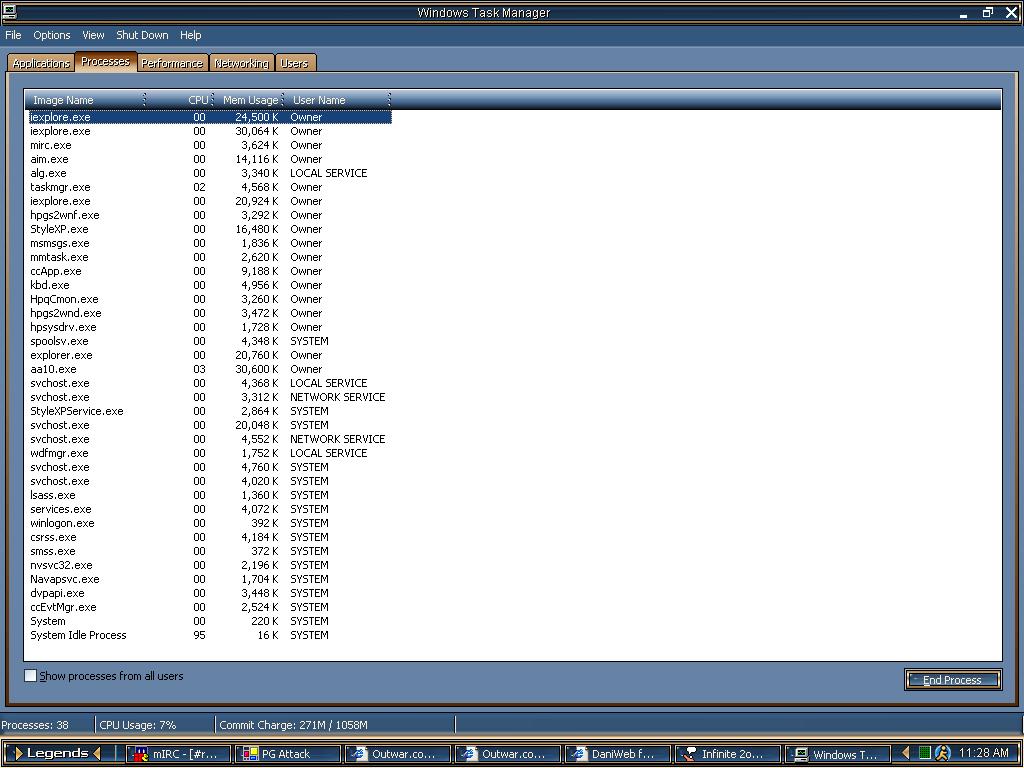
Can Some One Check My Processes And Tell Me If I Have SOmethin There I Shouldnt

Dani AI

Generated

opened the thread asking whether any running processes looked suspicious. rightly pointed to Black Viper's Services Guides as a reference for service hardening, and noted why the attached screenshot might appear blurry in older viewers. The key distinction to keep in mind: a "process" is any running program, while a "service" is a special kind of process that often runs under svchost.exe on Windows XP. Not every unfamiliar name is malware, but some patterns are worth checking.

Quick, practical checks that reliably reveal whether a process is benign or risky: examine CPU/memory behavior and the process PID; use a tool that shows the full image path and publisher (Process Explorer is the classic choice for XP-era troubleshooting); map svchost.exe instances to hosted services with tasklist /svc; inspect startup locations with Autoruns or msconfig; look for network activity with netstat -ano or TCPView; and verify suspicious binaries by checking file properties (company, description), file location (temporary or profile folders are red flags), and submitting hashes to malware scanners. Black Viper helps decide service startup types, but it does not replace per-process investigation.

Cautions and context: terminating system-critical processes (for example csrss.exe, winlogon.exe, or lsass.exe) or indiscriminately killing svchost.exe can crash the machine. Create a restore point or backup before changing services or removing files. Windows XP reached end-of-life in 2014, so signature and tool support may be limited; prefer up-to-date scanners on a separate, patched system when analyzing unknown binaries. For community diagnostics, helpful details are exact process names, PIDs and full image paths rather than only a screenshot.

Recommended Answers

All 2 Replies

Take a look at Black Viper's Services Guides, that should help you decide what needs to be running. BTW I'm unable to read any of the entries in the attached file. Text is all blurry.

Bear,if you are using winxp like I ,click on the attachment ,then just hold you mouse in the lower right coner until the orange box comes up and click it and expand it will come clear

Be a part of the DaniWeb community

We're a friendly, industry-focused community of developers, IT pros, digital marketers, and technology enthusiasts meeting, networking, learning, and sharing knowledge.