I opened the add/remove programs window in the control panel of Windows ME, and I look and everything on the Add/Remove Programs list is gone! What happened to my list and is this a result of spyware, virus, or trojans?

Dani AI

Generated

This thread correctly narrowed the likely causes — either the Add/Remove applet or the uninstall registrations were damaged or a piece of bundled adware removed or hid entries. ’s screenshot and ’s note about BargainBuddy/Ebates point to adware; those packages are known to behave as toolbars/BHOs and to be installed via pay‑per‑install bundles. (juniper.net)

Practical triage (non-destructive first): try launching the Control Panel applet directly (for example with the applet name) and check whether the list appears in Safe Mode — if the applet works in Safe Mode but not normal mode, a third‑party startup program or BHO is likely interfering. If the applet fails to start or throws parser/COM errors, that points to corrupted system components; attempting a file‑repair step or a repair/restore of system files is the usual next move. Microsoft’s System Restore (introduced in Windows Me) can roll the system and registry back to a prior state. (learn.microsoft.com)

Malware cleanup strategy: run multiple up‑to‑date scanners (antivirus plus at least one dedicated adware/spyware scanner) from Safe Mode or from a rescue environment; adware removers historically catch toolbar installs that standard AVs miss. After successful removal, clear System Restore’s saved checkpoints and then re‑enable it — System Restore can hold archived copies of infected files that AV tools cannot clean, so restore points must be cleared to avoid reinfection. Back up personal files before making registry or system changes. (en-academic.com)

If registry entries truly vanished (not just hidden) or the applet remains broken after scanning, restore a known good restore point or perform a repair install from original media as a last resort; manual deletion of program folders without using uninstallers will leave orphaned registry and shared files. The advice from and about checking the uninstall registrations and using ME’s automatic backups is sound — combine those checks with the safe‑mode scanning and the System Restore housekeeping above.

Recommended Answers

All 7 Replies

Use Antivirus Software To Check For Viruses

...and is this a result of spyware, virus, or trojans?

Could be. Get free online virus scans at the links below, and check out threads in our Security forum to find out where to get and how to use some of the recommended spyware/adware/hijacker/etc. detection and removal utilities.

http://housecall.trendmicro.com/
http://www.pestscan.com/


If you do find this to be a problem related to a virus or spyware infection, please post the specifics in a new thread in the Security forum; that forum is where we deal with those issues.

Just to look to see if they are still there go into the registry and see if they are in fact there are they are gone.. If they are gone from the registry then i would suspect a vius or someone just trying to mess with you.

Just to look to see if they are still there go into the registry and see if they are in fact there are they are gone.. If they are gone from the registry then i would suspect a vius or someone just trying to mess with you.

How exactly do I do that through the registry?

The entries in the Add/Remove Programs control panel are stored in the following registry key:

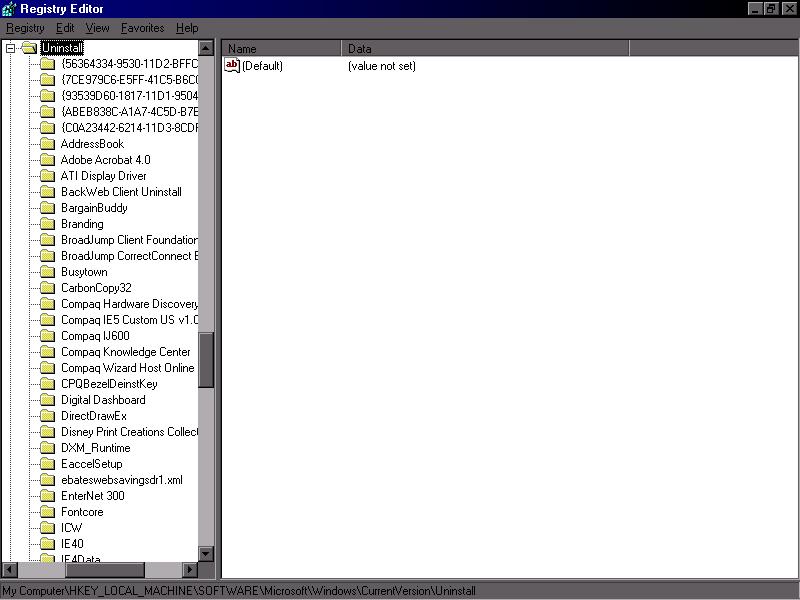
HKEY_LOCAL_MACHINE\SOFTWARE\Microsoft\Windows\CurrentVersion\Uninstall

If you do not see any entries for your installed programs under that registry key, the registry has been corrupted. Depending on how long ago the problem occurred, you may be able to restore the registry from one of automatic backup copies that ME creates. Instructions for doing so are here:

Here is a screenshot from my computer of the Uninstall section in the registry key.

I see two nasties there. Bargain Buddy and Ebates. Those folders under uninstall are what is on your PC. We cannot see the entire list so you will have to go through them and see what is there.

Be a part of the DaniWeb community

We're a friendly, industry-focused community of developers, IT pros, digital marketers, and technology enthusiasts meeting, networking, learning, and sharing knowledge.