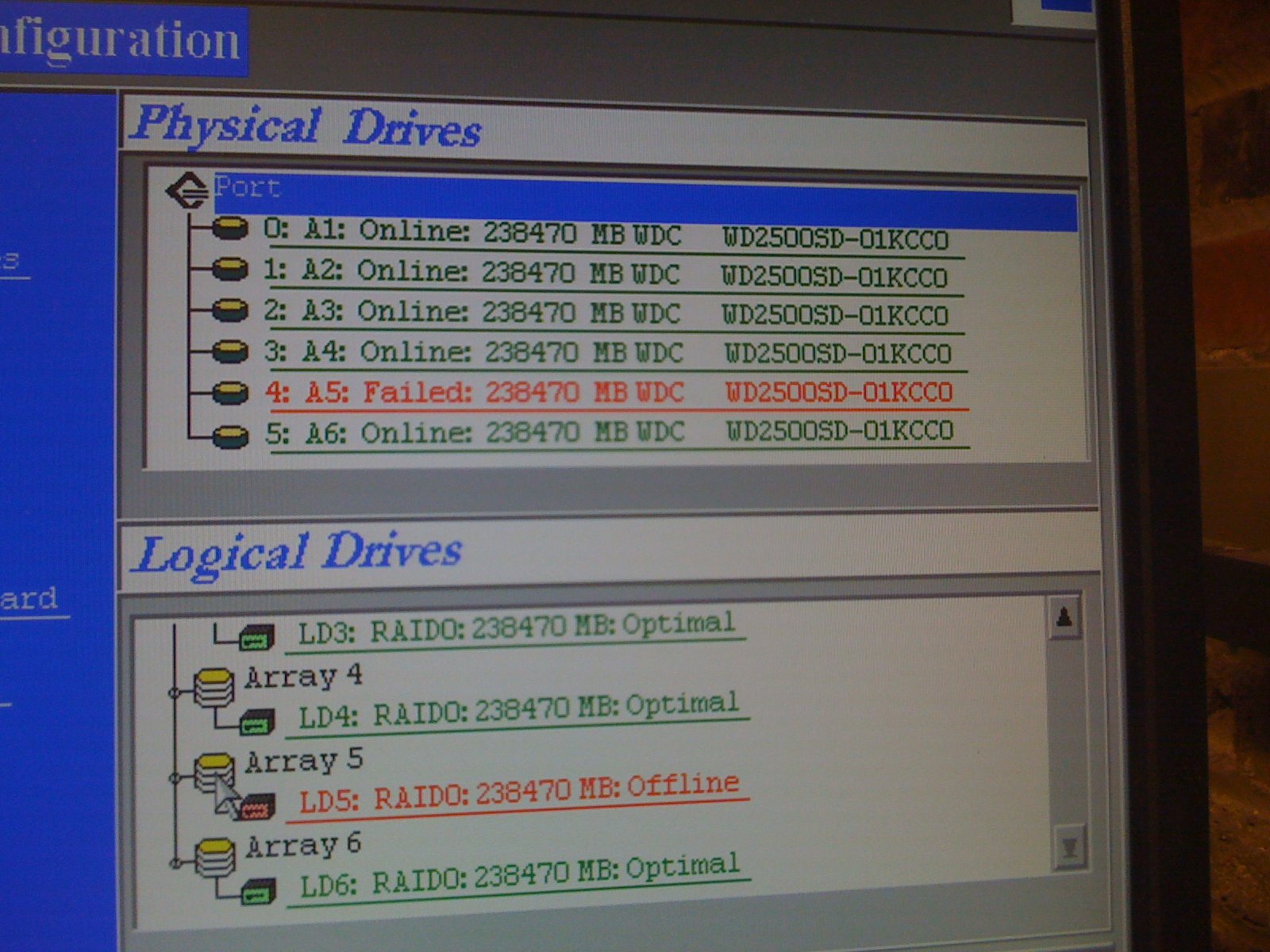
Hi Everyone I am having a problem with a server that is running windows server 2008. I just started working at a company and we were having a vpn connection issue, however before I even got a chance to look at it one of the guys went in and restarted the server. upon coming back up it asked to go to safe mode due to an incomplete shut down then when it started it kept doing this repetitive beeping from the internal speaker, like beeeeeeeeeep.....beeeeeeeep etc.

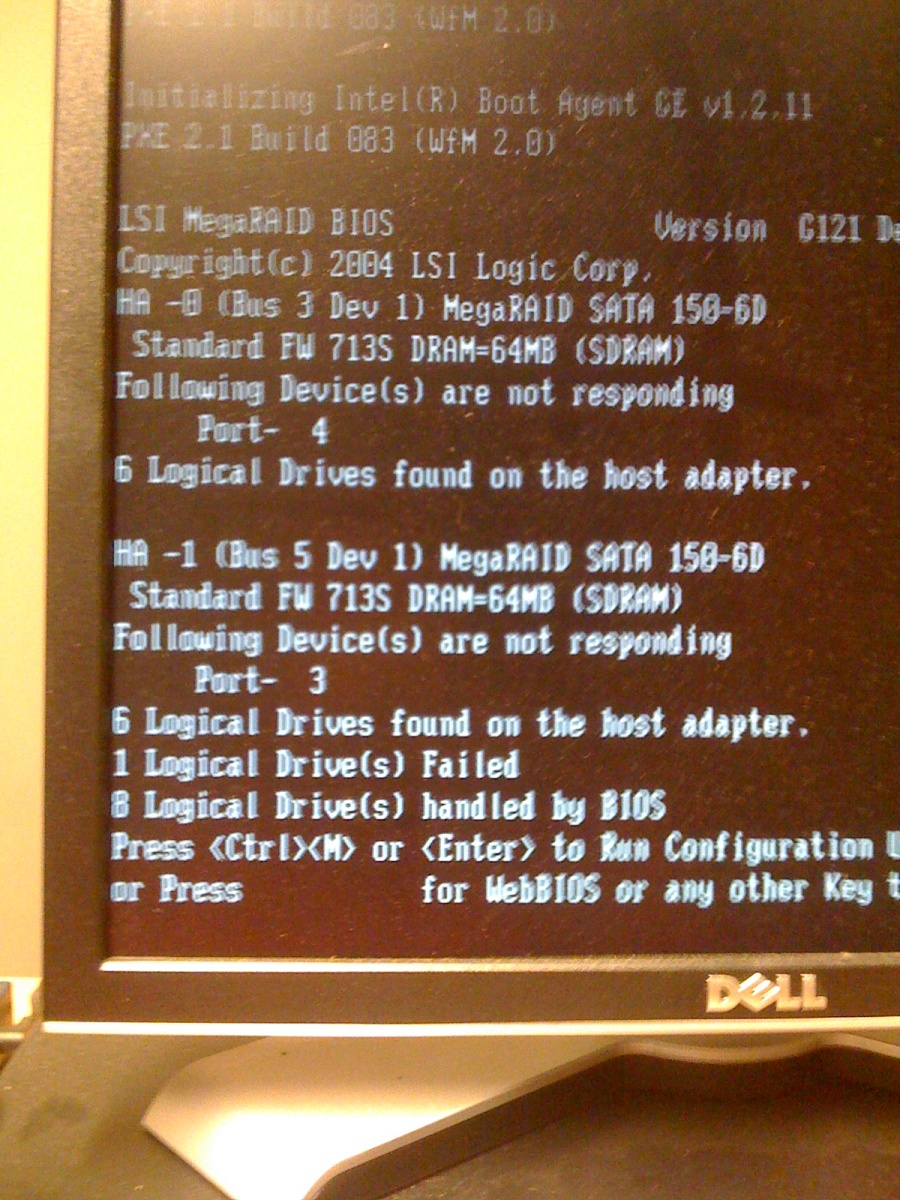
I did a restart to see what the post had actually said and I got a screen that said
"Following Devices are not responding
Port -3
6 logical drives found on the host adapter
1 logical drive failed
8 logical drives handled by bios"

SO i checked connections etc and everything was plugged in the all of a sudden windows wouldn't start it would get to a mouse then do an auto reboot. I check RAM it all worked. I did not check power supply because the didn't have a tester. Its not over heating.

The server has a 12 hdd raid set up, and this is the DNS server so now nothing is working. We got some replacement drives to just to make sure, is there anything i'm missing??

Any help will be appreciated.
Dani AI

Generated

Short summary and a safe recovery plan you can follow before making changes that might worsen the situation.

Stop power-cycling and do not insert or initialize replacement disks yet. Repeated boots and blind disk swaps can convert a recoverable failure into permanent loss. If the data is business-critical, power the server down and get a disk image of each member drive (or call a recovery specialist) before attempting rebuilds.

Immediate steps to take

  • Photograph the POST/RAID messages and note the server model and RAID controller model/firmware.
  • Use the RAID controller utility (the BIOS/firmware utility shown at POST or the vendor management tool) to read controller logs and identify which physical bay(s) are degraded. Do not accept "import/initialize" prompts without confirming the configuration.
  • Verify drive bay LEDs and serial numbers so you replace only the failed member(s). Use the same interface and equal-or-larger capacity drive for a replacement.
  • If the array is non‑redundant (a pure stripe) treat it as likely unrecoverable without backups; stop and consult backups or a recovery service. If the array is redundant, let the controller perform a controlled rebuild and monitor closely (rebuilds under degraded conditions are risky).
  • Check the backplane/cables/controller battery and reseat connections; a controller/backplane fault can mimic disk failures.

Notes and context from thread contributors
and are correct that a non‑redundant stripe will lose data if a member fails; ’s suggestion to use a redundant level for the future is sensible. ’s BIOS/firmware flash is risky here — only consider firmware changes after the array is stable and you have backups. ’s backup warning is the key takeaway: once recovered, implement a tested backup plan, redundant RAID level, and a hot spare/UPS to avoid repeat outages.

Recommended Answers

All 5 Replies

That looks pretty self explanatory...

If I had to guess, I'd say you have a dead drive. Now, it also looks like you're running RAID 0, which is striping... There's no redundancy there. Not the smartest thing and whoever set that up should probably be slapped upside the head.

You should likely be running RAID 1+0 or just 1. But judging by the pic, you have a dead drive. This RAID array should be corrected.

I think ,brush the BIOS or restart the flash ,maybe will better ```. It's just a suggest ,hope you are good luck

RAID Level 0 is not redundant, hence does not truly fit the "RAID" acronym. In level 0, data is split across drives, resulting in higher data throughput. Since no redundant information is stored, performance is very good, but the failure of any disk in the array results in data loss. This level is commonly referred to as striping.

I agree with JUstinNH...........

+1 to "slapped upside the head"! RAID 5 could also be used if you need the additional disk space.

Hi, If your Raid Server is creating Beeping noise , it might be at risk. Consult to expert and If possible maintain backup of important document otherwise your data might get lost.

Be a part of the DaniWeb community

We're a friendly, industry-focused community of developers, IT pros, digital marketers, and technology enthusiasts meeting, networking, learning, and sharing knowledge.