Hello,,

I am not sure if this whether is this a correct page to post my question.Sorry if i am wrong.

Anyways, I am trying to use this 7zip software which i have made a batch script and integrate the script with it.
I tried to make all the files that i want being zipped after i run the script. And below is the code :

@echo off

  FOR /F "delims=*" %%D IN (excel.txt) DO (
    echo "%%D"
    C:\Users\rizal.yusoff\Desktop\RAS\7-ZipPortable\App\7-Zip\7z.exe u -tzip "%%D".zip "%%D" && del "%%D" -y 
  )

PAUSE

and the file of excel.txt contains this directory :

C:\Users\rizal.yusoff\Desktop\test
C:\Users\rizal.yusoff\Desktop\test2
C:\Users\rizal.yusoff\Desktop\test3

So as you can guess, after i run the batch script, the script will create me zipped file of the folder of test, test2 and also test 3.

But the problem is that each time i the script wanted to zipped the folder, it will promt out a question and asked whether or not i am sure about that.See the screenshot below :
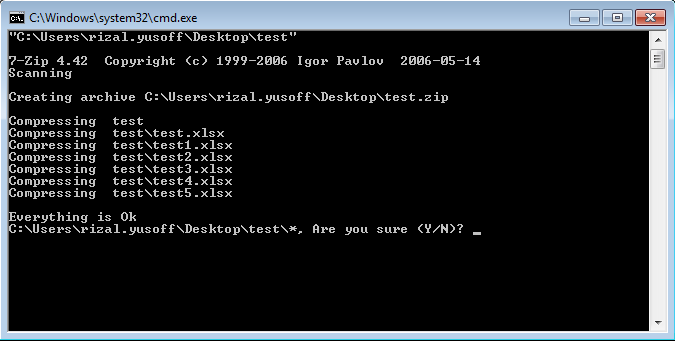
cmd

So, it is okay for this case which i only have three folders, but imagine if i have 1000 of files to be zipped like that, and that will be pretty tiring and also annoying to just answer "yes" for a thousand of time.

Thus, my question is that could i make the script answer "yes" or "no" automatically for me?
I have looked onto the documentation, but found nothing that i want.

really appreaciate if you could give any help with this.Thank you..

Dani AI

Generated

The prompts happen because 7‑Zip asks for confirmation when it would overwrite or replace entries inside an archive. The command‑line tool includes a built‑in switch -y ("assume Yes on all queries") so the process can run unattended; this is a simpler fix than GUI automation for this particular case (though 's AutoIt idea still fits other scenarios). (documentation.help)

A practical, robust pattern is to read the list with FOR /F (preserve spaces), call 7z with the a -tzip -r -y options to build each archive, and remove the source folder only when the archive command succeeds. Example:

@echo off
FOR /F "usebackq delims=" %%D IN ("excel.txt") DO (
  "C:\Path\To\7-Zip\7z.exe" a -tzip -r -y "%%~nxD.zip" "%%D\*" && rmdir /s /q "%%D"
)
PAUSE

FOR /F "usebackq delims=" preserves lines that contain spaces; rmdir /s /q removes a directory tree without prompting (del is for files). (learn.microsoft.com)

If automatic deletion by the archiver is preferred, 7‑Zip offers -sdel (delete files after successful include) which works with the a (add) command; however -sdel has known limitations in some usages (file lists, or when using u update), so test on a copy before running at scale. For long runs, consulting the 7‑Zip docs/forums (as suggested) is useful. (documentation.help)

Recommended Answers

All 3 Replies

Best if you just ask 7zip forums yourself

thank you for your suggestion..
I'll try my luck there :)

If the 7z.exe does not have additional switches (/?) that you can use, you would need to use another program that can emulate keyboard strokes. In the past, I have used a product called AutoItScript. It can basically script and emulate any manual process.

Be a part of the DaniWeb community

We're a friendly, industry-focused community of developers, IT pros, digital marketers, and technology enthusiasts meeting, networking, learning, and sharing knowledge.