I am running Windows 7 Ultimate 32-bit.
I have a 16 bit application that I developed with Borland Turbo C++ on XP.
I have installed XP mode and reloaded Borland and my application, but when I try to run it, nothing appears to happen.
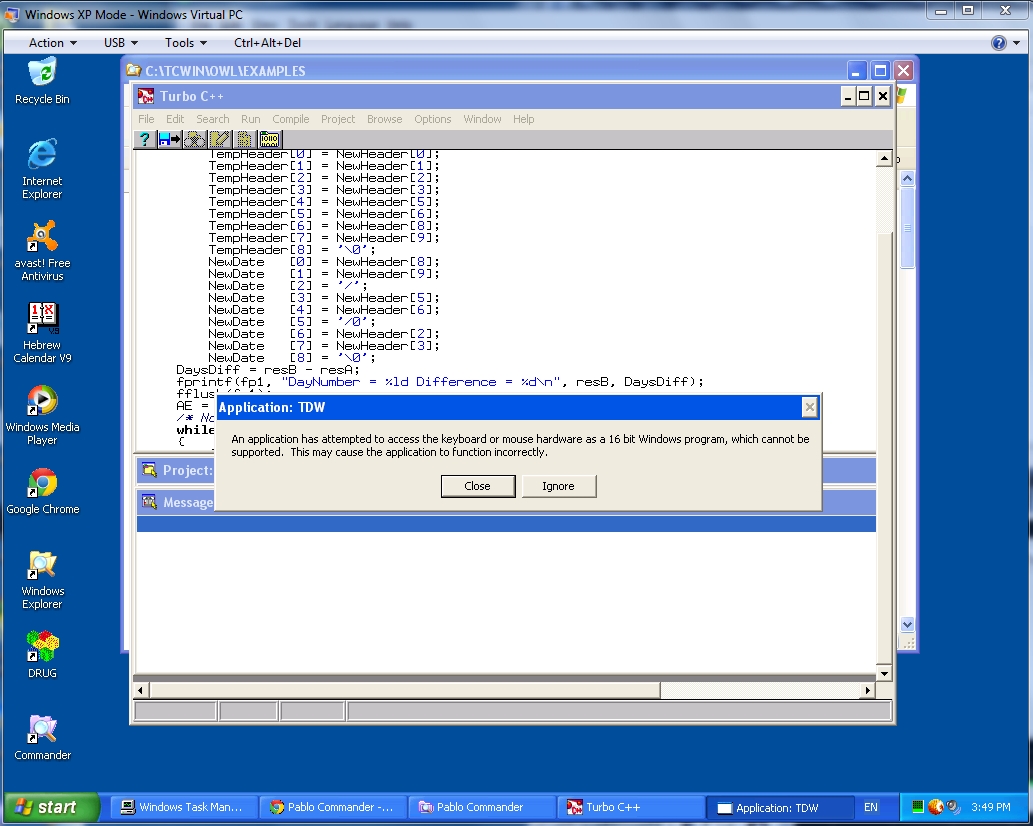
When I run it under the Borland Debugger I get the message:

An application has attempted to access the keyboard or mouse hardware as a 16 bit Windows application, which cannot be supported. This may cause the application to function incorrectly.

This comes after my latest reinstall of W7 after some very strange errors started cropping up.
This never happened in previous installs of XP Mode.
I have also installed my copy of XP SP3 using VirtualBox, and have got exactly the same message.

I originally saw this message when I installed the Borland software on W7 and tried to run it from there, but it has ALWAYS worked in XP Mode in the past.

The funny(!) thing is that I have a second application created in Turbo C++ and that is working correctly.

Can someone tell me what is going on? XPMode
Dani AI

Generated

— the dialog shown in the Borland debugger is coming from the Win16 subsystem (wow32/NTVDM): it means a 16‑bit Windows program tried to access keyboard/mouse hardware directly, and the subsystem stopped it because direct hardware access from Win16 code is not supported. (windows10dll.nirsoft.net)

Practical checklist (fast to try, top → bottom):

  1. Confirm the EXE is a true 16‑bit (NE) binary (not a 32‑bit build). Quick checks:

    file myprog.exe          # on Cygwin/WSL/Unix
    sigcheck -a myprog.exe   # Sysinternals (Windows)
    strings myprog.exe | grep -i 'int 9\|int 33\|inp\|outp'

    If it’s NE/16‑bit, the behavior in NTVDM/WOW is expected. (en.wikipedia.org)

  2. Compare the two Turbo C++ programs (the one that works vs the one that fails). Look in source for direct port/IO/interrupt usage (INT 9, INT 33h, inp/outp, custom VxD calls) — those cause this exact dialog when thunking to Win32 fails. If source exists, replace low‑level access with Win32 input APIs (GetAsyncKeyState, SetCursorPos/mouse_event, etc.) or rebuild as a native 32‑bit app.

  3. VM/guest checks: ensure the XP guest has its integration drivers installed (VirtualBox Guest Additions or Windows Virtual PC integration components). Missing guest drivers or integration can change how input is presented to the guest and may expose shim/driver differences. Also check the XP Event Viewer (Application/System) for ntvdm/wowexec errors when the program starts. (virtualbox.org)

If porting isn’t possible, try running the app on an actual Windows XP machine (not just a VM) to confirm whether the VM/guest is the blocker. If the app previously ran in XP Mode but not after the reinstall, compare guest configuration and installed drivers/integration components rather than relying only on Compatibility settings in the host — compatibility flags rarely change how a Win16 program is handled inside an XP guest. (en.wikipedia.org)

Notes: ’s advice to keep the guest updated is valid; ’s compatibility‑tab suggestion is usually ineffective for Win16/NTVDM issues because the failure is at the Win16/driver level rather than per‑executable compatibility shims.

Recommended Answers

All 3 Replies

.

.

This problem may be resolved when you run a full Windows update. (via MS website)

Have you tried to run the executable in compatibility mode?

Right-click on the executable file and choose "Properties," and then click the "Compatibility" tab.

Tick off the box stating "Run this program using Compatibility Mode."

Select the version of Windows for which the software was originally written from the drop-down menu.

Click "OK" to save changes.

First off, I'm not sure if it was clear enough, but I was not talking about MS-DOS applications, i.e. console applications, but 'proper' windows applications with all the relevant api calls, so instructions on how to troubleshoot MS-DOS applications doesn't seem quite right, nor does WOW. Unless I've got that wrong?
Compatibility mode? Why, these programs were developed on XP for XP and worked from SP1 to SP3 quite happily AND in every reinstall of XP Mode until now!
I have finally worked my way through ALL the updates that Windows Update could find, and the result is still the same.
So what next?

Be a part of the DaniWeb community

We're a friendly, industry-focused community of developers, IT pros, digital marketers, and technology enthusiasts meeting, networking, learning, and sharing knowledge.