hi, I would like to know how to program a PIC16F877 microcontroller. I am using this microcontroller with a LCD so I would like to send data to the LCD. I have connected my microcontroller to a Bluetooth module which is connected to my PC via Bluetooth dongle so I am sending data from my PC to Bluetooth module then by using the microcontroller I am displaying it on the LCD. If eny1 can help I will appriciate it as I dnt really know how to program a PIC16F877 microcontroller. If eny1 can show me the commands and functions of them it will be nice. Thanx in advance

Dani AI

Generated

Practical plan and common pitfalls for displaying Bluetooth serial data on a PIC16F877(A) + HD44780 LCD

Treat the Bluetooth module as a simple serial (UART) device and use the PIC16F877(A) hardware EUSART (RC7 = RX, RC6 = TX) to receive bytes and forward them to the LCD. Verify signal levels first: modules that speak true RS‑232 (+/‑12V) require a level shifter (MAX232); many Bluetooth modules provide TTL UART (often 3.3V) and can be used directly if logic levels are compatible or shifted safely. Also ensure PORT pins used for the LCD are digital (set ADCON1 appropriately) and set the TRIS bits for RC6/RC7 so the UART lines are correctly configured.

Minimal C skeleton (XC8-style register names) — receive from UART and write to an HD44780-style LCD:

/* minimal UART + LCD loop for PIC16F877(A) */
#define _XTAL_FREQ 20000000UL

void uart_init(unsigned long fosc, unsigned long baud) {
    unsigned int spbrg_val;
    BRGH = 1;               // high speed
    spbrg_val = (unsigned int)((fosc/(16UL*baud)) - 1); // BRGH=1 formula
    SPBRG = (unsigned char)spbrg_val;
    SYNC = 0; SPEN = 1; TXEN = 1; CREN = 1;
}

char uart_getc(void) { while(!RCIF); return RCREG; }
void uart_putc(char c) { while(!TXIF); TXREG = c; }

int main(void) {
    uart_init(_XTAL_FREQ, 9600);
    lcd_init();                 // standard HD44780 init (4-bit recommended)
    while (1) {
        char c = uart_getc();
        if (c == '\r') lcd_newline();
        else lcd_putc(c);
    }
}

Notes, troubleshooting and workflow

  • Use 4‑bit LCD mode to save pins and implement either busy‑flag checking or fixed delays; forgetting to set ADCON1 often leaves pins analog and the LCD will not respond.
  • If the Bluetooth module shows garbled text, confirm both ends use the same baud, parity and stop bits.
  • For testing, simulate the circuit (Proteus/ISIS or a real breadboard) and use the PC side virtual COM port to send text.
  • For (counting to 9999): Timer0 is 8‑bit — implement a software 16‑bit counter on Timer0 overflow or use Timer1 (16‑bit) for simpler hardware counting.

Ties to earlier posts: ’s advice to start small is sensible for learning flow; ’s simulation suggestion is valuable for verifying behavior before hardware changes; ’s RS‑232 warning is a good reminder to check levels.

Recommended Answers

All 6 Replies

I would like to know how to program a PIC16F877 microcontroller

I recommand you to learn PIC16F84 like microcontroller first before you going into the PIC16F877 . Beacuse you can easily find a programmer . I mean make a programmer . It will only costs at 75 ruppies .here is the website that you can find the information about making the programmer and find the software for it .

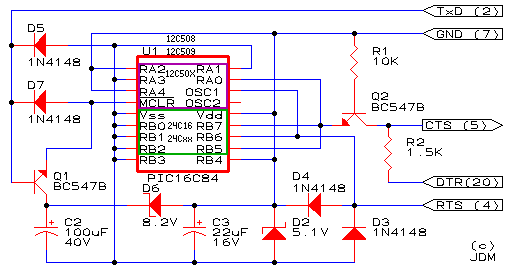
I recommand you to make the JDM programmer for PIC16F84A before you are going to program PIC16F877 , and then you underestand what are the programming pins that are going from your programmer to the pic , then you can connect it to the PIC16F877 ,
the circuit digram for your programmer is : http://www.ic-prog.com/jdmprog.gif
and the software is normal ic-prog software , this is a really good starting point .

anyway ,
have connected my microcontroller to a Bluetooth module which is connected to my PC via Bluetooth dongle so I am sending data from my PC to Bluetooth module then by using the microcontroller I am displaying it on the LCD. If eny1 can help I will appriciate it as I dnt really know how to program a PIC16F877 microcontroller. If eny1 can show me the commands and functions of them it will be nice
It looks like that your using a learning kit . Learning kits are only adveresting exercises don't buy them . Underestand what's going beyond the screen and try to hack it and dig it .
learning kits are only wasting your money and you really cannot learn something from it . So you are going to make your own programmer and don't worry to connect it to your computer if you are correctly assemble it . I heard no-one who damage his/her hardware from this programmer experiments . Be free ! First time I assemble it wrongly . and it did not works and does not damage my computer hardware also However but I cannot guranttee , 99.9999999% it will not damage your hardware . So please be straight to make your own programmer .

Start with PIC16F84A . you can find the datasheet form the www.microchip.com . Don't try to read the manual first . First you make a circuit that blink a led . use a breadbord instead of a learning kit . bread-bord is more less cost than it ! .you can find a good first experiment here ,
http://www.angelfire.com/dragon/tai/IntroPIC_16F84.html
please note that this article is not mine ok , anyway you can use it .Try to write the first
helloLed.asm
you just can write it in a text file or you can use a MPLAB form the microchip web site .the above tells you to download MPASM the microchip assembler only , but you can download the whole IDE once , things are easy with best tools and these tools are free ! then use it .

instead of the free leagal web articles there are more illeagal things that you can find free . But sorry friend, i cannot include them here , but if you smart you can find them ! good luck
:)

commented: Don't use TEX (i.e. LaTeX) tags for quoting text. Use quote tags. -2

thanz for ur comment i do know sum of the stuff but let me tell u dat its nt a starter hardware I am making it by myself i just want sum help in programming the PIC16F877A microcontroller which can take the data from the Bluetooth module and display it on the LCD display if there is an example may b u can give it 2 me will be helpful thanz man for all the info u gave me I really appriciate it thanx

thanz for ur comment i do know sum of the stuff but let me tell u dat its nt a starter hardware I am making it by myself i just want sum help in programming the PIC16F877A microcontroller which can take the data from the Bluetooth module and display it on the LCD display if there is an example may b u can give it 2 me will be helpful thanz man for all the info u gave me I really appriciate it thanx

Hello,
Well i differ from the above opinion. It is true that the real knowldede comes through knowing whats going on behind the scene. But for strater kits i would recomend you the one if you are starter in microcontroller. Becuase it can save your lots of time and you can foucus more on learing how to develope application. The hardware development is not a big issue when you firs learn how to develop applications using microcontrollers.

For communication with blutooth. you also need to by bluetooth kit with RS232 interface. YOu can not directly attach your bluetooth dongle to PIC microcontroller easilly therefore you have to have some solution like TDK's blue2i kit.

regards
Adnan -dani

I'd be more inclined to recommend a simulator like Isis from Labcenter myself, since it supports numerous microcontrollers and components which you can wire whatever way you choose.

plz send me some pic16F877 program on my mail ID : [email]snipped[/email]

commented: Useless bump and "send to my email address" -4

how to count 9999 using tmr0 on the pic16f877

Be a part of the DaniWeb community

We're a friendly, industry-focused community of developers, IT pros, digital marketers, and technology enthusiasts meeting, networking, learning, and sharing knowledge.