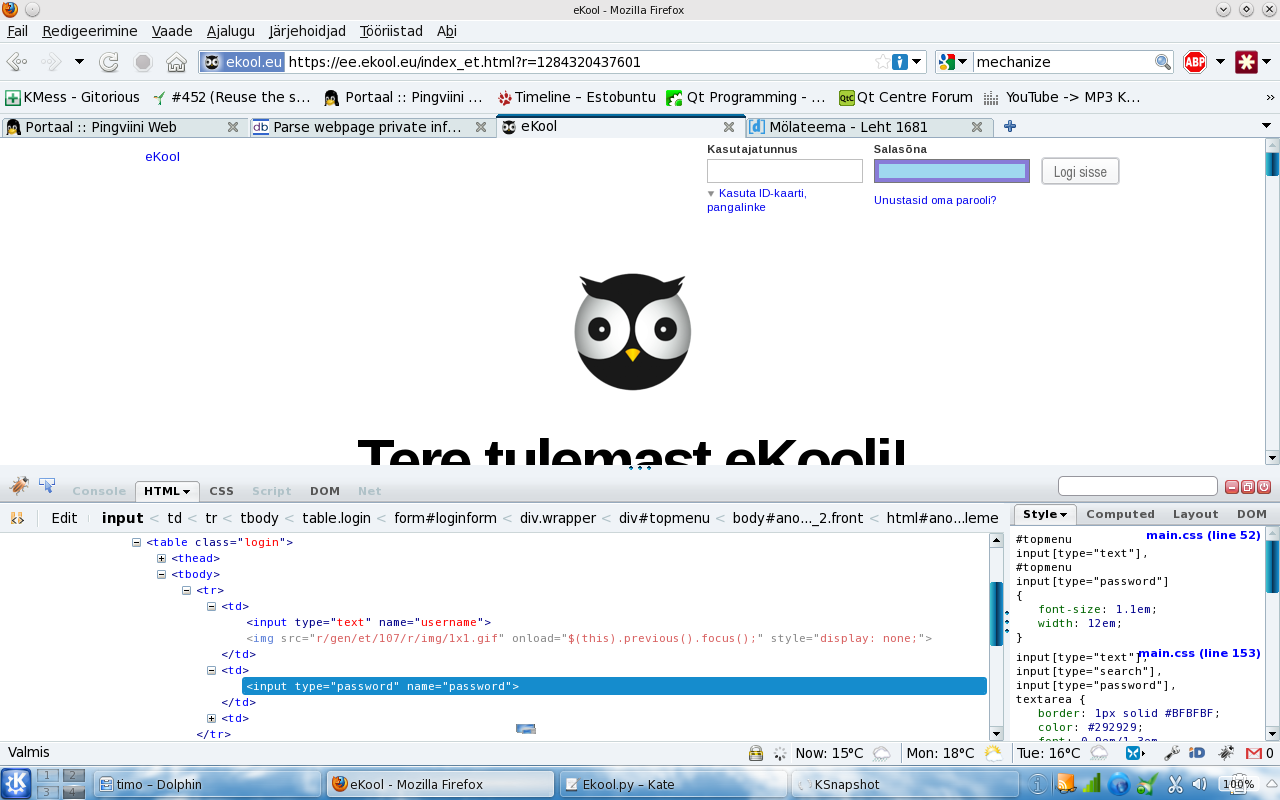
Best way to parse this webpage private info:

https://ee.ekool.eu/index_et.html?r=2#/?screenId=g.user.login&err=1

I found Beautiful soap and PyKhtml. What is the better?

Dani AI

Generated

Short summary and practical path forward based on the thread: and gave the usual server-side form suggestions, but ’s FormNotFoundError shows the crucial detail — the page uses a hash/JS-driven UI, so there is no static <form> in the server HTML for mechanize/urllib2 to find. That behavior means you either need to (A) reproduce the underlying XHR/API that the page’s JavaScript calls, or (B) drive a real browser so the JavaScript can run.

Quick diagnostic checklist

  • Compare “View source” vs DevTools → Elements. If the form appears only in Elements, it’s created by JS.
  • Open Network → XHR and watch the request made when you log in from a real browser. Note URL, method, headers, cookies and any CSRF/token fields.
  • If you see a JSON response or an API endpoint, you can mimic that request directly; if login is entirely client-side or uses complex JS flows, use a headless browser.

Practical approaches

  • Prefer replicating the API: use a requests.Session() to GET the login page (to get cookies/tokens) and POST the same payload/headers the browser sends. This is lighter and more robust than full browser automation when possible.
import requests

s = requests.Session()
r = s.get('LOGIN_PAGE_URL')              # fetch cookies / token
# extract token from r.text (regex or parser)
login = s.post('API_LOGIN_ENDPOINT', data=payload, headers={'Referer': r.url})
  • Fallback: headless browsers (Selenium / Playwright) to let JS run, perform the login, then grab the post-login HTML.

Troubleshooting tips and cautions

  • HTTP 405 usually means wrong method or wrong endpoint; confirm method in the browser Network tab.
  • Watch for CSRF tokens, required headers like X-Requested-With or a specific Referer, and make sure cookies persist across requests.
  • Respect the site’s terms, throttle requests, and never hard-code or expose real credentials.

This fills the gap left by the earlier replies: detect whether the form is server-side or JS-generated, capture the real XHR, then either reproduce it with requests or automate a browser.

Recommended Answers

All 8 Replies

You have urllib2 also, or you can try with the Beautiful Soup.

Cheers and happy coding

For log in use mechanize.
for parsing are beautifulSoup or lxml good choice.

import mechanize
browser = mechanize.Browser()
browser.open(your_url)
browser.select_form(nr=0) #Check form name nr=0 work for many
browser['username'] = "xxxxx"
browser['password'] = "xxxxx"
response = browser.submit()
html = response.read()
print html

urllib2 module can help you

For log in use mechanize.
for parsing are beautifulSoup or lxml good choice.

import mechanize
browser = mechanize.Browser()
browser.open(your_url)
browser.select_form(nr=0) #Check form name nr=0 work for many
browser['username'] = "xxxxx"
browser['password'] = "xxxxx"
response = browser.submit()
html = response.read()
print html
File "Ekool.py", line 5, in <module>
    browser.select_form(nr=0) #Check form name nr=0 work for many
  File "/usr/lib/python2.6/site-packages/mechanize/_mechanize.py", line 527, in select_form
    raise FormNotFoundError("no form matching "+description)
mechanize._mechanize.FormNotFoundError: no form matching nr 0

I'm trying to (0, 1, 2, 3) same problem.

Ok, I add a picture, maybe this helps :)

Wheres your code?

Wich methods have you tryed to?

Wich are the errors?

Cheers and Happy coding

import urllib2
import urllib

# build opener with HTTPCookieProcessor
o = urllib2.build_opener( urllib2.HTTPCookieProcessor() )
urllib2.install_opener( o )

# assuming the site expects 'user' and 'pass' as query params
p = urllib.urlencode( { 'username': 'name', 'password': 'password' } )

# perform login with params
f = o.open( 'https://ee.ekool.eu/index_et.html?r=2#/?screenId=g.user.login',  p )
data = f.read()
f.close()
Traceback (most recent call last):
  File "Ekool.py", line 61, in <module>
    f = o.open( 'https://ee.ekool.eu/index_et.html?r=2#/?screenId=g.user.login',  p )
  File "/usr/lib/python2.6/urllib2.py", line 397, in open
    response = meth(req, response)
  File "/usr/lib/python2.6/urllib2.py", line 510, in http_response
    'http', request, response, code, msg, hdrs)
  File "/usr/lib/python2.6/urllib2.py", line 435, in error
    return self._call_chain(*args)
  File "/usr/lib/python2.6/urllib2.py", line 369, in _call_chain
    result = func(*args)
  File "/usr/lib/python2.6/urllib2.py", line 518, in http_error_default
    raise HTTPError(req.get_full_url(), code, msg, hdrs, fp)
urllib2.HTTPError: HTTP Error 405: Not Allowed
[timo@localhost ~]$

Second ver:

import urllib2

theurl = 'https://ee.ekool.eu/index_et.html?r=2#/?screenId=g.user.login'
username = 'name'
password = 'password'

passman = urllib2.HTTPPasswordMgrWithDefaultRealm()
# this creates a password manager
passman.add_password(None, theurl, username, password)
# because we have put None at the start it will always
# use this username/password combination for  urls
# for which `theurl` is a super-url

authhandler = urllib2.HTTPBasicAuthHandler(passman)
# create the AuthHandler

opener = urllib2.build_opener(authhandler)

urllib2.install_opener(opener)
# All calls to urllib2.urlopen will now use our handler
# Make sure not to include the protocol in with the URL, or
# HTTPPasswordMgrWithDefaultRealm will be very confused.
# You must (of course) use it when fetching the page though.

pagehandle = urllib2.urlopen(theurl)
# authentication is now handled automatically for us

print pagehandle

and output:

<addinfourl at 3068350220L whose fp = <socket._fileobject object at 0xb737616c>>

Maybe this works? How to control this, if connecting sucess?

Edit:

Second solution works! Thanks!

Be a part of the DaniWeb community

We're a friendly, industry-focused community of developers, IT pros, digital marketers, and technology enthusiasts meeting, networking, learning, and sharing knowledge.