i already post this topic in the programmingforums.org..a sister site of daniwebs.
i think that this site is more populated.. i exploring deep programming, and i would like to have good start.. i want to determine the parts of this code, and how it works..

i think this is very interesting..

Const EWX_LogOff As Long = 0
       Const EWX_SHUTDOWN As Long = 1
       Const EWX_REBOOT As Long = 2
       Const EWX_FORCE As Long = 4

       Private Declare Function ExitWindows _
               Lib "User32" Alias "ExitWindowsEx" _
               (ByVal dwOptions As Long, ByVal dwReserved As Long) As Long

I'm currently studying in the built-in functions in user32.dll..
i'm quite confused on parts of the code..

what are these constants? is this user-defined constants or the constant name is already constant itself? where can i get this constants?

does every function has its constants?

if i'm not mistaken, is this 'Alias' the Function Name in User32.dll?

one more.. how can i determine it's parameters??

please give me a hand..im little confused...
i'm a kind of programmer that does not want to use codes that i don't perceive.

thanks for any comments and help.

Dani AI

Generated

Good clarifications from and — here are authoritative, practical follow-ups that close some gaps and point to where to look next.

The official Windows API reference shows the real prototype and the full set of flags for ExitWindowsEx (the DLL entry is in user32). The first parameter is a flags/bitmask that selects the action (logoff/shutdown/reboot/power‑off and related options); the call is asynchronous (a nonzero return means the shutdown was initiated, not necessarily completed). The docs also list newer flags such as hybrid shutdown and power‑off and explain how flags combine. (learn.microsoft.com)

A common stumbling block: shutting down or rebooting usually requires the SeShutdownPrivilege to be enabled in the process token — simply calling ExitWindowsEx without that privilege will fail. Enabling it is done with the standard token APIs (OpenProcessToken, LookupPrivilegeValue, AdjustTokenPrivileges). If ExitWindowsEx returns zero, check GetLastError/Err.LastDllError for the reason (missing privilege, non‑interactive session, etc.). (learn.microsoft.com)

For language specifics: the Windows SDK headers (WinUser.h/Windows.h) and the Microsoft docs are the authoritative source of parameter types and constant values. Study the Windows data types (DWORD, UINT, LONG_PTR) so you pick the right VB/VB.NET types — pointer-sized types matter on 64‑bit. In classic VB you use the Declare statement with an optional Alias; in VB.NET you typically use DllImport and IntPtr/UInt32 as appropriate. (learn.microsoft.com)

A short, safe VB.NET example (not present in the thread) to show form — always set SetLastError and use correct types for portability:

<DllImport("user32.dll", SetLastError:=True)>
Private Shared Function ExitWindowsEx(uFlags As UInteger, dwReason As UInteger) As Boolean
End Function

Also read the Alias/Declare docs when you declare APIs so your symbol names map correctly to the DLL export. If something fails: re-check the SDK prototype, confirm the exported name (dumpbin/Dependency Walker), verify calling convention/ByVal vs ByRef, and inspect the last error. (learn.microsoft.com)

Recommended Answers

All 4 Replies

Constants are named storage locations in memory, the value of which does not change during program Execution. They remain the same throughout the program execution. When the user wants to use a value that never changes, a constant can be declared and created. The Const statement is used to create a constant. Constants can be declared in local, form, module or global scope and can be public or private as for variables. Constants can be declared as illustrated below.

You can see more on this at -

http://www.daniweb.com/forums/thread103372.html
Or
http://www.devx.com/vb2themax/Tip/19047
Or

Or
http://visualbasic.freetutes.com/learn-vb6/lesson6.2.html
Or

This should answer your question in full. Happy coding.

Question no.1: What are these constants?

These constants are built in or should I say came with the function itself, you can get information about these constants for every functions by looking within the documentation of these functions ->
you can look some of these functions in Win32 Programmer's Reference, or just Google for the function that you want and it will show up

Question no.2 and 3: is this user-defined constants or the constant name is already constant itself?

NO, you can change the declaration name of these constants, but not the values, these constant values have a corresponding meaning to the function itself

Question no. 4: if i'm not mistaken, is this 'Alias' the Function Name in User32.dll?
how can i determine it's parameters??

Yes, the Alias name corresponds to the function name inside the .DLL library
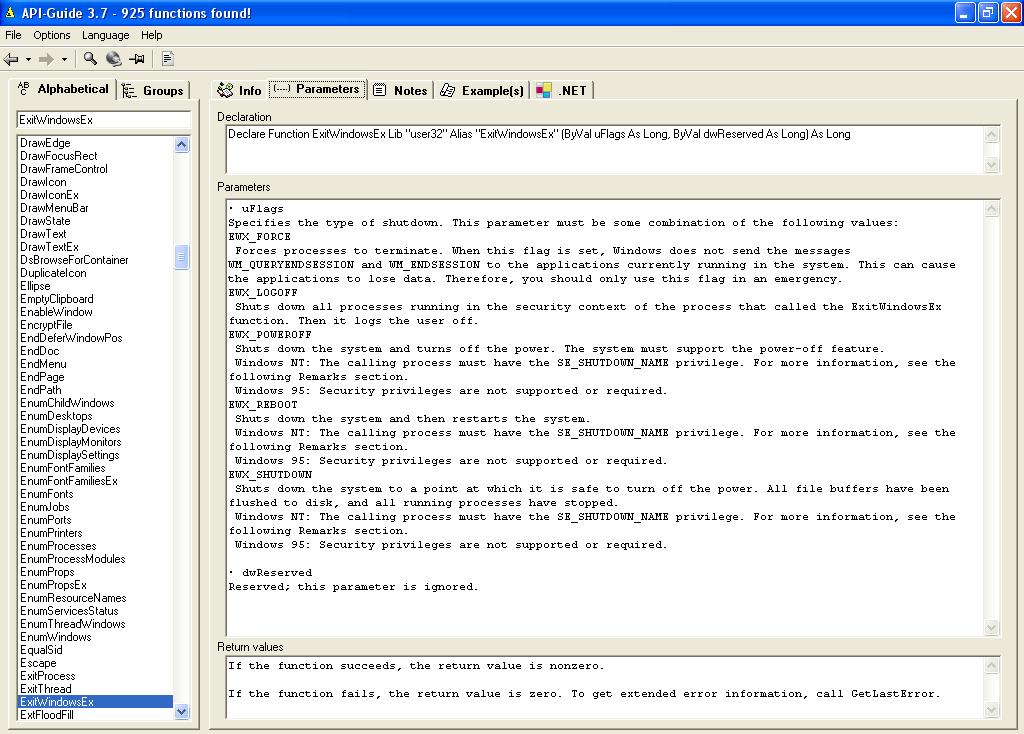
You can determine it's parameter by looking at it's documentations

you can go to this website for more information, tutorials and example programs in using these API functions

http://allapi.mentalis.org/

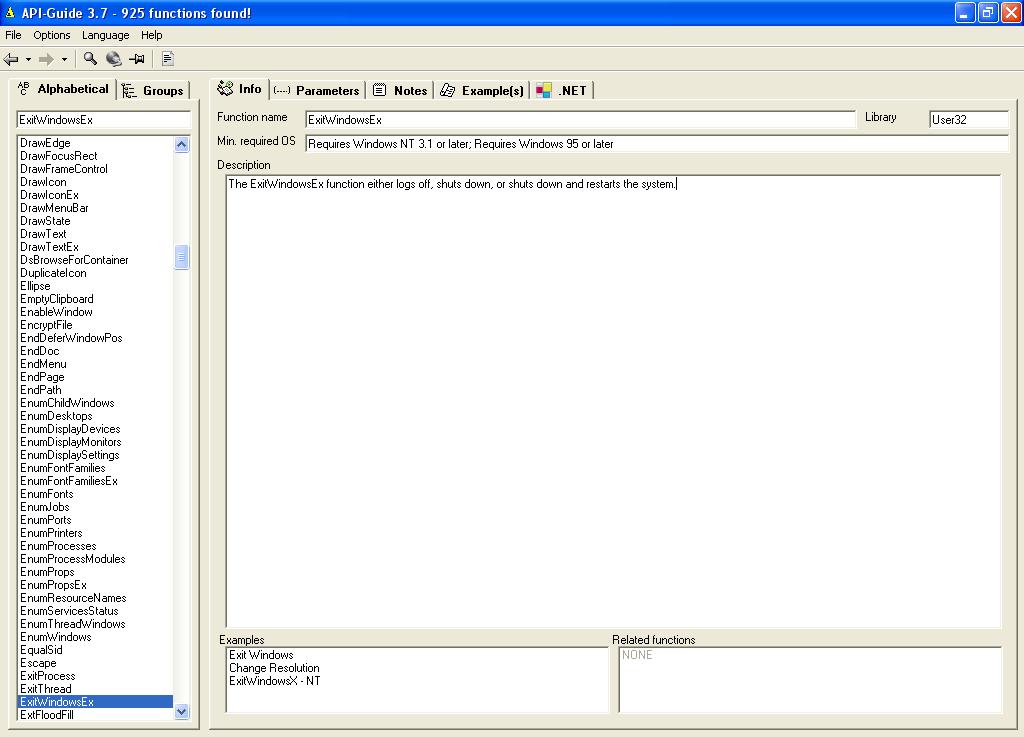
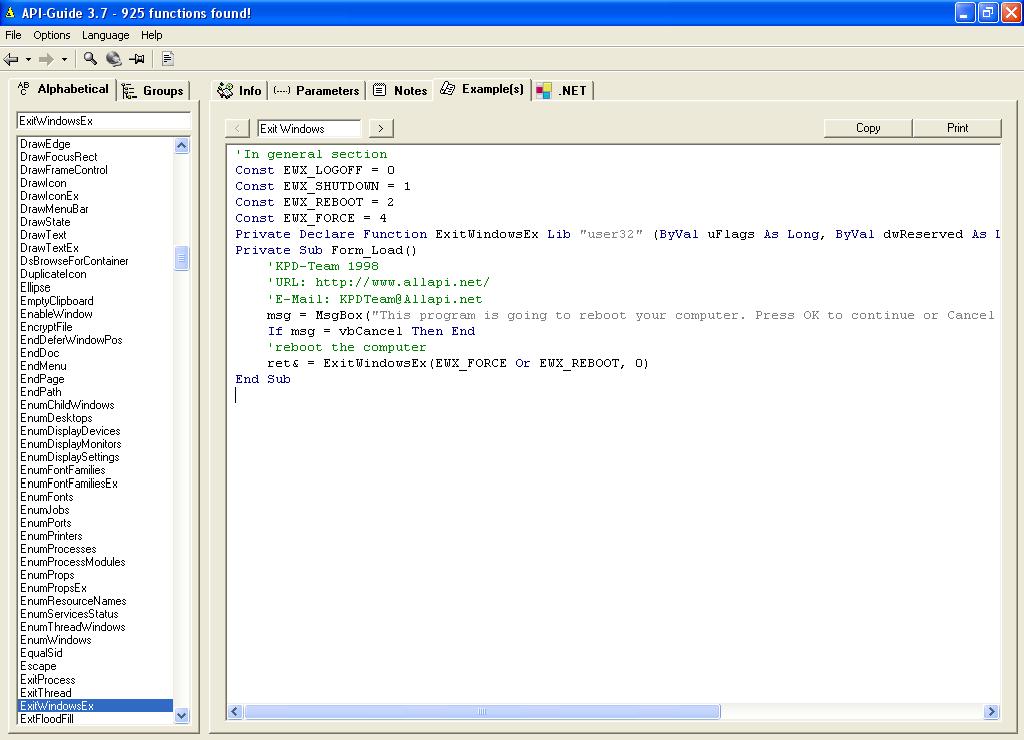
NOTE: be sure to check and download their API-Guide, and the API Viewer, it contains about more than 900+ API functions with example codes, and explanations...:D

Here are the Screenshots:

Poisoned heart, you explained it well. all questions are answered. thank you!!!
it's very nice of you sharing your knowledge. thanks again. =)

your welcome exception!, thank you =D

Be a part of the DaniWeb community

We're a friendly, industry-focused community of developers, IT pros, digital marketers, and technology enthusiasts meeting, networking, learning, and sharing knowledge.