Hi all,

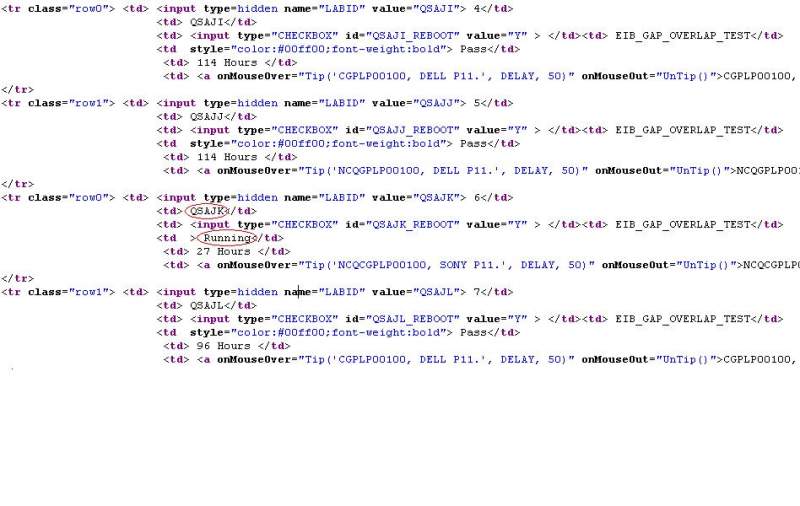
I just started learning Python and Beautiful Soup. I am developing a script to look for particular text "Running" in the HTML. If that text "Running" exits, I would like to print out the keyword "QSAJK". Please see the attached image to visualize. If there is one or more text of "Running", the script should also print out respective keywords. Below is my code to open the webpage and search for the text. How should I modify to fulfill my requirements. Thank you very much in advance.

import time
import urllib2
import re
from BeautifulSoup import BeautifulSoup
from BeautifulSoup import NavigableString

def Check_Tester():

  soup = BeautifulSoup(urllib2.urlopen("").read())
  Key_Word = soup.findAll('td',text='Running')
  
def main():
  
  Check_Tester()
  
main()
Dani AI

Generated

If each row contains a status cell and a separate keyword cell (e.g., the keyword like QSAJK is in the same table row as the word Running), parse the row of every status match and then read the keyword cell. Also note that your snippet uses Python 2-era modules and Beautiful Soup 3; today it is simpler and better supported to use Requests + Beautiful Soup 4.

import re
import requests
from bs4 import BeautifulSoup

url = "https://example.com/page"  # the HTML with the table
resp = requests.get(url, timeout=10)
resp.raise_for_status()

soup = BeautifulSoup(resp.text, "html.parser")

for status_td in soup.find_all("td", string=re.compile(r"\bRunning\b", re.I)):
    row = status_td.find_parent("tr")
    # Prefer a semantic cell if present; otherwise fall back to the first column
    kw_td = (row.find("td", class_="keyword")
             or row.find("td", attrs={"data-label": "Keyword"})
             or row.find_all("td")[0])
    print(kw_td.get_text(strip=True))

Why this works:

  • string=re.compile(r"\bRunning\b", re.I) finds only whole-word, case-insensitive matches.
  • find_parent("tr") scopes extraction to the row containing that status.
  • Selecting by a class or data-label is robust; the fallback handles plain tables. Trim with get_text(strip=True) to avoid whitespace issues.

References: see the Beautiful Soup 4 documentation for searching by string/regex, navigating parents, and CSS-like selection; HTTP basics with requests.get are covered in the Requests quickstart; regex details are in Python’s re module docs.

Recommended Answers

All 3 Replies

I'm not familiar with Beautiful Soup but I assume that soup (in your code) is a text string. If I'm correct then you want to be using string replace methods:

str.replace(old, new[, count])
Return a copy of the string with all occurrences of substring old replaced by new. If the optional argument count is given, only the first count occurrences are replaced.

If you have to make sure that your 'Running' is not in the middle of a word (outrunning), or it case is unimportant, or if there are additional considerations then you may have to move up to the re (regular expression) module

re.sub - http://docs.python.org/py3k/library/re.html?highlight=re.#re.sub

I have been using regular expressions for so long in so many languages I can't remember where I learned it. The python docs are the place to start...

Be a part of the DaniWeb community

We're a friendly, industry-focused community of developers, IT pros, digital marketers, and technology enthusiasts meeting, networking, learning, and sharing knowledge.