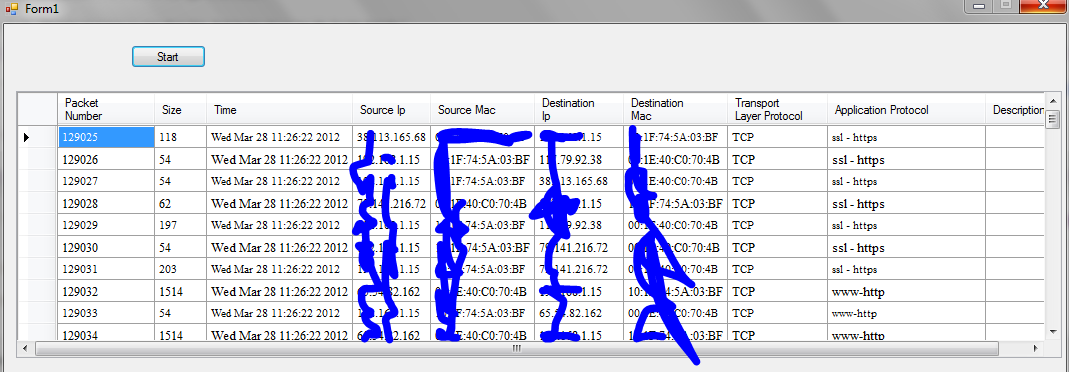
I have developed a sniffer code in C language. Now i am creating user interface for that. I am using visual C++ to design user interface. Once the program starts it stores each packets ip address, port number , protocol type ,time etc in respective variables. Now i want to display these values in a tabluar format. So i choose datagridview. How to proceed, i am unable to insert the values in cell, msdn didnt helpful..kindly help.

Dani AI

Generated

the freeze happens because the UI thread is doing too much work (and often because rows are being added from a worker/capture thread). Binding once and appending to a bound collection is a lot cheaper than calling Rows->Add in a tight loop. was pointing you in the right direction: create a small view-model class and bind a BindingList<T> so new packets appear automatically. See Microsoft’s BindingList<T> docs for how WinForms listens for additions. BindingList<T>

Here is a pattern that scales and keeps the UI responsive: capture thread enqueues rows; a UI timer drains the queue in batches into the bound list. Never touch the grid from the capture thread; if you must poke the UI, marshal with BeginInvoke. Control.BeginInvoke

// C++/CLI
public ref class PacketRow {
public:
    property int No, Size;
    property String^ Time, Proto, SrcIP, SrcMAC, DstIP, DstMAC;
};

System::ComponentModel::BindingList<PacketRow^>^ rows =
    gcnew System::ComponentModel::BindingList<PacketRow^>();
dataGridView1->AutoGenerateColumns = true;
dataGridView1->DataSource = rows;

auto backlog = gcnew System::Collections::Concurrent::ConcurrentQueue<PacketRow^>();
// capture thread:
auto row = gcnew PacketRow(); /* fill fields; e.g., mac = String::Format("{0:X2}:{1:X2}:...", b0,b1,...) */
backlog->Enqueue(row); // do not touch dataGridView here

// UI timer (e.g., 50 ms):
void timer1_Tick(System::Object^, System::EventArgs^) {
    PacketRow^ r; int n = 0;
    while (n++ < 200 && backlog->TryDequeue(r)) rows->Add(r);
}

More tips that help under load:

  • Throttle updates (e.g., 10–20 times/sec), set AllowUserToAddRows = false, turn off autosizing until idle, and predefine column types.
  • If packets are truly high-rate, switch the grid to virtual mode and supply values on demand via CellValueNeeded. DataGridView VirtualMode

Side note for : DataGridView is a Windows Forms control, so on Ubuntu use a native toolkit (Qt’s QTableView, GTK’s TreeView, etc.).

Recommended Answers

All 10 Replies

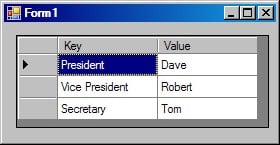
Certain collections are naturally suited to a DataGridView -- like a List<T^>.
If I use a List<KeyValuePair<String^, String^>>^, I can store data in the DataGridView without additional manipulation:

System::Void Form1_Load(System::Object^  sender, System::EventArgs^  e)
{
   List<KeyValuePair<String^, String^>>^ lst_kvp_s2s = gcnew List<KeyValuePair<String^, String^>>();
   //
   lst_kvp_s2s->Add(KeyValuePair<String^, String^>("President", "Dave"));
   lst_kvp_s2s->Add(KeyValuePair<String^, String^>("Vice President", "Robert"));
   lst_kvp_s2s->Add(KeyValuePair<String^, String^>("Secretary", "Tom"));
   //
   dataGridView1->DataSource = lst_kvp_s2s;
}

Output attached:

Thanks for reply
but the problem is i have to insert 10 variables, ie source mac & ip,destination mac & ip(the values are in const char *)..packet number, size in int, some are unsigned char..how to dispaly all these. Help me...

Devfeel... Uhm, I dont want to sound rude but how can that be such a big problem?

converting and datatype shuffeling and loading into lists is something that should be rather simple if you managed the program you mentioned above?

thines01's advice is solid and will give you exactly what you need...

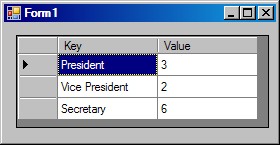
Not a problem:

System::Void Form1_Load(System::Object^  sender, System::EventArgs^  e)
{
   const char* arr_pstrTitles[] = {"President", "Vice President", "Secretary"};
   int arr_intYears[] = {3, 2, 6}; 

   List<KeyValuePair<String^, int>>^ lst_kvp_s2i = gcnew List<KeyValuePair<String^, int>>();
   //
   for(int i=0; i<3; i++)
   {
      lst_kvp_s2i->Add(KeyValuePair<String^, int>(
         gcnew String(arr_pstrTitles[i]), arr_intYears[i]));
   }
   //
   dataGridView1->DataSource = lst_kvp_s2i;
 }

Thanks ...
@Eagleton I am a biggener in this...& creating a console application is easy compared to GUI..I have done c socket programming to fetch all these values. Now for GUI I am facing this problem.
When i click start button the values gets generated reading the socket and stores the values in these variables.
time_t epoch;
char packet_buffer[4096],tcp_proto[41];
char sip_buffer[80], dip_buffer[80];
char packet_type[80]; etc..I want to display all this in tablur format...

Well in that case I am bloody impressed... well done :)

just ensure (with debug output) that your info is saved in the arrays correctly...

then follow thines' advice in his last post to create the list... and set it to the datasource...

I am unable to create list. When i run the above code it shows List undeclared identifier.

What exactly is the error you get? I have a feeling that would probably be because of an include that you are missing...

try: "#include <list>"

Finally did it...thanks both of u for helping...
i used

            array<String^>^ itemRec1=gcnew array<String^>(10);

            itemRec1[0]=i.ToString();//packet number

            itemRec1[1]=ip_pkt_len.ToString();//packet length

            String ^aTime = gcnew String(s);
            itemRec1[2]=aTime;// time
            //etc

            dataGridView1->Rows->Add(itemRec1);//to create row and insert items

The problem i am facing now is that wen so many packets arrive it goes in to not responding after printing certain values. How to handle large amount of data?

hey , i need to create grid page in c++ with cell
OS: ubuntu (linux)

Be a part of the DaniWeb community

We're a friendly, industry-focused community of developers, IT pros, digital marketers, and technology enthusiasts meeting, networking, learning, and sharing knowledge.