Hello everyone,

I've been having this problem for years:
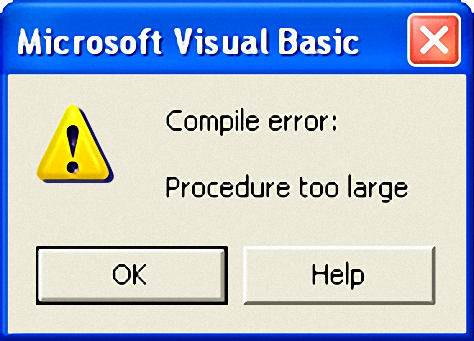
"Compile error: Procedure too large"
I asked this question in few places, Expert-Exchange was one,
but nobody never came out with an answer, now here i am again,
hoping to find a solution for this issue or problem in my project.

Here is a bit of information about this error:
I am trying to create a file from a resource file, but not a .RES file,
when i said Resources i meant, resource code, and i have no problems with
small files, but when the file is bigger than 4MB i get this error.
Dani AI

Generated

posted a classic VB/VBA limitation and ’s suggestion to break the routine is the right first step: Visual Basic compiles each procedure into p‑code and a single procedure’s compiled code cannot exceed ~64KB — the documented fix is to split large procedures. (learn.microsoft.com)

Practical options that avoid the “Procedure too large” trap (ranked, with tradeoffs):

  • Keep the binary/text data out of a single source routine. Store the payload as an external file and write it at runtime — simplest and most maintainable for multi‑MB blobs.
  • Use the VB resource editor (.res) and LoadResData/LoadResPicture/LoadResString to store pieces, but LoadResData is limited per call (so add the asset as several RCDATA entries or multiple string chunks). (learn.microsoft.com)
  • Embed the whole blob as a single custom RCDATA resource and read it via the Win32 resource API (FindResource/LoadResource/SizeofResource/LockResource + CopyMemory) from VB; that avoids per‑procedure compile limits and can handle large binary resources. This uses standard Win32 resource loading functions rather than VB’s LoadResData helper. (learn.microsoft.com)

A compact, maintainable pattern that preserves the original workflow while staying under the compiler limit is to ship the data as multiple small chunks and stream them to file at runtime. Example pattern (split each literal into many ChunkN functions, call a small writer routine to convert hex -> bytes and Put to a Binary file):

Sub BuildFile()
  Open "C:\Dani-Web.txt" For Binary As #1
  WriteHexChunk #1, Chunk1()
  WriteHexChunk #1, Chunk2()
  ' ...
  Close #1
End Sub

Sub WriteHexChunk(fnum As Integer, hexStr As String)
  Dim i As Long, b As Byte
  For i = 1 To Len(hexStr) Step 2
    b = CByte("&H" & Mid$(hexStr, i, 2))
    Put #fnum, , b
  Next
End Sub

Notes and cautions: splitting into many Subs fixes the compile error but bloats source and makes maintenance hard; embedding huge blobs in the EXE can cause packaging, signing, or AV issues; extracting a single large RCDATA with the Win32 API is more robust but requires careful Declare/CopyMemory handling. For a long‑term, maintainable fix prefer storing large assets as external files or real resources (chunked or RCDATA+API), rather than as megabyte string literals inside one Sub.

Recommended Answers

All 2 Replies

Break up your main function into multiple functions.
You can call them all from main.

...or are you implying you're loading a resource that is taking up too much RAM?

Hi thines,

No, let me explain... actually let me post a bit of example.

Sub C0ding()
Dim Coding$(1)
Coding$(1) = "D A 48657920686920746F2065766572796F6E6520686572652061742044616E69576562203A2D29D A D A 5468697320697320433064696E67205E5F5ED A D A "

DF = FreeFile
Open "C:\Dani-Web.txt" For Output As #DF
For i = 1 To 1
a$ = Coding$(i)
While Len(a$) > 0
b$ = "&H" & Left$(a$, 2)
a$ = Right$(a$, Len(a$) - 2)
Print #DF, Chr$(Val(b$));
Wend
Next i
Close #DF
End Sub

This is just a fraction of a very small resource file,
the big the file gets, the numbers of coding lines grow.
and then if the final out put file is too big, i get an
error when decompile my final executable project.

Be a part of the DaniWeb community

We're a friendly, industry-focused community of developers, IT pros, digital marketers, and technology enthusiasts meeting, networking, learning, and sharing knowledge.