I'm making a payroll software ,I have made two forms

1.Employer Form
2.Employees form

I think now that I have confused ,because now I cannot diffrenciate between who works for who

any sugesstions how can I improve on design ,or something that can solve the confusion (Problem)
I also have two seperate tables for both employer and employees

Thanks in Advance

Dani AI

Generated

Short summary: the relationship should be one-to-many — one Employer to many Employees. was correct: Employer needs a primary key (EmployerID) and Employee needs an EmployerID column that references that key. The common workflow is to store only the EmployerID on the Employee record and show the employer name on forms (combo box/select bound to Employer table) so there is never doubt which employee belongs to which employer.

If the tables already exist, follow these safe steps (run on a backup or test copy first):

-- add EmployerID as nullable so existing rows are untouched
ALTER TABLE Employee ADD EmployerID INT NULL;

-- populate EmployerID for existing employees (example: assign to employer 1)
UPDATE Employee SET EmployerID = 1 WHERE EmployerID IS NULL;

-- check for nulls and orphaned FK values
SELECT COUNT(*) FROM Employee WHERE EmployerID IS NULL;
SELECT e.EmployeeID FROM Employee e
LEFT JOIN Employer r ON e.EmployerID = r.EmployerID
WHERE r.EmployerID IS NULL;

-- make column NOT NULL when every row has a valid value
ALTER TABLE Employee ALTER COLUMN EmployerID INT NOT NULL;

-- finally add the foreign key constraint
ALTER TABLE Employee
  ADD CONSTRAINT FK_Employee_Employer
  FOREIGN KEY (EmployerID)
  REFERENCES Employer(EmployerID);

Troubleshooting note for the error seen by : the "cannot insert the value NULL into column 'EmployerID'" message happens because the designer/DDL tried to enforce NOT NULL or FK while rows exist that would violate that rule (NULLs or values that do not match an Employer). Fix by populating/fixing those rows first, or create the FK only after data is consistent. The SSMS Table Designer can sometimes attempt to recreate the table and fail; using explicit ALTER statements is clearer and safer.

UI and integrity tips: populate the employee form with a drop-down of employers (show CompanyName), avoid storing names twice, and choose sensible FK behavior (usually NO ACTION/RESTRICT for payroll so deleting an employer requires first handling its employees). See Microsoft docs on foreign keys and ALTER TABLE for exact syntax and options: and ALTER TABLE (Transact-SQL).

Recommended Answers

All 11 Replies

You haven't posted the structure of the tables so a definitive answer isn't possible, however I suspect you haven't related the tables. Your Employer table will need at least two fields such as

Employer
EmployerID (identity)
EmployerName (varchar)

And the Employee table will need the same type of fields plus it must contain the field, EmployerID so that each EmployeeName record relates to a record in the Employer table. The EmployerID field in the Employer table will be either an integer (auto-increment) or a GUID value. In a real-world situation, EmployerName would actually be broken down into separate fields such as FirstName, MiddleName and LastName.

Yes you are right I have not related the tables
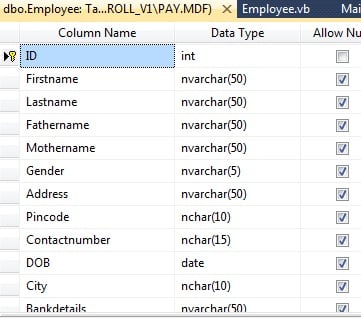
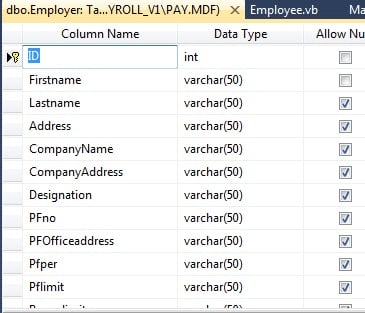
here is the screen shot of the structure of tables

Employee_tableEmployer_table

You'll have to add the EmployerID field to the Employee table in order to link the two tables. Also, what are the definitions of Firstname & Lastname as applied to an employer? For example, I used to work for Manitoba Hydro, which would be entered under CompanyName (which is not a required field???). No one person owns that company so what gets entered for Firstname/Lastname? Only Lastname is a required field. Firstname is not. Yet in the employee table only the ID is required which is pointless because an employee must have a name. You still have some thinking to do.

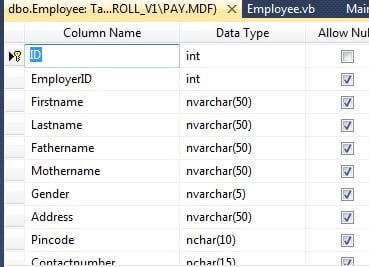
I have added a new Field in the Employee table as you can see in this screenshot attached
and I'm preparing this software for the small firm not a big company,so first name and last name is required,and I have the companyname field in Employer table also.
Now how to relate the two tables? Employee_table_1

You will also have to define EmployerID in the Employee table as a foreign key and you can define a contraint to ensure that it exists in the Employer table. How you do this depends on your DBMS. I use MS SQL but because my dev system is in for repairs I can't give you instructions on how to set this up at the moment.

You will also have to decide which fields are required and deselect the Allow NULLS option.

You mean both my two table have EmployerID as a field and make it a Foreign Key and deselect Allow nulls options in both the tables for the specific fields?

Actually Both my tables have the field ID and both I have added as FK to it .

Both your tables have a field named ID, but in the Employee table it is the Employee ID and in the Employer table it is the Employer ID. Each record in the Employee table has to be associated with an employer. You do this by ensuring that each record contains the Employer ID.

I get when I try to click the option Allow Nulls

'Employee' table
- Unable to modify table.  
Cannot insert the value NULL into column 'EmployerID

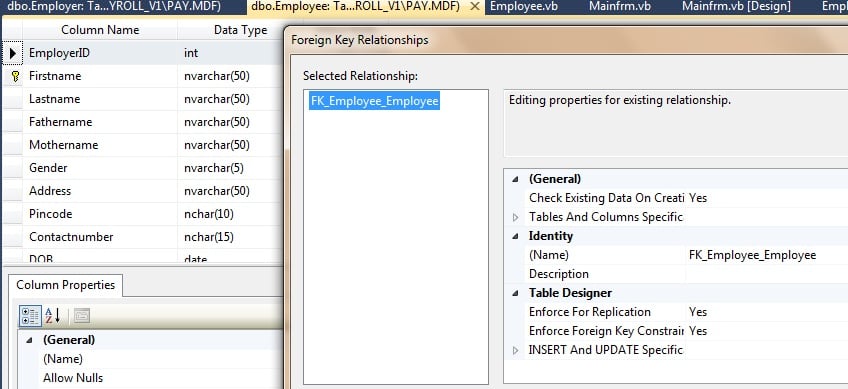
I have added a FK(Foreign Key) to my Employee Table ,now what next? FK_relationship_Employee_table

And my Employer table has the same field and column set as PK(Primary Key) NOT set as FK(Foreign Key)

Be a part of the DaniWeb community

We're a friendly, industry-focused community of developers, IT pros, digital marketers, and technology enthusiasts meeting, networking, learning, and sharing knowledge.