year.png

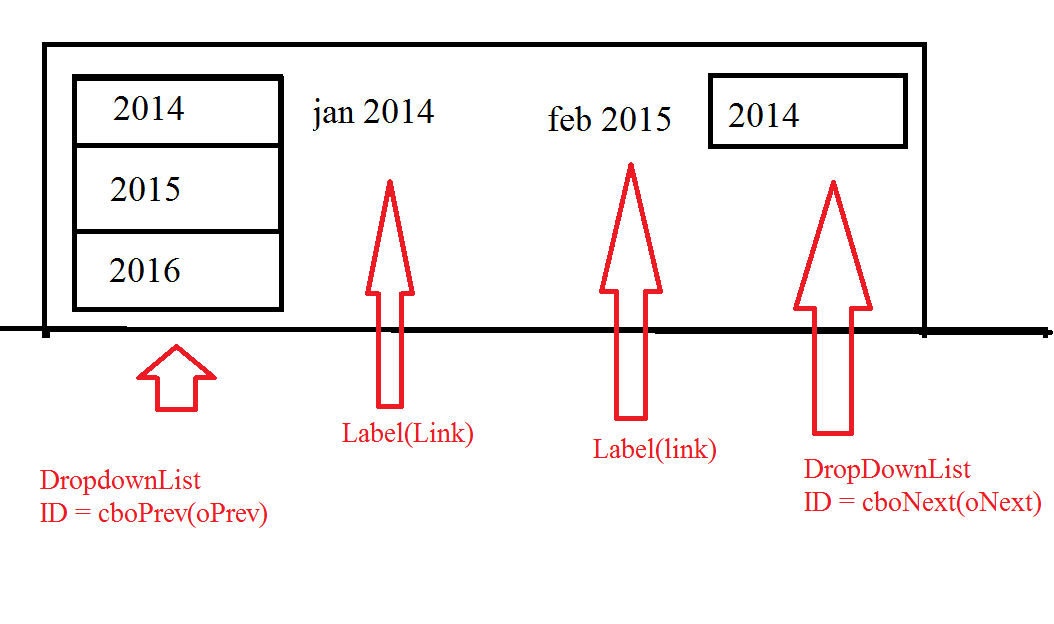
first take a look at attachment pic to get a idea.

I have two dropDownLists.1st dropDownList ID is cboPrev(oPrev) and 2nd dropDownList ID is cboNext(oNext).
These both DropDownList will have the following 4 items (2014, 2015, 2016, 2017). User can click on dropdownlist and pick a year.

problem:

so for default item on dropDownList is "2014" but when user click on "2016" than the default first item is still "2014" - which is wrong

What I want:

So for default item on dropDownList is "2014" but when user click on "2016" than the default first item in dropDownList should be "2016". I want the defualt item in dropDownList what every user select. How can I do this in vb .net?

  Protected Sub dlCalendar_ItemDataBound(ByVal sender As Object, ByVal e As DataListItemEventArgs)
        ' Just populationg my header section
        Dim dDate As DateTime
            dDate = DateTime.Now

        If e.Item.ItemType = ListItemType.Header Then
            Dim oPrev As DropDownList = DirectCast(e.Item.FindControl("cboPrev"), DropDownList)
            Dim oNext As DropDownList = DirectCast(e.Item.FindControl("cboNext"), DropDownList)
            Dim dtYear As New DataTable()
            dtYear.Columns.Add("year4")
            dtYear.Columns.Add("sValue")

            ' store iteams in DropDownList: 2014, 2015, 2016, 2017
            dtYear.Rows.Add(DateTime.Now.AddYears(-1).ToString("yyyy"), "01 Jan," & DateTime.Now.AddYears(-1).ToString("yyyy"))
            dtYear.Rows.Add(DateTime.Now.ToString("yyyy"), DateTime.Now.ToString("dd MMM, yyyy"))
            dtYear.Rows.Add(DateTime.Now.AddYears(1).ToString("yyyy"), "01 Jan," & DateTime.Now.AddYears(1).ToString("yyyy"))
            dtYear.Rows.Add(DateTime.Now.AddYears(2).ToString("yyyy"), "01 Jan," & DateTime.Now.AddYears(2).ToString("yyyy"))

            'bind data
            oPrev.DataTextField = "year4"
            oPrev.DataValueField = "sValue"
            oPrev.DataSource = dtYear
            oPrev.DataBind()
            oNext.DataTextField = "year4"
            oNext.DataValueField = "sValue"
            oNext.DataSource = dtYear
            oNext.DataBind()


            'left(mm yyyy) - middle(mm yyyy) - right(mm yyyy)
            'click on link and it stay that year
            DirectCast(e.Item.FindControl("lblLeft"), Label).Text = "<a style=color:Black href=Calendar.aspx?id=" & Request.QueryString("id") & "&SpecificMonth=" & dDate.AddMonths(-1).ToString("dd-MMMM-yyyy") & ">" & dDate.AddMonths(-1).ToString("MMMM yyyy") & "</a>"
            DirectCast(e.Item.FindControl("lblMiddle"), Label).Text = dDate.ToString("MMMM yyyy")
            DirectCast(e.Item.FindControl("lblRight"), Label).Text = "<a style=color:Black href=Calendar.aspx?id=" & Request.QueryString("id") & "&SpecificMonth=" & dDate.AddMonths(+1).ToString("dd-MMMM-yyyy") & ">" & dDate.AddMonths(+1).ToString("MMMM yyyy") & "</a>"

        End If
    End Sub


    Protected Sub RfreshData(ByVal sender As Object, ByVal e As System.EventArgs)
        'redirect by date thats why page can render the calendar according to user selection
        Response.Redirect("Calendar.aspx?id=" & Request.QueryString("id") & "&SpecificMonth=" + DirectCast(sender, DropDownList).SelectedValue)
    End Sub

Dani AI

Generated

Short answer: the lists are being rebound without setting the selected item afterwards, so the first row (2014) wins. Because your RefreshData redirects with SpecificMonth you should set the DropDownList selection after you call DataBind() using the querystring value (or store the choice in Session/DB as suggested).

A small, safe pattern to add right after you bind each DropDownList:

' after oPrev.DataBind() and oNext.DataBind()
Dim requested As String = Request.QueryString("SpecificMonth")
If Not String.IsNullOrEmpty(requested) Then
    Dim li As ListItem = oPrev.Items.FindByValue(requested)
    If li IsNot Nothing Then
        oPrev.ClearSelection()
        li.Selected = True
    End If

    li = oNext.Items.FindByValue(requested)
    If li IsNot Nothing Then
        oNext.ClearSelection()
        li.Selected = True
    End If
End If

Notes and troubleshooting tips:

  • The value you compare must match exactly. In your code sValue sometimes uses "01 Jan,YYYY" and sometimes dd MMM, yyyy — that inconsistency will prevent a match. Make sValue consistent (prefer a simple year like "2016" or an ISO date "yyyy-MM-dd") so FindByValue always succeeds.
  • If you never redirect and want the choice to survive reloads, persist the selection (Session, cookie, DB) as suggested; if you do redirect, the querystring approach above is simplest.
  • When debugging, inspect oPrev.Items and Request.QueryString("SpecificMonth") in a breakpoint to confirm exact strings. Use ClearSelection() before setting Selected = True. If you only want to build the lists once, consider wrapping binding in If Not IsPostBack Then ... — but note a redirected page is not a PostBack, so you still must set the selection after binding on load.

Mmm the dropdownlist I think has some indexes which you can play around with to get what you want. But since you didn't say whether the selected year should remain the first selected even if the program restarts, and also you said you need to change the "default selected" I think you either want to re-arrange or want to just remember the selected value.

To do so you will need a global variable that will hold the selected value, but for your app to remember your choice you will need something to write your choice/selection(database/text file) at.

You can either keep/remember the index or the selected value, your choice.

 ' Suppose you want to keep the index. This is your global variable
 Dim SelectedIndx As Integer

Now you need to put this inside the dropdown selected item .

 SelectedIndx = DropDownList1.SelectedIndex

Now you will need 'IF' statement on your refresh to ensure the selected data remains selected.

 If SelectedIndx = Nothing Then
 ' Because we haven't saved any selected the default will apply.
 DropDownList1.SelectedIndex = 0
 Else
 ' We have stored something so let's replace default and use our own default selection based on what was selected.
 DropDownList1.SelectedIndex = SelectedIndx
 End If

Well there are some adjustments you will have to do, this is just an idea I thought while reading your post.

HIH.

Be a part of the DaniWeb community

We're a friendly, industry-focused community of developers, IT pros, digital marketers, and technology enthusiasts meeting, networking, learning, and sharing knowledge.