
I set up a servlet project in eclipse and I am trying to connect a Access databasae(Ucanaccess) with it. By looking at below error, its look like I am missing jar files but if you take a look at attchement image. You will see all my jar files are in the project.
ClassNotFoundException: net.ucanaccess.jdbc.UcanaccessDriver
SQLException: No suitable driver found for jdbc:ucanaccess://C:/Users/dave/My_WorkSpace/Eclipse_Workspaces/workspace-jsp/JDBC_Database.accdb
Aug 06, 2015 7:29:23 PM org.apache.catalina.core.StandardWrapperValve invoke
SEVERE: Servlet.service() for servlet [ex02] in context with path [/T_02_Servlet_01] threw exception
java.lang.NullPointerException
    at ex02.doGet(ex02.java:104)
    at javax.servlet.http.HttpServlet.service(HttpServlet.java:622)
    at javax.servlet.http.HttpServlet.service(HttpServlet.java:729)
    at org.apache.catalina.core.ApplicationFilterChain.internalDoFilter(ApplicationFilterChain.java:291)
    at org.apache.catalina.core.ApplicationFilterChain.doFilter(ApplicationFilterChain.java:206)
    at org.apache.tomcat.websocket.server.WsFilter.doFilter(WsFilter.java:52)
    at org.apache.catalina.core.ApplicationFilterChain.internalDoFilter(ApplicationFilterChain.java:239)
    at org.apache.catalina.core.ApplicationFilterChain.doFilter(ApplicationFilterChain.java:206)
    at org.apache.catalina.core.StandardWrapperValve.invoke(StandardWrapperValve.java:219)
    at org.apache.catalina.core.StandardContextValve.invoke(StandardContextValve.java:106)
    at org.apache.catalina.authenticator.AuthenticatorBase.invoke(AuthenticatorBase.java:502)
    at org.apache.catalina.core.StandardHostValve.invoke(StandardHostValve.java:142)
    at org.apache.catalina.valves.ErrorReportValve.invoke(ErrorReportValve.java:79)
    at org.apache.catalina.valves.AbstractAccessLogValve.invoke(AbstractAccessLogValve.java:617)
    at org.apache.catalina.core.StandardEngineValve.invoke(StandardEngineValve.java:88)
    at org.apache.catalina.connector.CoyoteAdapter.service(CoyoteAdapter.java:518)
    at org.apache.coyote.http11.AbstractHttp11Processor.process(AbstractHttp11Processor.java:1091)
    at org.apache.coyote.AbstractProtocol$AbstractConnectionHandler.process(AbstractProtocol.java:668)
    at org.apache.tomcat.util.net.NioEndpoint$SocketProcessor.doRun(NioEndpoint.java:1521)
    at org.apache.tomcat.util.net.NioEndpoint$SocketProcessor.run(NioEndpoint.java:1478)
    at java.util.concurrent.ThreadPoolExecutor.runWorker(Unknown Source)
    at java.util.concurrent.ThreadPoolExecutor$Worker.run(Unknown Source)
    at org.apache.tomcat.util.threads.TaskThread$WrappingRunnable.run(TaskThread.java:61)
    at java.lang.Thread.run(Unknown Source)
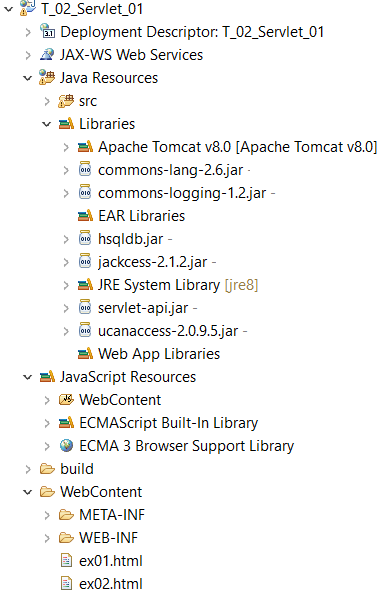
here is the Servlet code:
@WebServlet("/ex02")
public class ex02 extends HttpServlet {
    private static final long serialVersionUID = 1L;

    public ex02() {
        super();

        String url = "jdbc:ucanaccess://C:/Users/dave/My_WorkSpace/Eclipse_Workspaces/workspace-jsp/JDBC_Database.accdb";
        Connection con;

        try {
            Class.forName("net.ucanaccess.jdbc.UcanaccessDriver");
        } catch (java.lang.ClassNotFoundException e) {
            System.err.print("ClassNotFoundException: ");
            System.err.println(e.getMessage());
        }

        try {
            con = DriverManager.getConnection(url, "", "");
            stmt0 = con.createStatement();
        } catch (SQLException ex) {
            System.err.println("SQLException: " + ex.getMessage());
        }
    }

    protected void doGet(HttpServletRequest request,
            HttpServletResponse response) throws ServletException, IOException {
            //...
    }


    protected void doPost(HttpServletRequest request,
            HttpServletResponse response) throws ServletException, IOException {
        doGet(request, response);
    }

}
