With rptSalesEnquiryChecklist
Set .DataSource = ar
.DataMember = ""

With .Sections("Section7").Controls
For i = 1 To .Count
If TypeOf .Item(i) Is RptTextBox Then

Select Case .Item(i).Name
Case "txtAddress"
.Item(i).DataMember = ""
.Item(i).DataField = ar.Fields("Address").Name

Case "txtSupplier_Company_Name"
.Item(i).DataMember = ""
.Item(i).DataField = ar.Fields("Supplier_Company_Name").Name

Case "txtSupplier_Name"
.Item(i).DataMember = ""
.Item(i).DataField = ar.Fields("Supplier_Name").Name

Case "txtProduct"
.Item(i).DataMember = ""
.Item(i).DataField = ar.Fields("Product").Name

Case "txtContact_No"
.Item(i).DataMember = ""
.Item(i).DataField = ar.Fields("Contact_No").Name
End Select
End If
Next i
End With
End With

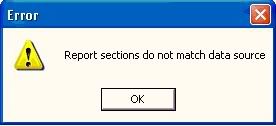
[img] http://i48.photobucket.com/albums/f245/zykhoo/11.jpg [/img]
why my data report will prompt out this msg box? the data report got subreport or not?

Dani AI

Generated

Likely causes and quick summary (ties to the existing answers)
The snippet posted by shows runtime binding and per-control DataField assignment; the error “data section does not match data source” usually means either the report was bound to the wrong kind of object (DataEnvironment vs an ADODB.Recordset), a control’s DataMember/DataField names don’t exist in the active rowset, or the code is addressing a non‑existent section (Section7 in a report without that many groups). (daniweb.com)

Binding modes and what the DataMember means
When the DataReport’s DataSource is a DataEnvironment, DataMember must select the DataEnvironment command (or hierarchical level) that produces the rowset. When binding directly to an ADODB.Recordset, the report’s DataMember should be the empty string and each textbox’s DataMember should match the level (or be empty for the top level). Controls fail if their DataField names aren’t present in the rowset. Official documentation and runtime examples discuss these two patterns and how DataMember/DataField are used. (learn.microsoft.com)

Practical diagnostics (safe, non‑destructive)

  • Confirm what ar actually is: Debug.Print TypeName(ar) and whether it is open.
  • Confirm field names: For Each f In ar.Fields: Debug.Print f.Name: Next.
  • Confirm the report’s sections and control bindings. Example diagnostic loop (run from a form before Show):
Dim s As Long, c As Long
For s = 0 To rpt.Sections.Count - 1
  Debug.Print "Section"; s; rpt.Sections(s).Name
  For c = 1 To rpt.Sections(s).Controls.Count
    Debug.Print "  Ctrl"; c; TypeName(rpt.Sections(s).Controls(c));
    On Error Resume Next
    Debug.Print "    DM:"; rpt.Sections(s).Controls(c).DataMember; " DF:"; rpt.Sections(s).Controls(c).DataField
    On Error GoTo 0
  Next c
Next s

If any control lists a DataField that does not appear in the AR/command rowset, the report will error (“Failed getting Rowset(s)…” and similar messages). Also remember that a simple, non‑grouped report uses the detail section (Section1) for row-bound controls. (daniweb.com)

Checklist of fixes to try

  • If ar is a DataEnvironment: set DataMember to the command name (the command’s rowset), then bind the DataEnvironment. If ar is an ADODB.Recordset: bind that recordset and use DataMember = "" for top‑level fields.
  • Ensure the rowset is open and fresh (close/reopen DataEnvironment commands before showing the report if parameters changed).
  • Verify the section index/name exists (change Section7 to the actual section used) and that controls are in the expected section. (daniweb.com)

References: the thread above and VB6/Microsoft guidance on DataMember/DataSource usage.

Recommended Answers

All 2 Replies

With rptSalesEnquiryChecklist
Set .DataSource = ar
.DataMember = ""

With .Sections("Section7").Controls
For i = 1 To .Count
If TypeOf .Item(i) Is RptTextBox Then

Select Case .Item(i).Name
Case "txtAddress"
.Item(i).DataMember = ""
.Item(i).DataField = ar.Fields("Address").Name

Case "txtSupplier_Company_Name"
.Item(i).DataMember = ""
.Item(i).DataField = ar.Fields("Supplier_Company_Name").Name

Case "txtSupplier_Name"
.Item(i).DataMember = ""
.Item(i).DataField = ar.Fields("Supplier_Name").Name

Case "txtProduct"
.Item(i).DataMember = ""
.Item(i).DataField = ar.Fields("Product").Name

Case "txtContact_No"
.Item(i).DataMember = ""
.Item(i).DataField = ar.Fields("Contact_No").Name
End Select
End If
Next i
End With
End With

[img] http://i48.photobucket.com/albums/f245/zykhoo/11.jpg [/img]
why my data report will prompt out this msg box? the data report got subreport or not?

i think u set ur datasource wrongly
is ar the dataenvironment?
check the file name of your source in the properies of the data report

set datareport.datasource= ar

Hi,

Do u have "Section7" yn ur datareport..
If u dont have any Groups and detail section must be "Section1"

Regards
Veena

Be a part of the DaniWeb community

We're a friendly, industry-focused community of developers, IT pros, digital marketers, and technology enthusiasts meeting, networking, learning, and sharing knowledge.