Hi.
I want to know how it is possible to export data through php to an already available template excel and word, and then how to read from those template?
regards,
Hi.
I want to know how it is possible to export data through php to an already available template excel and word, and then how to read from those template?
regards,
The thread shows the goal clearly: write MySQL data into existing Word and Excel templates and let the document expand when the data set grows. Below are modern, reliable approaches that avoid recreating templates by hand and work on Linux/Windows without running Office on the server.
For Word (.docx) templates
Use PHPOffice PHPWord TemplateProcessor to replace placeholders and to duplicate table rows or blocks for repeating data. Save your template as .docx (not legacy .doc). TemplateProcessor can clone a table row and then set per-row values so the table grows automatically across pages.
Example (Composer + PHPWord):
use PhpOffice\PhpWord\TemplateProcessor;
$tpl = new TemplateProcessor('template.docx');
$tpl->setValue('customer', $customerName);
$tpl->cloneRow('item', count($items));
foreach ($items as $i => $it) {
$n = $i + 1;
$tpl->setValue("item#{$n}", $it['description']);
$tpl->setValue("price#{$n}", $it['price']);
}
$tpl->saveAs('output.docx'); For Excel (.xlsx) templates
Use PHPOffice PhpSpreadsheet to load an .xlsx template, insert rows starting at a given row, and save the result. Formatting and formulas in the template are preserved. If you need a new sheet per group/page, clone the worksheet before filling it.
Example:
use PhpOffice\PhpSpreadsheet\IOFactory;
$ss = IOFactory::load('template.xlsx');
$sheet = $ss->getActiveSheet();
$r = 5;
foreach ($rows as $rowData) {
$sheet->setCellValue('A'.$r, $rowData['id']);
$sheet->setCellValue('B'.$r, $rowData['name']);
$r++;
}
$writer = IOFactory::createWriter($ss, 'Xlsx');
$writer->save('output.xlsx'); Practical notes and troubleshooting
This approach answers ’s original need and gives concrete code examples for to adapt; it also offers a server-safe alternative to client-side template rebuilding.
Jump to Post— somedude3488 228i don't think you can export and fill a template with php. I have however exported data from a database to excel with php. My suggestion is that you recreate the template in html and have server side code fill the template then export. Excel will read html tables.
Jump to Post— somedude3488 228i will see if i can write some code for you. can you attach a template? maybe i can find a better solution once i see how the template are formatted ect.
i don't think you can export and fill a template with php. I have however exported data from a database to excel with php. My suggestion is that you recreate the template in html and have server side code fill the template then export. Excel will read html tables.
Thanks for the replying,
maybe I could not express my problem well, or did not get your idea.
I have have a word template already created, what I need to write data through php into that template.
and about the excel as you mentioned, possible to put an example of that ?
i will see if i can write some code for you. can you attach a template? maybe i can find a better solution once i see how the template are formatted ect.
Hi.
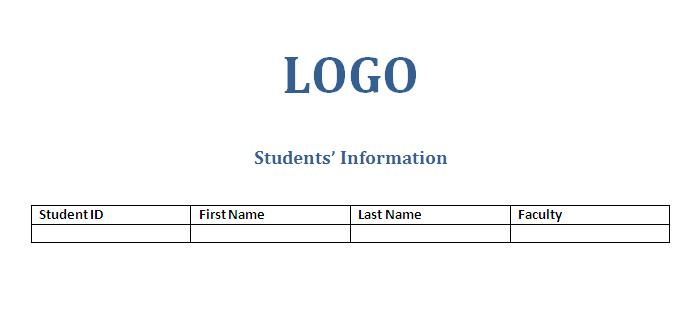
I attached the template, just I need the data from mysql written inside the cells of the table, and also if the data are more than one page then automatically other pages create.
Thanks
since ms word decided to expire right now, can you add %%ID%%, ect in the empty cells so I can find it in the template.
Hi.
since ms word decided to expire right now, can you add %%ID%%, ect in the empty cells so I can find it in the template.
how is actually the code look like?i need to complete my project on this topic as well..and i'm using PHP....
We're a friendly, industry-focused community of developers, IT pros, digital marketers, and technology enthusiasts meeting, networking, learning, and sharing knowledge.