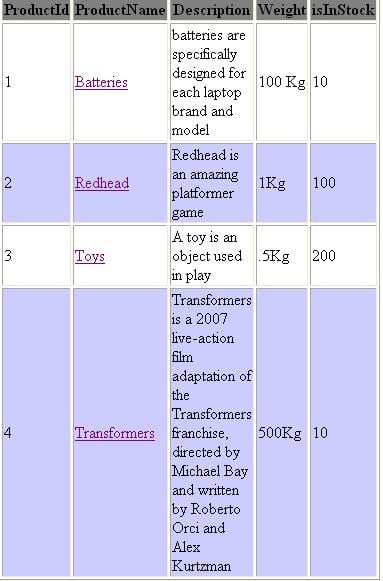
SOURCE CODE
<asp:Repeater ID="Repeater1" runat="server">
                        <HeaderTemplate>
                         <table border="1" width="100%">
                        <tr bgcolor=Gray>
                        <th>ProductId</th>
                        <th>ProductName</th>
                        <th>Description</th>
                        <th>Weight</th>
                        <th>isInStock</th>
                        </tr>
                        </HeaderTemplate>

                        <ItemTemplate>
                        <tr>
                   	    <td width ="10%" height ="50%"><%# DataBinder.Eval(Container.DataItem,"ProdID") %></td>
                   	    <td width ="10%" height ="50%"><asp:HyperLink id="hlEdit" runat="server" NavigateUrl="Frmuser.aspx" Text='<%# DataBinder.Eval(Container.DataItem, "ProdName") %>'></asp:HyperLink></td>
                        <td width ="10%" height ="50%" ><%# DataBinder.Eval(Container.DataItem,"Descr") %></td>
                        <td width ="10%" height ="50%" ><%# DataBinder.Eval(Container.DataItem,"Weight") %></td>
                        <td width ="10%" height ="50%" ><%# DataBinder.Eval(Container.DataItem,"islnStock") %></td>
                        </tr>
                        </ItemTemplate>

                        <AlternatingItemTemplate>
				        <tr bgcolor="#ccccff">
				        <td width ="10%" height ="50%"><%# DataBinder.Eval(Container.DataItem,"ProdID") %></td>
                   	    <td width ="10%" height ="50%"><asp:HyperLink id="hlEdit" runat="server" NavigateUrl="Frmuser.aspx" Text='<%# DataBinder.Eval(Container.DataItem, "ProdName") %>'></asp:HyperLink></td>
                        <td width ="10%" height ="50%" ><%# DataBinder.Eval(Container.DataItem,"Descr") %></td>
                        <td width ="10%" height ="50%" ><%# DataBinder.Eval(Container.DataItem,"Weight") %></td>
                        <td width ="10%" height ="50%" ><%# DataBinder.Eval(Container.DataItem,"islnStock") %></td>
                        </tr>
				        </AlternatingItemTemplate>

                        <FooterTemplate>
                        </table>
                       </FooterTemplate>
                    </asp:Repeater>
public partial class FrmMain : System.Web.UI.Page
{
SqlConnection conn = new SqlConnection(ConfigurationManager.ConnectionStrings["Connection"].ConnectionString);
SqlDataAdapter da;
DataSet ds = new DataSet();
string query;
SqlCommand cmd;
protected void Page_Load(object sender, EventArgs e)
{
try
{
da = new SqlDataAdapter("SELECT * FROM Products", conn);
da.Fill(ds, "PRODUCTS");
Repeater1.DataSource = ds.Tables["PRODUCTS"];
Repeater1.DataBind();
}
catch (Exception ex)
{
}
}Only Probs is dat i want to fix the height & width of TD.See the Description (TD) is having too much height.I wnat to fix it.See i pic.