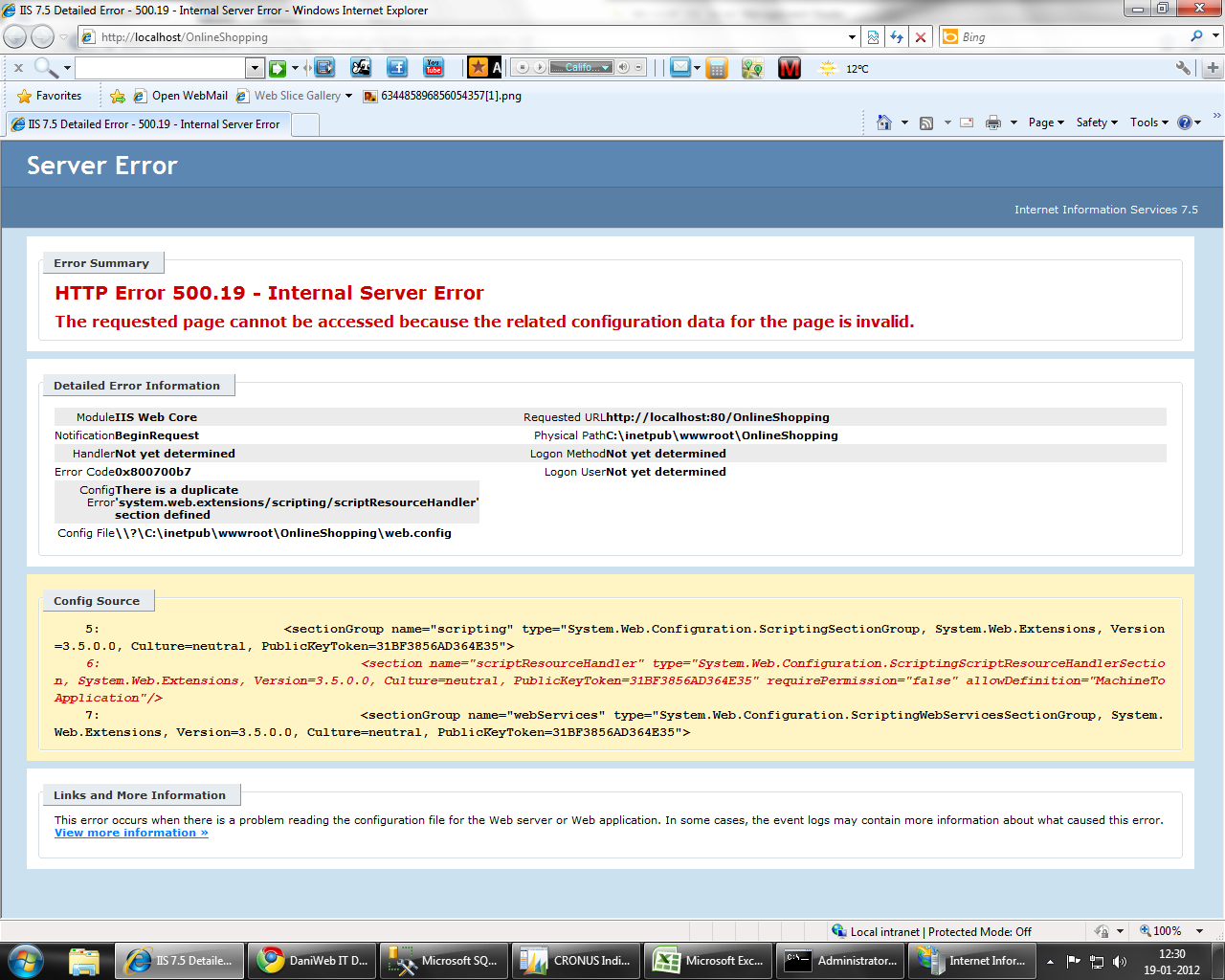
m receiving the following error while publishing my site on iis. Please help. I have also attached the screenshot


Server ErrorInternet Information Services 7.5
Error Summary
HTTP Error 500.19 - Internal Server Error
The requested page cannot be accessed because the related configuration data for the page is invalid. Detailed Error Information
Module IIS Web Core
Notification BeginRequest
Handler Not yet determined
Error Code 0x800700b7
Config Error There is a duplicate 'system.web.extensions/scripting/scriptResourceHandler' section defined
Config File \\?\C:\inetpub\wwwroot\OnlineShopping\web.config
Requested URL http://localhost:80/OnlineShopping
Physical Path C:\inetpub\wwwroot\OnlineShopping
Logon Method Not yet determined
Logon User Not yet determined
Config Source
5: <sectionGroup name="scripting" type="System.Web.Configuration.ScriptingSectionGroup, System.Web.Extensions, Version=, Culture=neutral, PublicKeyToken=31BF3856AD364E35">
6: <section name="scriptResourceHandler" type="System.Web.Configuration.ScriptingScriptResourceHandlerSection, System.Web.Extensions, Version=, Culture=neutral, PublicKeyToken=31BF3856AD364E35" requirePermission="false" allowDefinition="MachineToApplication"/>
7: <sectionGroup name="webServices" type="System.Web.Configuration.ScriptingWebServicesSectionGroup, System.Web.Extensions, Version=, Culture=neutral, PublicKeyToken=31BF3856AD364E35">
Links and More InformationThis error occurs when there is a problem reading the configuration file for the Web server or Web application. In some cases, the event logs may contain more information about what caused this error.
View more information »
Dani AI

Generated

Short summary and practical checklist

This 500.19 / 0x800700b7 error happens when the same ASP.NET configuration element is declared more than once so IIS cannot build the final configuration. In this thread the duplication involves the System.Web.Extensions scripting handler; removing the redundant definition in the site config (what reported) is a valid and common fix. The duplicate can come from the site web.config, the machine-level .NET web.config files, or from applicationHost.config (as noted).

Quick diagnostic steps

  • Confirm the site folder is configured as an IIS Application (IIS Manager → Sites → right‑click → Convert to Application). Some config sections are only valid at the application root; being a nested virtual directory can trigger the error.
  • Locate duplicates by searching IIS config and the .NET CONFIG folders (applicationHost.config and the framework CONFIG directories). Use a file/text search tool or PowerShell to find occurrences of the handler/section name.
  • Always backup any config file before editing and test on a non-production host if possible.
  • Check Event Viewer and IIS Failed Request Tracing for the exact config file path the error reports.

Safe fixes and cautions

  • The least-impact fix is to remove or comment the redundant section from the site’s web.config (this is what resolved the OP’s site). Avoid deleting definitions from machine-level config unless you need the change globally; editing machine-level files affects all sites on the server.
  • After edits recycle the App Pool or restart IIS to clear config caches.
  • If problems persist, verify the application pool’s .NET CLR version matches the app’s target framework and that referenced assemblies/versions in web.config are appropriate.

Thanks to and for the pointers noted in the thread.

Recommended Answers

All 3 Replies

You have a Web site that is hosted on Internet Information Services (IIS) 7.5

This problem occurs because the ApplicationHost.config file has a duplicate entry for the following code.

<add accessType="Allow" users="*" />

To resolve this problem,

In the ApplicationHost.config file, delete the duplicate entry for the authorization rule. To do this, follow these steps:

Click Start, type Notepad in the Start Search box, right-click Notepad, and then click Run as administrator.

Note If you are prompted for an administrator password or for a confirmation, type the password, or click Continue.
On the File menu, click Open, type %windir%\System32\inetsrv\config\applicationHost.config in the File name box, and then click Open.
In the ApplicationHost.config file, delete the duplicate entry that resembles the following code.

<add accessType="Allow" users="*" />

Hope This will solve your problem...

Regards,
Vishal

I configured the problem. We need to delete/comment

<sectionGroup name="scripting" type="System.Web.Configuration.ScriptingSectionGroup, System.Web.Extensions, Version=3.5.0.0, Culture=neutral, PublicKeyToken=31BF3856AD364E35">
</sectionGroup>

This solved my issue...! :icon_cool:

Be a part of the DaniWeb community

We're a friendly, industry-focused community of developers, IT pros, digital marketers, and technology enthusiasts meeting, networking, learning, and sharing knowledge.