Have downloaded apache 2 in ubuntu 10.10 through terminal screen and also php5 but when I type the server address in the browser, it asks for a username and password .I tried giving the login username and password( the one with which I created my ubuntu login) but that wont help:(
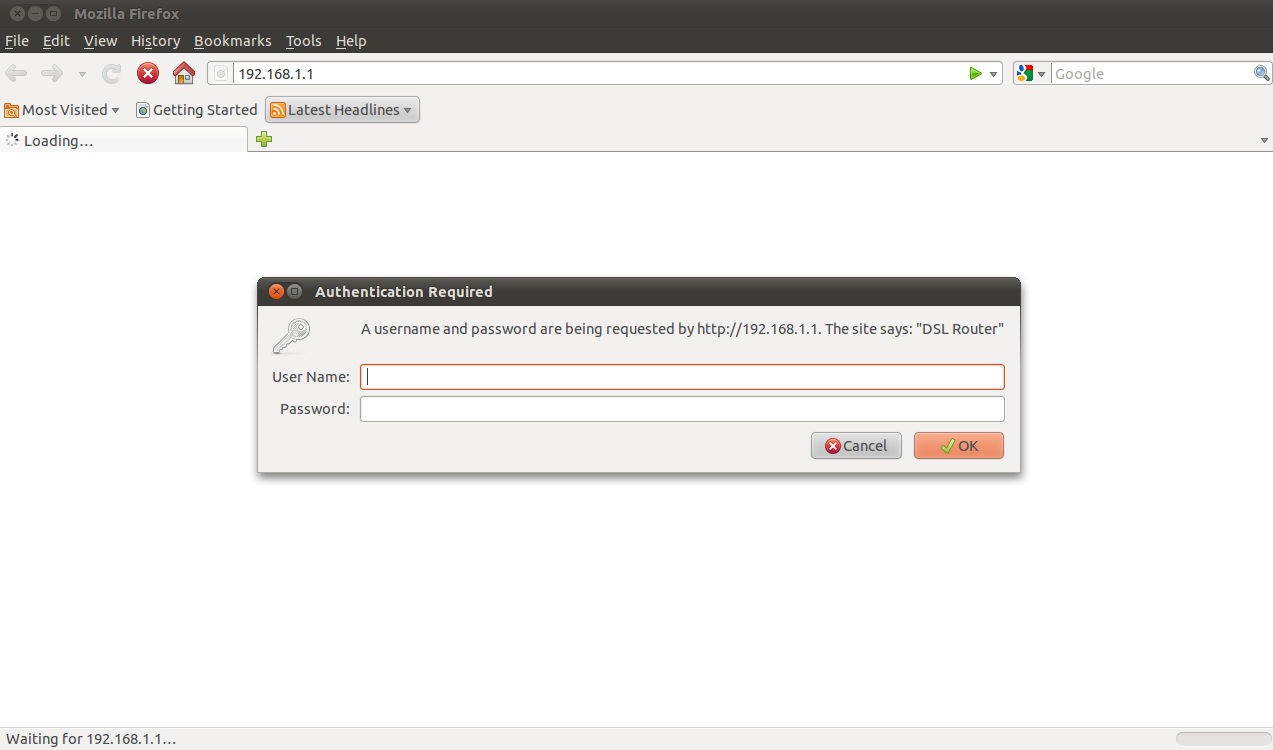
Have attached the screen shot too.please help

Dani AI

Generated

As pointed out, the prompt in the screenshot matches a router/administration login rather than an Apache-auth dialog. Hitting the router's address will return the router UI and ask for router credentials, so the Ubuntu account won't work. The checklist below covers the common causes missed in the thread and gives quick diagnostics to run on the Ubuntu box.

Confirm Apache is running and listening, and inspect recent errors:

sudo systemctl status apache2
# (on older Ubuntu releases)
sudo service apache2 status

sudo apache2ctl configtest
sudo tail -n 50 /var/log/apache2/error.log

sudo ss -ltnp | grep ':80'
# or
sudo netstat -ltnp | grep ':80'
ps aux | egrep 'apache|httpd'

Look for accidental Basic-auth configuration or .htaccess files that would trigger a login prompt:

grep -R "AuthType\|AuthUserFile" /etc/apache2 /var/www 2>/dev/null
find /var/www -name .htaccess -print

Any occurrences of AuthType Basic or AuthUserFile in site configs or a .htaccess inside the DocumentRoot will cause a browser credential popup. Also verify the DocumentRoot actually contains an index file and has readable permissions:

ls -ld /var/www /var/www/html
ls -l /var/www/html

Network notes and safety: accessing the router's external address from inside the LAN often returns the router UI instead of the webserver; test from the server machine itself or via the server's LAN IP. Ensure the host firewall allows port 80 (sudo ufw status, sudo ufw allow 80/tcp if necessary). If remote access is required, configure router port forwarding and disable remote router management on port 80. Do not expose an unsecured server to the Internet without proper hardening.

Useful diagnostic outputs for deeper analysis: service status text, listening-socket lines, the last 50 lines of the Apache error log, any grep hits for Auth* directives, and a directory listing of the DocumentRoot.

That's looks like the IP address for your router, not the apache server.
The username and password you're being asked for in the image is the one for your router.
Try 127.0.0.1 (localhost) in your browser instead!

Be a part of the DaniWeb community

We're a friendly, industry-focused community of developers, IT pros, digital marketers, and technology enthusiasts meeting, networking, learning, and sharing knowledge.