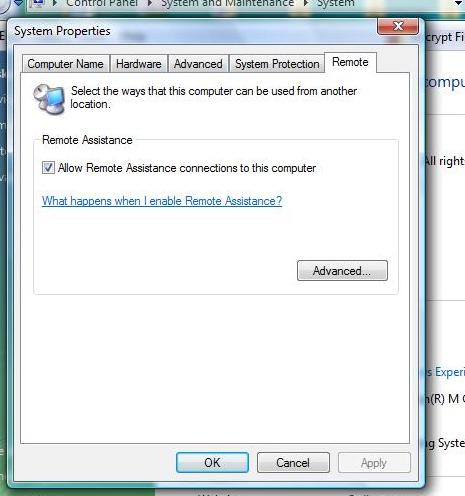
When I click System - Remote, only Remote Assistance appears. I don't see Remote desktop (as you can see in the attachment).
Please give me an explanation.

Dani AI

Generated

Short answer for : Vista Home Premium does not include the Remote Desktop "host" (RDP server) feature. The Remote Desktop item under System Properties appears only on Business, Ultimate or Enterprise editions. The Remote Desktop entry you see in Accessories is the client program (mstsc.exe) used to connect out to other computers — it cannot enable incoming connections on a Home edition. was correct about the edition limitation.

How to proceed:

  • Confirm the edition: Start -> Right‑click Computer -> Properties (or run winver). If you had Business/Ultimate/Enterprise, System Properties -> Remote would show the "Allow users to connect remotely to this computer" checkbox.
  • Remote Assistance is different: it is included in all editions and can be used for one‑time support sessions (the person at the PC must allow the connection).
  • If you need unattended inbound access on Home Premium, either upgrade Windows to a Pro-level edition or use a third‑party tool (TeamViewer for easy unattended access through NAT, or VNC variants if you prefer self‑hosted).

Practical tips and cautions:

  • If you ever enable RDP on a supported edition, open the Windows Firewall rule for Remote Desktop (TCP 3389) or use the "Allow a program through Windows Firewall" control.
  • Exposing RDP to the Internet has security risks: use strong passwords, consider a VPN, and keep the OS patched.
  • Remember that RDP on client Windows locks the local console session (single interactive session), unlike server editions that support multiple sessions.

Quick checklist:

  • Verify edition -> decide upgrade vs third‑party.
  • Use Remote Assistance for help sessions.
  • If enabling RDP, set firewall rules and secure access.

Recommended Answers

All 5 Replies

2 reasons why it's not showing up,
1. You're running XP which BTW does not have that feature
2. It's not turned on, which I think is your problem.
Give this a read and see if it helps;

I have Windows Vista and in System Properties -Remote, Remote Desktop is missing (see the image I 've attached before), so I can't turn it on.
I've found Remote Desktop in Accessories...but it can't be turned on from there.

If you have the Home Edition, it does not have that option.

Important note: Remote desktop is only included in the Professional, Business, or Ultimate versions of Windows. Home editions do not have remote desktop.

I have Home Premium edition, indeed. Then why Remote Desktop can still be found in Accessories? .......

Be a part of the DaniWeb community

We're a friendly, industry-focused community of developers, IT pros, digital marketers, and technology enthusiasts meeting, networking, learning, and sharing knowledge.