Why i am getting the following error .when i tried to send email using Smtp Server???.Kindly let me know the idea. any help would be highly appreciated !!!.

Task 'Pop.gmail.com - Sending' reported error (0x800CCC7D) : 'Your outgoing (SMTP) server does not support SSL-secured connections. If SSL-secured connections have worked in the past, contact your server administrator or Internet service provider (ISP).'
Dani AI

Generated

This thread shows an Outlook client trying to send mail through Gmail and hitting an SSL/authentication problem. later reports a credentials error and suggested contacting the ISP — that usually isn’t needed for Gmail. Most Gmail send failures come from wrong port/SSL settings, blocked Google sign-ins, or antivirus/mail‑scanning interfering with the connection.

Checklist to fix this (in the mail client):

  • Set outgoing server to smtp.gmail.com.
  • Use port 465 with SSL enabled, or port 587 with TLS/STARTTLS enabled.
  • Turn on “My outgoing server (SMTP) requires authentication” and choose “use same settings as my incoming mail server.”
  • Use the full Gmail address as the username and the correct password. Do not enable SPA (Secure Password Authentication).

If Outlook rejects the username/password:

  • Verify you can log into Gmail in a browser first.
  • If the Google account uses 2‑step verification, create and use an App Password for the mail client (regular account password will be rejected).
  • Google may block sign-ins from older clients; modern authentication (OAuth2) or an app password is required — the old “allow less secure apps” approach is no longer a long‑term fix.

Other troubleshooting:

  • Enable POP or IMAP in Gmail web settings if using those protocols.
  • Temporarily disable antivirus/firewall mail scanning — these can break SSL.
  • Confirm the system clock is correct (certificate checks fail if the date/time is wrong).
  • Try both ports (465 and 587) and toggle SSL/TLS to see which works.

If problems persist, capture the exact Outlook error and note whether the account is configured as POP (the client label often shows that). That detail narrows the fix: server names, ports, authentication type, or Google account security settings.

Recommended Answers

All 4 Replies

hi best to do as the error states call your and Internet service provider

hi best to do as the error states call your and Internet service provider

NOOOOOOOOOOOOOOOOOOOOOOO I am Using Gmailllllllllllllllll .especially i am getting
this error when i send any email .

sorry, had you said that in your first post i would not have replied,i don't use gmail

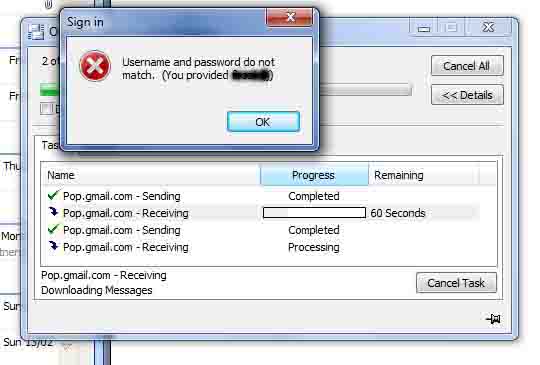
now i am getting error username and password don't match.Kindly let me know the idea .any help would be highly appreciated .

Be a part of the DaniWeb community

We're a friendly, industry-focused community of developers, IT pros, digital marketers, and technology enthusiasts meeting, networking, learning, and sharing knowledge.