Hi everyone,

I'm still using Windows 10 version 1703 (OS Build 15063) and would like to run Microsoft PowerToys. I know the latest releases require a much newer version of Windows 10, but I'm wondering if there's an older PowerToys release that's compatible with my system.

Has anyone successfully installed PowerToys on Windows 10 version 1703?

  • Which PowerToys version works?
  • Are there any required dependencies?
  • Which features are supported or unavailable?
  • Is there any workaround, or is upgrading Windows the only option?

I'd appreciate any suggestions or experiences. Thanks!
Recommended Answers

All 6 Replies

How I did that was to install the last or latest version.

Done. Since my license was legit, not a single problem to report except the time it took to get it done.

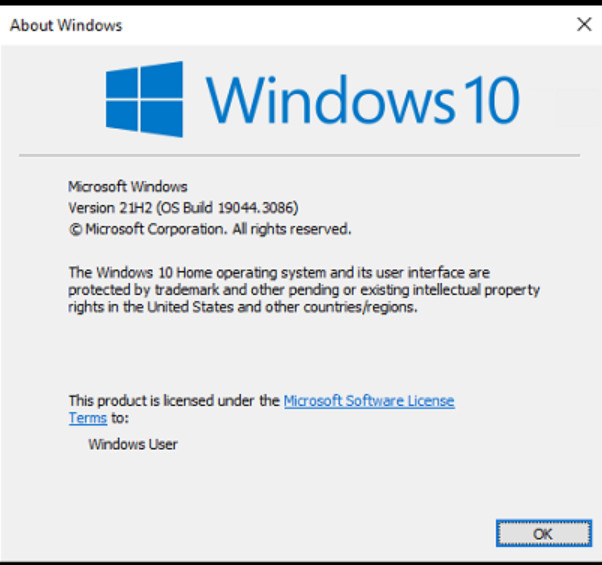
I don't recognize your version numbers. What do you get when you run winver? My results are shown below and I'm running the current version of PowerToys.

2026-08-07_133151.jpg

Microsoft PowerToys requires a newer Windows version; upgrade Windows 10 to a supported release before installing and running PowerToys.

PowerToys is not compatible with Windows 10 1703 in its latest versions. You could try an older version, but compatibility may still be limited.
Upgrading Windows would be the better option.

I can understand not upgrading to Windows 11 since your computer is too old, but why would you not want to upgrade to the most recent Windows 10? Why should we to go to the trouble of figuring out how to get PowerToys to run on your computer when you don't seem to want to go to the trouble of updating your OS?

Windows 10 1703 is quite old, so I wouldn't try to force a current PowerToys release onto it.

PowerToys increased its minimum Windows requirement over time; releases after the older compatibility range require newer Windows 10 builds. For comparison, PowerToys 0.35.x was the last branch before the project moved to Windows 10 1903 or later.

You could check the older PowerToys releases on the official GitHub repository and look specifically for a release whose requirements still include your 1703 build.

If you're staying on 1703, I'd also expect some newer utilities/features to be unavailable even if you find a compatible older build. In practice, upgrading Windows is the much better option if the hardware supports it.

Be a part of the DaniWeb community

We're a friendly, industry-focused community of developers, IT pros, digital marketers, and technology enthusiasts meeting, networking, learning, and sharing knowledge.