Hi,

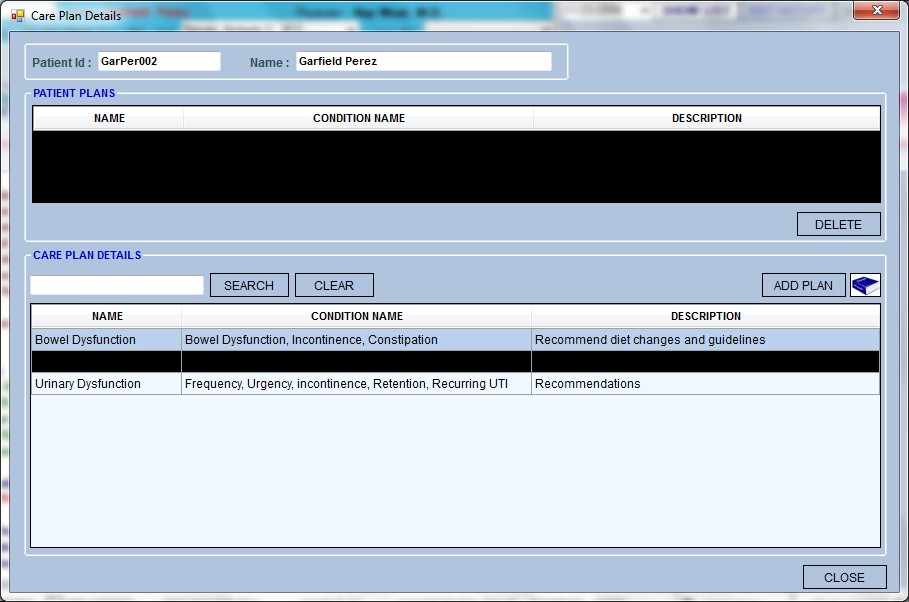
My project works fine with windows xp but when we run it in windows 7 some fields are becoming black as shown in the attachemnt

Could anyone let me know the reason for that?
It happens with some controls

Thanks

Dani AI

Generated

reported that a WinForms app that runs fine on XP shows some fields painted black on Windows 7. 's ForeColor check is a good quick test, but when black regions appear across different forms the root cause is usually a painting/composition mismatch rather than a single color setting.

Common causes and quick checks:

  • Visual-theme / desktop-composition differences (Aero/DWM) can change how GDI/GDI+ painting is composited. Try a non‑Aero theme (Windows 7 Basic/Classic) or temporarily disable Desktop Composition to see if the rendering changes (DWM overview).
  • Graphics driver / hardware acceleration problems. Update the video driver and test on another Win7 machine.
  • .NET/runtime differences or missing service packs. Ensure the app runs on the intended CLR and apply recent framework updates.
  • Custom or owner‑drawn controls that do not paint their background correctly (transparent backgrounds, owner-draw code that skips filling the background, etc.).

WinForms fixes to try (VB.NET):

  • Make sure visual styles are enabled at startup:
Sub Main()
    Application.EnableVisualStyles()
    Application.SetCompatibleTextRenderingDefault(False)
    Application.Run(New MainForm())
End Sub

(see how to enable visual styles ).

  • For custom-painted controls ensure the background is painted and enable double buffering:
Me.SetStyle(ControlStyles.OptimizedDoubleBuffer Or ControlStyles.AllPaintingInWmPaint, True)
Me.UpdateStyles()

Reference for SetStyle: Control.SetStyle.
Also avoid relying on Color.Transparent for controls that do not support true transparency; see Microsoft guidance on transparent control backgrounds.

If the black areas persist after these checks, capture whether the problem appears in a screenshot (indicates painting) or only on the display (indicates driver/DWM). A minimal repro that isolates the control/container will speed diagnosis and point to either a code fix or an OS/driver update.

Hi,

My project works fine with windows xp but when we run it in windows 7 some fields are becoming black as shown in the attachemnt

Could anyone let me know the reason for that?
It happens with some controls

Thanks

hi telltouday, wich fore color you have for that parts of you form. If it is "system" change it and try again

But it happens irrespective of any color and to all forms too which is strange and weird too...
I feel i'm missing any latest updates from either windows 7 or vs2005 which is causing this problem

Be a part of the DaniWeb community

We're a friendly, industry-focused community of developers, IT pros, digital marketers, and technology enthusiasts meeting, networking, learning, and sharing knowledge.