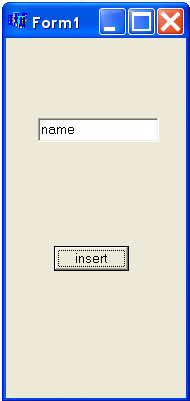
hey guyz..
I don't understand the REAL job of a controller in MVC pattern.
Can anyone show me a simple program with the controller's code?

thanks a lot

Dani AI

Generated

A concise, practical view of the controller’s job (for desktop C++ MVC)

The controller is the application-flow coordinator, not the data holder. It translates UI events into domain actions: validate and normalize input from the view, construct or update domain objects, call persistence/services, handle errors or transactions, and tell the view what to show next (success, error, updated data). This echoes ’ point about separating responsibilities, but adds that validation and domain rules belong in different places: UI-level checks and mapping happen in the controller; core business invariants live in the model or a service layer.

A simple C++ layout (interfaces only — no ownership or implementation details shown):

struct Person { std::string name; void validate() const; };

struct IPersonRepository {
    virtual bool add(const Person&) = 0;
    virtual ~IPersonRepository() = default;
};

struct IView {
    virtual void showError(const std::string&) = 0;
    virtual void refreshList() = 0;
};

class PersonController {
    IPersonRepository& repo_;
    IView& view_;
public:
    PersonController(IPersonRepository& r, IView& v): repo_(r), view_(v) {}
    void onInsert(const std::string& rawInput);
};

Implementation notes and common pitfalls

  • Do not make persistence classes inherit from entities (avoid PersonDB : public Person). That mixes responsibilities and breaks testability. Prefer a repository/DAO interface.
  • Avoid new inside event handlers; inject repository and view so the controller is testable and does not manage lifetime blindly. Use smart pointers where ownership is needed.
  • Keep long-running DB calls off the UI thread (async/task queue) and marshal results back to the UI thread (signals/slots or dispatcher).
  • For testability, have controller methods return status or error objects rather than directly coupling to concrete view behaviour; mocks can verify the correct calls.

Tying back to the thread: ’s flow shows how the view triggers the controller; the refinement above keeps the controller responsible for orchestration while keeping persistence, validation and UI rendering in their proper layers.

Recommended Answers

All 5 Replies

Basic program coming up... please forgive the datatypes, I work mainly with QT libraries

MODEL:

QTreeWidgetItem ContainerClass::loadData(){

    <Database call and query>

    QTreeWidgetItem item.text(<field index> = query.record.value(<fieldname>).toString().trimmed();

    return item;

}

VIEW:

void ViewClass::on_btnLoad_clicked(){

    ControllerObject * TWControlObject = new ControllerObject()

    TWControlObject->loadData();
    
}

Controller:

void ControllerObject::loadData(){

    ContainerClass * DataObject = new ContainerClass();

    tw->addTopLevelItem(DataObject->loadData());

}

Sorry but i don't understand this :/
Let me explain what i am looking for..
For example, we have a Form (like the form.bmp) -look down-.
Also, we have a database to store the data.
When the user input data on editbox and press the insert button, the controller take effect and do the job, i'm answering what is his job?


example:

we have a Person class.

class Person{
       private:
             String _name;
       public:
             void setname(String name){...}

And a PersonDB class

class PersonDB:public Person{
            bool AddpersonTodb(Person* person){//it creates a person and add it to db}

I have read that the controller is something like mediator between View (Form.bmp) and Model (Person class), but i don't know what is the REAL job of controller, for example, it calls the PersonDB methods? and how update/change the state of a class?

I'm totally confused :(

In this case I would not use "Person* person" in the Model,

I would have a Controller class,

which will be instantiated as an object in your View class (Person)

the Controller class will have an object for the Model class (PersonDB)...

and you will work with a middle method to call the functionality of the Model, Or you can even try something like the following in the view itself:

void Person::saveData(){

    <ControllerName>.PersonDB.AddpersonTodb(Person name)
}

If I try to explain it... the Controller communicates the program functionality (in the Model) with the user input handled in the View

The Wikipedia article explains it pretty well.

The essential idea is that your application's parts should not need to know too much about each other.

For example, let's consider a simple text editor.

The "model" represents the textual data and all the stuff you can do to it, like load and save to file, search it and replace text, add and delete text, etc.

The "view" is responsible for displaying the text to the user and the UI elements that the user manipulates to modify it.

The "controller" manages these two things. For example, if the view signals that the user wishes to save (because he pressed Ctrl+S), the controller will do things like check to see if the document needs saving, whether the user needs to be asked for a filename, etc, before instructing the model to save, and afterward reporting any potential failure.

Typically an application will have more than one view (a text editor has other GUI elements besides the text widget, like menus, etc). Often the view and controller are treated as the same thing as well... It is also possible for the view to directly manipulate the model as well. (For example, pressing the Enter key when the text widget has focus doesn't necessarily involve controller action.)

Ideally, this can all be done in such a way as to make the exact model or view changeable to a different one. (For example, you could swap the view from a plain text editor to a WYSIWYG HTML view.)

Sorry for the typos -- sleeping baby on one arm...
Hope this helps.

Be a part of the DaniWeb community

We're a friendly, industry-focused community of developers, IT pros, digital marketers, and technology enthusiasts meeting, networking, learning, and sharing knowledge.