Hi there,

I am very new to VB6.
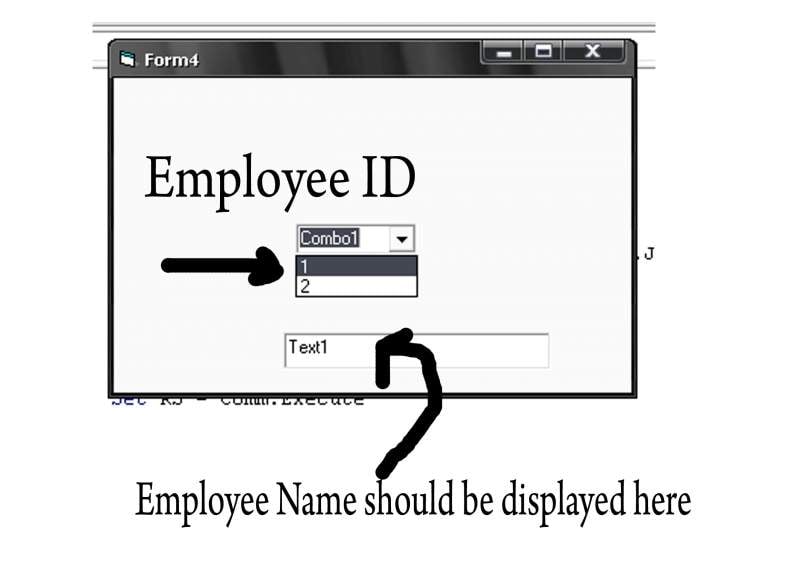
I have a combobox name combo1
textbox= text1
and a database which contain field id and employee name.

what I want is when I click the combo box and select the value 1 the program should look into the database and if it find id=1 then it should automatically display the employee name of that particular ID in the textbox. Can anyone help me.

Private Sub Form_Load()
    Dim RS As ADODB.Recordset
    Dim Conn As ADODB.Connection
    Dim Comm As ADODB.Command
    Dim str As String
     
    Set Conn = New ADODB.Connection
    Conn.ConnectionString = "Provider=Microsoft.Jet.OLEDB.4.0;Data Source = employee.mdb"
    Conn.Open
    Set Comm = New ADODB.Command
    Set Comm.ActiveConnection = Conn
    Comm.CommandText = "SELECT id FROM emp"
    Comm.CommandType = adCmdText
    Set RS = Comm.Execute
     
    Do Until RS.EOF = True
    Combo1.AddItem RS!id
    RS.MoveNext
    Loop
     
    Set RS = Nothing
    Set Comm = Nothing
    Set Conn = Nothing
    End Sub
Dani AI

Generated

Two simple, reliable patterns address the original goal (select an ID in the ComboBox and show the employee name in Text1). populated the combo with IDs; pointed to handling selection in the combo event. The two options below show (A) preload names and keep the ID as hidden data (fast, avoids an extra query), and (B) keep visible IDs and query the DB when the selection changes (useful for very large or frequently-updated tables).

Private Sub Form_Load()
    Dim cn As ADODB.Connection
    Dim rs As ADODB.Recordset

    Set cn = New ADODB.Connection
    cn.ConnectionString = "Provider=Microsoft.Jet.OLEDB.4.0;Data Source=C:\Path\To\employee.mdb"
    cn.Open

    Set rs = cn.Execute("SELECT id, empName FROM emp")
    Do While Not rs.EOF
        Combo1.AddItem rs!empName
        Combo1.ItemData(Combo1.NewIndex) = rs!id
        rs.MoveNext
    Loop

    rs.Close: cn.Close
    Set rs = Nothing: Set cn = Nothing
End Sub

Private Sub Combo1_Click()
    If Combo1.ListIndex >= 0 Then Text1.Text = Combo1.Text
End Sub
Private Sub Combo1_Change()
    Dim cn As ADODB.Connection
    Dim cmd As ADODB.Command
    Dim rs As ADODB.Recordset

    If Len(Trim(Combo1.Text)) = 0 Then Text1.Text = "" : Exit Sub

    Set cn = New ADODB.Connection
    cn.ConnectionString = "Provider=Microsoft.Jet.OLEDB.4.0;Data Source=C:\Path\To\employee.mdb"
    cn.Open

    Set cmd = New ADODB.Command
    Set cmd.ActiveConnection = cn
    cmd.CommandText = "SELECT empName FROM emp WHERE id = ?"
    cmd.Parameters.Append cmd.CreateParameter(, adInteger, adParamInput, , Val(Combo1.Text))

    Set rs = cmd.Execute
    If Not rs.EOF Then Text1.Text = rs!empName Else Text1.Text = ""
    rs.Close: cn.Close
    Set rs = Nothing: Set cmd = Nothing: Set cn = Nothing
End Sub

Notes and troubleshooting: ItemData holds Long values only; use a parallel array or a "id|name" token if IDs are non-numeric. Always close recordsets/connections and add error handling. Preload when the table is small for snappy UI; use on-change queries when the table is large or updated often. This ties ’s event-based idea with a preload pattern that avoids repeated DB hits.

Recommended Answers

All 3 Replies

You can use the sub Combo1_Change to execute the sql statement and place the result in the textbox.

Can you provide me the code please

you can check it. I think you can get idea form it.

Be a part of the DaniWeb community

We're a friendly, industry-focused community of developers, IT pros, digital marketers, and technology enthusiasts meeting, networking, learning, and sharing knowledge.