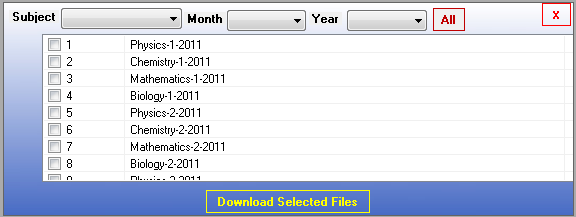
Hi guys,
How to display vertical scrollbar in listview. In listview their are 3 columns also i have set

ListView.View = View.Details;

but vertical scrollbar doesn't appear. Any idea

Thanks in advance.

Dani AI

Generated

correctly pointed out the basic checks and has confirmed those conditions are met. When Scrollable is true and the ListView is in Details mode yet no vertical scrollbar appears, the cause is usually environmental rather than a bug in ListView itself: parent containers that provide their own scrolling, VirtualMode/VirtualListSize mismatches, owner-draw code or custom window styles that remove WS_VSCROLL, or another control overlapping the scrollbar area.

A quick runtime diagnostic is to compare how many rows fit with how many items there are and to force the last item visible to see whether the control actually scrolls. Run this in the debugger or from a button handler after the ListView is populated:

if (listView.Items.Count > 0)
{
    int itemHeight = listView.GetItemRect(0).Height;
    int visibleRows = listView.ClientSize.Height / itemHeight;
    // visibleRows >= listView.Items.Count => no scrollbar expected
    listView.Items[listView.Items.Count - 1].EnsureVisible();
}

Notes: GetItemRect needs at least one item; EnsureVisible will programmatically scroll the view. If the view moves but no scrollbar is drawn, inspect parent controls (AutoScroll, docking, panels, SplitContainer), temporarily disable OwnerDraw/VirtualMode, and check for an overlapping control or altered window styles. To isolate the problem, reproduce the list on a fresh form docked Fill — if the scrollbar appears there, the issue is with the surrounding layout. If this is an ASP.NET/ListView scenario instead of WinForms, scrolling must be provided by CSS (wrap the output in a fixed-height container and use overflow-y: auto).

Recommended Answers

All 3 Replies

You should see a scrollbar if you have set the Scrollable property to true and the content in the list view takes up more than the allowed content area.

Hi hericles, both the conditions are true.

Hi, please see attached file.

Be a part of the DaniWeb community

We're a friendly, industry-focused community of developers, IT pros, digital marketers, and technology enthusiasts meeting, networking, learning, and sharing knowledge.