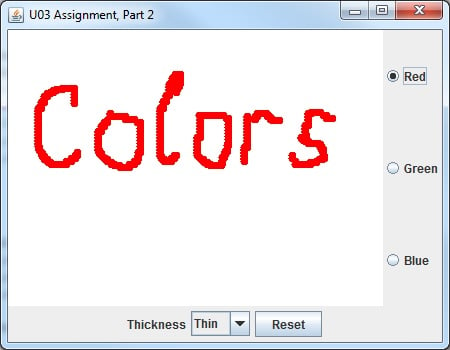
Hi all, I am having an issue with getting my Jbuttons and JComboBox alignment properly in the JPanel. I have tried changing the coordinates of the GridLayout around to try to satisfy, but they are working properly. I am trying to get my radio buttons to the far right and my combobox and button at the bottom. (See example photo)
Below is my code
DrawingPane.java
package u09.u09.homework.start0;

import java.awt.BorderLayout;
import java.awt.Color;
import java.awt.Graphics;
import java.awt.GridLayout;
import java.awt.Point;
import java.awt.event.ActionEvent;
import java.awt.event.ActionListener;
import java.awt.event.ItemEvent;
import java.awt.event.ItemListener;
import java.awt.event.MouseEvent;
import java.awt.event.MouseMotionListener;

import javax.swing.ButtonGroup;
import javax.swing.JButton;
import javax.swing.JComboBox;
//import javax.swing.JLabel;
import javax.swing.JPanel;
import javax.swing.JRadioButton;


@SuppressWarnings("serial") // we do not need serialization
public class DrawingPane extends JPanel implements MouseMotionListener, ItemListener {

    private int stateID;    // memorizes the state of this JPanel
    private Point[] points; // xy-points entered while the mouse is dragged
    private int count;  // number of points memorized
    private int radius; // circle radius for drawing points
    private JButton fancyJButton;
    private JComboBox<String> imagesJComboBox;
    //private JLabel label;
    private static final String[] names = { "Thin", "Thick" };
    //private Color[] colors = {Color.RED, Color.BLUE, Color.GREEN};
    private JRadioButton redButton, blueButton, greenButton;

    // constructor
    public DrawingPane() {


          imagesJComboBox = new JComboBox<String>( names ); // set up JComboBox
          imagesJComboBox.addItemListener( this );

          this.add( imagesJComboBox, BorderLayout.SOUTH ); // add combobox to JFrame


          JPanel buttonPanel = new JPanel();
          buttonPanel.setLayout(new GridLayout(1,15, 10, 10));
          fancyJButton = new JButton( "Reset" );
          buttonPanel.add( fancyJButton ); // add fancyJButton to JFrame
          this.add(buttonPanel, BorderLayout.SOUTH);


          ButtonHandler handler = new ButtonHandler();
          fancyJButton.addActionListener( handler );


          // Create the radio buttons.
          redButton = new JRadioButton("Red");
          redButton.setSelected( true) ;
          greenButton = new JRadioButton("Green");
          blueButton = new JRadioButton("Blue");
          // Group the radio buttons together
          ButtonGroup group1 = new ButtonGroup();
          group1.add( redButton );
          group1.add( greenButton );
          group1.add( blueButton );
          // get these buttons receiving events
          redButton.addItemListener( this );
          greenButton.addItemListener( this );
          blueButton.addItemListener( this );


          this.setBackground(Color.WHITE);

          stateID = 0;
          points = new Point[10000];
          count = 0;
          radius = 3;
          // tell JVM that this object wants to receive mouse motion events
          addMouseMotionListener(this);

          // create a wrapper panel
          JPanel buttonPanel2 = new JPanel();
          buttonPanel2.setLayout(new GridLayout(7,450, 12, 71));
          // place all three on this panel
          buttonPanel2.add(redButton);
          buttonPanel2.add(greenButton);
          buttonPanel2.add(blueButton);
          // add the wrapper panel to this frame
          this.add(buttonPanel2, BorderLayout.EAST);
    }


    private class ButtonHandler implements ActionListener {

        public void actionPerformed( ActionEvent event )
        {

        if (event.getSource().equals(fancyJButton))
         stateID = 0;
         points = new Point[10000];
         count = 0;
         radius = 3;
         repaint();
         System.out.println("The panel state was reset");

        }


    }


    public void paintComponent(Graphics g) {
        super.paintComponent(g);    // clear the panel
        if (stateID == 0) {
            // display the welcome message (until the state changes)
            g.drawString("This is a blank DrawingPane", 20, 20);
            g.drawString("Drag the mouse to draw something", 20, 35);
        }
        // draw all available points, if any
        for (int i=0; i<count; i++) {
            g.fillOval(points[i].x - radius, points[i].y - radius, 2*radius, 2*radius); //changed to fillOval
        }
    }

    //////////  methods required by interface MouseMotionListener /////////////
    @Override
    /**
     * this method is invoked as the mouse cursor is being dragged
     * with the left button pressed; the mouse event is generated at some
     * predetermined time intervals; xy-coordinates of each event are
     * placed in the array; no array overflow protection is implemented though
     */
    public void mouseDragged(MouseEvent event) {
        // this printout is used in test cases
        System.out.println("Mouse dragged count = " + count +
                    "  x = " + event.getX() + "  y = " + event.getY());
        // memorize mouse cursor position
        points[count] = new Point(event.getX(), event.getY());
        count++;
        stateID = 1;    // this changes the state
        repaint();  // this invokes method paintComponent
    }

    @Override
    public void mouseMoved(MouseEvent arg0) {

        // TODO Auto-generated method stub

    }


    public void itemStateChanged(ItemEvent evt) {
            if(evt.getSource().equals(redButton))
               setForeground(Color.RED);
            if(evt.getSource().equals(greenButton))
                setForeground(Color.green);
            if(evt.getSource().equals(blueButton))
                setForeground(Color.blue);

        }

    /*  public void itemStateChanged2( ItemEvent event )
       {
         // determine whether item selected
         if ( event.getStateChange() == ItemEvent.SELECTED )
         {
             // determine which of the two comboboxes was activated
             Object source = event.getSource();
             if ( source.equals( imagesJComboBox ) )
             {
                label.setIcon( colors[
                   imagesJComboBox.getSelectedIndex() ] );
             }
             else
             {
                // this should be never executed
              //    System.out.println( "Unknown source" + event.getSource() );
             }
          }*/


}
GUI_Main.java
package u09.u09.homework.start0;


import java.awt.BorderLayout;

import javax.swing.JFrame;

@SuppressWarnings("serial") // we do not need serialization
public class GUI_Main extends JFrame {

    // starter method
    public static void main(String[] s) {
        GUI_Main app = new GUI_Main();
        app.setDefaultCloseOperation(JFrame.EXIT_ON_CLOSE);
        app.setSize(450, 350);
        app.setTitle("U03 Quick Start");
        app.setLocation(400, 300);
        app.setVisible(true);
    }

    // constructor
    public GUI_Main() {
        // declared as final to allow access from anonymous inner class
        final DrawingPane pane = new DrawingPane();
        this.add(pane, BorderLayout.CENTER);
    }


}