how to code a function to send an email to a predetermine email address.
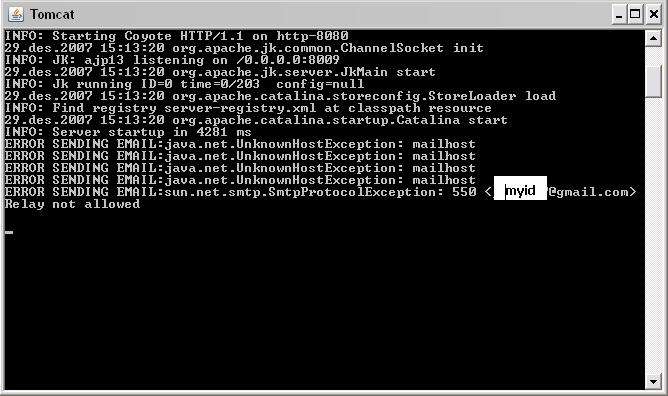
I developt a sample but i got som error message due to mailhost .
the error is showen in attached file.
can anyone say me how to solve this problem. i tried several mailhost, but it was useless.

the code i wrote is :
<%@ page import="sun.net.smtp.SmtpClient, java.io.*" %>
<%
String from="";
String to="";
try{
SmtpClient client = new SmtpClient("mail.gmail");
client.from(from);
(to);
PrintStream message = client.startMessage();
message.println("To: " + to);
message.println("Subject: Sending email from JSP!");
message.println("This was sent from a JSP page!");
message.println();
message.println("Cool beans! :-)");
message.println();
message.println();
client.closeServer();
}
catch (IOException e){
System.out.println("ERROR SENDING EMAIL:"+e);
}
%>
Dani AI

Generated

: the root problem is using the internal Sun SMTP class from a JSP scriptlet. That class is nonportable and will hit relay/authentication problems with real SMTP servers. correctly called out relaying/auth — most public mail servers refuse plain unauthenticated connections or require encryption and modern auth flows.

A practical, supported approach is to use the JavaMail (now Jakarta Mail) API from a servlet or helper class, not from a JSP page. Example skeleton (replace placeholders and keep credentials out of source):

Properties props = new Properties();
props.put("mail.smtp.host", "smtp.example.com");
props.put("mail.smtp.port", "587");
props.put("mail.smtp.auth", "true");
props.put("mail.smtp.starttls.enable", "true");

Session session = Session.getInstance(props, new Authenticator() {
    protected PasswordAuthentication getPasswordAuthentication() {
        return new PasswordAuthentication("username","password");
    }
});

Message msg = new MimeMessage(session);
msg.setFrom(new InternetAddress("from@example.com"));
msg.setRecipients(Message.RecipientType.TO, InternetAddress.parse("to@example.com"));
msg.setSubject("Subject");
msg.setText("Body");
Transport.send(msg);

Troubleshooting checklist: confirm the hosting provider allows outbound SMTP (firewall/ISP blocks are common); test connectivity to the SMTP host/port from the server (telnet or openssl s_client); check SMTP reply codes and Java exception stack traces for "relay denied" or "authentication failed"; verify account-side requirements (two-factor, app passwords or OAuth tokens). If server-side SMTP is blocked, use the hosting provider’s relay or a transactional email service with an API/relay.

Operational advice: don’t put credentials in JSP. Configure a container JNDI MailSession or keep secrets in environment variables, and send mail from a background task or servlet helper. Ensure SPF/DKIM/DMARC are set for deliverability. These steps address the relaying/authentication issues called out earlier and move the app to a maintainable, secure solution.

Relaying issues are the most common problem when trying to send E-mail with a website. You need to make sure the SmtpClient settings are appropriate. From your code sample, you are trying to make use of gmail's mail server, in which case you need to use the appopriate server name, port, method, and credentials.

According to

server: ''
port: 465
scheme: ssl
username: your gmail username (i.e., whatever at gmail dot com)
password: your gmail password

However, according to the JavaMail FAQ (http://java.sun.com/products/javamail/FAQ.html#security):
"The JavaMail APIs currently have no support for sending or receiving secure email."

So you cannot send mail via g-mail's smtp server. You will need another smtp server, either a mail server that you use that would allow such (like the one you get your own E-mail from, besides g-mail, if you have another). If there are none, then you cannot send e-mail, unless you can install an smtp client on the server you are hosting this website and configure it to send your mail.

~ mellamokb

commented: Nice info +7
Be a part of the DaniWeb community

We're a friendly, industry-focused community of developers, IT pros, digital marketers, and technology enthusiasts meeting, networking, learning, and sharing knowledge.