My system:
Dell Desktop: Inspiron 545
Intel Celeron Q9400
8 GB RAM at 800MHz
Windows Vista Home Premium, 64-bit
ZoneLabs Firewall & Anti-virus
CCleaner, CWShredder, SpyBot, SpySweeper, Ad-Aware

Dreamweaver 3
When I try to upload webpages (i.e., index page) on my new computer, the following message appears:
"An error occurred--cannot put index.html. The process cannot access the file because it is being used by another process."
--I was not using the file with other processes/programs at the time.

When I try to cache files, this message appears:
"Unable to write to cache file "C:\Program Files\Dreamweaver 3\Configuration\SiteCache\Craig Srebnik Fine Art.dws"

--Are updates/downloads required for using Dreamweaver 3 on Vista Home 64-bit (it worked with Windows XP)?
--If not, can you recommend the earliest (simpliest/cheapest) Dreamweaver version to buy or upgrade to?

Thank you for your help!
Dani AI

Generated

This thread shows two related symptoms: Dreamweaver cannot upload a file because it is reported as "in use", and the app fails to write its site-cache under Program Files. Those symptoms point to file-handle/permission problems on Vista rather than bad HTML or an FTP-host problem. reported the errors and already checked running processes (including the Adobe helper), which is useful but not the whole picture.

Common, practical causes and next steps:

  • Use Process Explorer (Sysinternals) to locate the handle that keeps the local file open. Run Process Explorer as administrator and use Find -> Find Handle or DLL, search for the HTML filename or the SiteCache filename to see which process holds it. Close the handle or stop the process only after confirming what it is.

  • Vista UAC and Program Files protection often block older apps that try to write into their installation folder. Run Dreamweaver in compatibility mode and with elevated rights: right-click the executable -> Properties -> Compatibility -> select Windows XP compatibility and check "Run this program as an administrator." Alternatively, change the NTFS permissions on the specific Configuration\SiteCache folder so the current user has Full Control (Advanced -> Owner if needed).

  • Test the upload with an external FTP client (eg, FileZilla) to separate Dreamweaver FTP code from file-locking problems. Temporarily disable real-time antivirus/scan and any backup/sync tools to rule them out as the locker.

  • Check for VirtualStore copies: older apps can be redirected to the user VirtualStore (AppData\Local\VirtualStore\Program Files...), which creates confusing duplicates. Remove stale virtual copies and consolidate permissions.

Short-term fixes: run Dreamweaver elevated or relax SiteCache folder permissions. Long-term fix: use a Dreamweaver build patched for Vista/64-bit or install the app outside Program Files, since continuing to run legacy editors under UAC can produce recurring permission and locking issues.

Recommended Answers

All 7 Replies

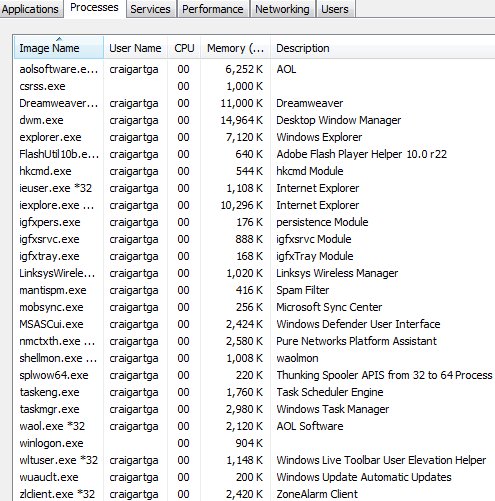
can you CTRL + ALT + DELETE for me and printscreen all the processes?

Thank you for your reply.
Attached are the processes shown in Task Manager.
Thanks for taking a look.

Hmm, I cant see anything suspicious to get in the way?

Urmm... Try ending AdobeUtil10b.exe?

Thank you for looking at the processes and for your advice.
I tried ending the Adobe Flash 10b.exe process and still received the same error message.

That awfully wierd.

The uploading one could be caused if your websites name is 27 or over in characters.

The cache error has just blown me away thought? Try uploading the most basic HTML page to the host and see if its in your code. If it is then youll have to paste your code up here or try and fix it yourself if not then contact support.

Thank you for more advice.
I tried uploading a very basic page, even without it being opened in Dreamweaver and received the same errors.
The website name is less than 27 characters.
All worked fine on my other computer. Perhaps going from Windows XP to Vista is the problem, as it is an older version of Dreamweaver. I haven't been able to send my questions to Adobe or even get to the telephone support page--I have problems with their website.
Thanks again!

Hmm, confusing..

Be a part of the DaniWeb community

We're a friendly, industry-focused community of developers, IT pros, digital marketers, and technology enthusiasts meeting, networking, learning, and sharing knowledge.