I don't know why it is so hard for tech companies to design good tech. Take my current (free) Rogers Xfinity camera. They tout it as being primarily used for the front door. According to the sales team here is how it works:

  1. Someone rings the doorbell
  2. See who it is on the camera
  3. Use the 2-way audio to talk with them

In reality here's what happens:

  1. Someone rings the doorbell
  2. Find your smart phone
  3. Unlock it
  4. Switch to the Xfinity app
  5. Re-login to the app because it randomly logged you out
  6. Select the camera
  7. Watch them leave because you took too long to respond

What morons decided this was a good system?

I have the full ISP package from my provider, which is why I got the free cam. Because it is an integrated system you would think there would be a Windows app I could use to make/receive phone calls on my laptop. For me this would be ideal because I am hearing impaired and can stream audio to my hearing aids from my laptop. But even on a system controlled entirely by Rogers this cannot be done.

There was something called the Rogers Xfinity Web Portal which was a browser app, but this was discontinued several years ago. Using the portal I could have used my laptop to make/receive calls, monitor, control, and configure my home network, etc. Now I have to use the smartphone app which has a shittier interface and less functionality.

2010-01-19.jpg

Recommended Answers

All 19 Replies

Presumably the very idea of "Find your smart phone" is so alien to genxyz because they're all surgically welded to their portable tracking devices.

My tapo is equally crap in that respect.

commented: What was the transgression? "Tapa & Tapo. torment, punishment, penance, esp. religious austerity, self-chastisement ascetic practice." +16

Tapo is a doorbell camera marketed in the UK

commented: Given one definition, a strange choice of brand names. Or maybe apropos. +0

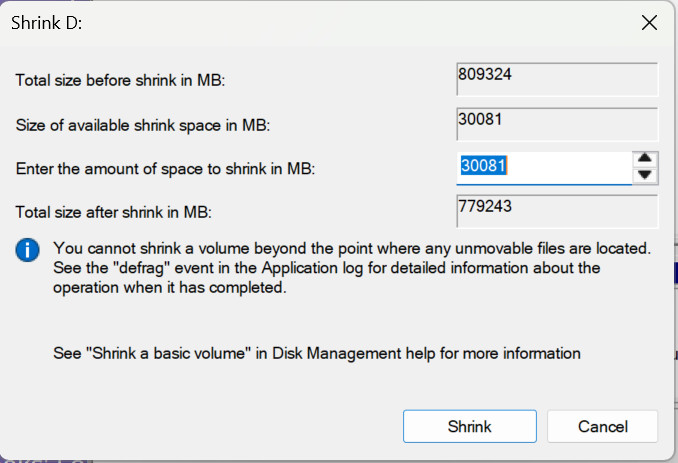
I have been running pretty tight on my Windows 11 C partition for some weeks so I decided to steal 30 gig from my D partition. It should have been a simple operation using the Windows disk management console. But, of course, Microsoft couldn't even get a basic tool like that right. After taking a C image (Macrium Reflect) and doing a full D: backup to an external drive, I ran diskmgmt.cpl, selected D: and picked "shrink volume". It turned out that the MS tool shrinks a volume from the right, meaning that there was then no way to expand C:.

Fortunately there is a free version of EaseUS Partition Manager. Let's compare the two utilities.

The Windows tool allows you to specify only one value, the amount to shrink. In most cases this would be sufficient, but in some cases you may want to actually give just the new size. With the MS tool you would have to keep changing the "shrink by" value until the "Total Size" is the number you want.

But the biggest flaw is that, as I stated earlier, the free space appears at the end.
2026-06-28_103036.jpg

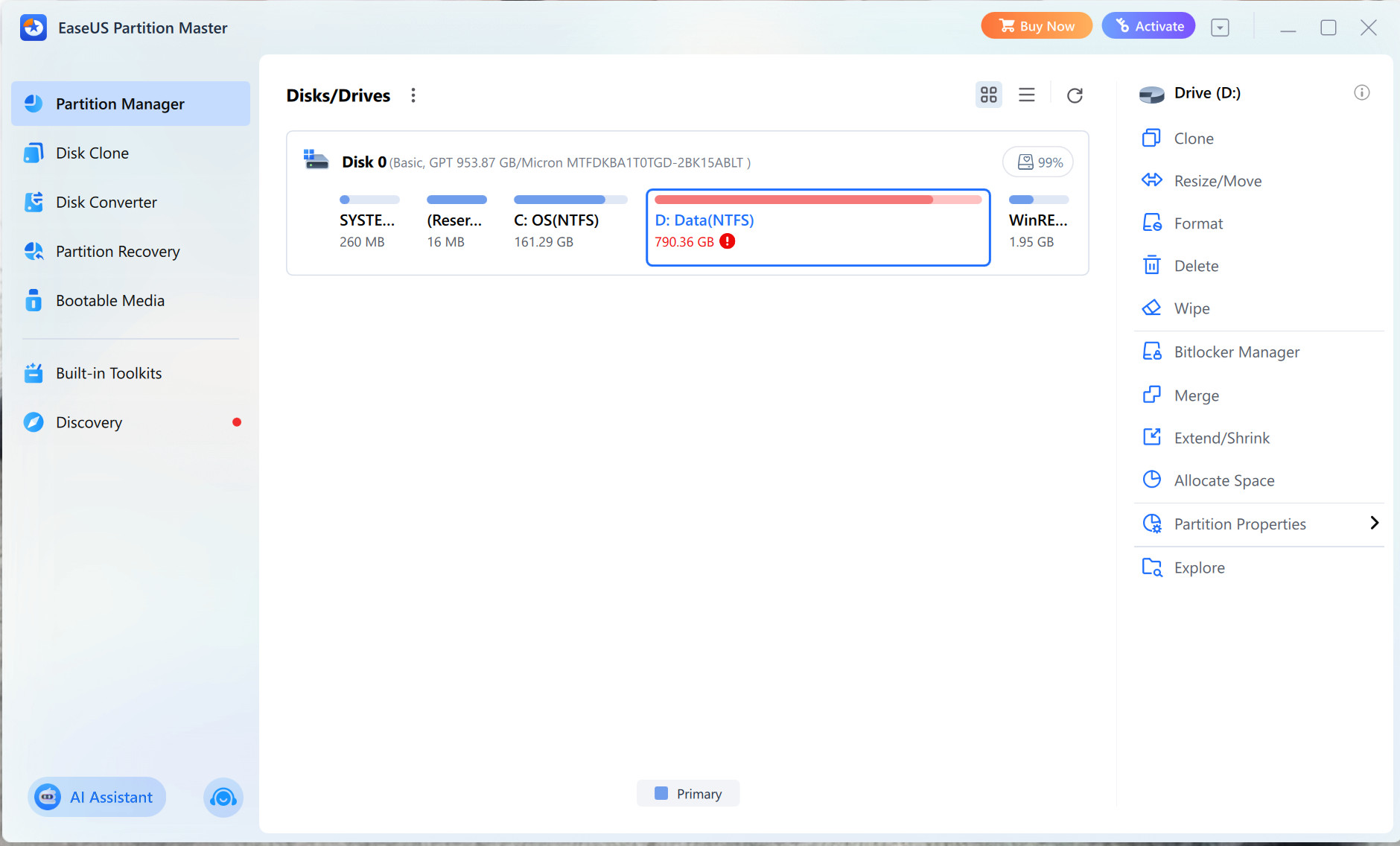
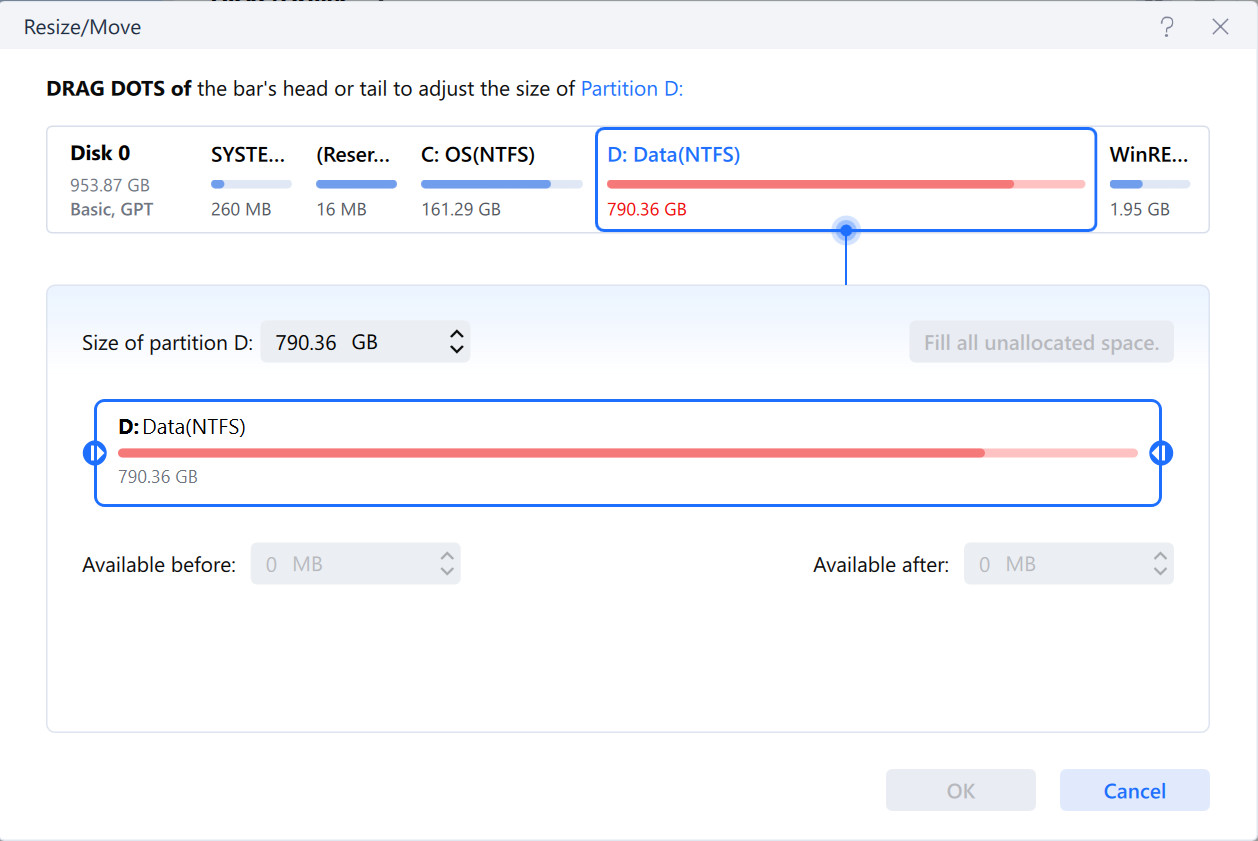
Now look at the EaseUS tool. In the first screen you see a full slate of disk tools that is far more complete than the MS disk manager. In the second screen you can drag the partition boundary at the left or right. Selecting advanced options shows you the actual values, updated as you drag the edge, of the available space you will end up with. Once you have dragged an edge those fields become enabled, meaning you can adjust by dragging, or by entering precise numbers in those fields. More options without being more confusing. I "stole" 30 gig from the start of D: The operation required a reboot to boot into a mode where EaseUS could perform the resize. It took under five minutes. Once I restarted I was able to use EaseUS again to expand C: into the now unallocated soace. This did not require a reboot. I could probably have done both operations at the same time but I am rather cowardly when it comes to futzing with my partitions.

2026-06-28_104039.jpg

2026-06-28_104153.jpg

My only criticism of EaseUS, and it is a petty one, is that the two numeric fields could easily have been enabled at the start.

So why couldn't Microsoft have gone to the trouble of building a disk manager that actually allows me to manage my partitions?

commented: Long ago I changed over to BFP. Big Fun Partition. Organizing is done with folders now. If you want a trash app, look at MSBACKUP. +16
commented: Easeus Free is much better than the Windows app. +0

All I'm finding when I google Big Fun Partition is musical numbers.

commented: My joke didn't land. BFG as in Doom. BFP for Windows. +0

By the time you've unlocked the phone, opened the app and logged in again, the visitor has already walked away.

commented: I unlocked the phone, opened the app, filled in the name and password, get a two factor auth text message, open messages, and they're gone. +16

I just rebuilt my wife's laptop after several MS-suggested repair techniques failed to debug it. I used Windows 11 Home 23H2, then applied all outstanding updates. Everything works fine now except for one annoyance.

Microsoft has decided that Microsoft Teams may no longer be moved from the System Tray overflow area to the main, always visible system tray. This is apparenty by design. So now if she gets a message on Teams while away from the screen she will no longer see the Teams icon indicating she has unread messages. I wonder what idiots at MS decided this was a good thing.

I saw a video on a small Linux distro called Zorin OS. I had an old Dell Latitude gathering dust because it was just too painfully slow to run Windows. Zorin OS look good because it was small, and the default desktop was visually very similar to Windows. I copied the iso to my Ventoys USB and got to work. Installation was a breeze and I was quickly up and running. Brave browser came pre-installed. I was able to join my home network and access shared network drives.

All of my home machines have TightVNC installed so I thought I'd install it on Zorin as well. As it turns out, I would have to use a fork of TightVNC called TigerVNC. That's when the "fun" began. Every failure to connect led me down a new rabbit hole where the "solution" (sorry about all the sarcastic quotes) was

Oh. You also have to install ...

So far I've installed five components I've never heard of, and each install resulted in the same failure to connect. While I have abandoned my attemt at renote access I do feel that Zorin seems to be a pretty spiffy distro but this is not the way to design tech.

commented: Wait till you see the command lines to do this! +16

Wait till you see the command lines to do this

The command lines are easier to work with. The github download page shows folders within folders within folders with downloads for different OSs, chipsets, versions, etc. and no explanation as to which file I need for my computer. And if there are instructions they are usually along the line of

Make sure you get the correct version for your installation.

But using

sudo apt install tigervnc-standalone-server tigervnc-common

gets the current correct version with no head scratching. Too bad it doesn't also get the dependencies as well.

I am currently in "negotiations" with Logitech regarding a problem with their Options+ software. For years now I have used the M720 Triathlon cordless mouse. What I like about the Options+/M720 combo is the ability to assign custom actions to all of the buttons. For example in vsCode I can toggle in/out of full screen with the thumb button, and step into/step over code with the forward/back buttons. Or I can assign ARROW-RIGHT and ARROW-LEFT to skip ahead/back in toutube and other videos.

But there are several problems with Options+. Occasionally O+ will start sending the wrong commands to the app. For example, clicking forward in youtube will start sending a space instead of ARROW-RIGHT, and the thumb button, instead of sending F11 will bring up the windows desktop previews. Removing and re-adding the app and settings does not fix the pro lem.

Another problem is that the only way to backup my settings is to log in to Logitech and backup the settings to their cloud. I don't have a problem with that except on the few occasions I have had to restore the backup, only 3-4 of the dozen or so apps I had customized were restored.

I have had this problem occur on three different laptops and three different versions of Windows. Also with two different M720 mice. Settings are stored locally in a sqlite database, but the database is locked so there is no way for me to see if the problem stems from a currupted database. Logitech

  1. Will not let me unlock the database

  2. Will not provide a reliable method to backup/restore the setting locally

  3. Will not provide a debug logging mode

What they will do is ask me to take steps which only result in wiping out all of my customizations, while in no way providing any useful degugging information. So far they have "escalated your case to our next level of support" six times, which makes me wonder how many levels they actually have.

As a former systems programmer, every one of my applications had debugging and logging built in and could easily be enabled/disabled.

I expect I will get responses like, "why do you keep using it?" The reason is that the problems happen infrequently enough that the productivity I gain far outweighs the trouble it takes to reapply the settings.

Is the database locked if you boot into windows safe mode?
IIRC, safe mode doesn't load any 3rd party stuff, so the DB should be in an unlocked state.

Another "out there" option is to boot say an Ubuntu live USB, mount the NTFS partition in read-only mode and then snaffle the database.

Nope. I've tried a Live boot with Zorin OS and I've tried copying the data base files to another laptop. It's Logitech that has done something to prevent non O+ access. This post was just another example of bad design rather than a plea for help. Because everything is locked down there is no way to see if it's the database that is bad, or if the database is good but O+ is screwing up the translation.

Good technology requires simplicity,reliability, security,and the ability to meet users'needs.Balancing all these aspects is challenging.

Good technology requires simplicity,reliability, security,and the ability to meet users'needs.Balancing all these aspects is challenging.

It's also time-consuming and costs money.

Which is a problem if you're trying to extract the most of money out of your customers with the least amount of expenditure.

Which probably explains why there is so much unreliable s/w with poorly thought out U/X and riddled with security issues.

And that's before all the enshittification designed to steal as much personal info as possible that can be sold to further reduce you to a product to be exploited rather than a customer.

commented: Did I hear "Send It!" Yup. +0

Poorly thought out applies to everything. We just seem to see it more often in computer tech. For example, my brother was at one time, the civil engineer in charge of all our province's rural water treatment plants. When it came time to build a new plant, he looked over the plans with input from the maintenance workers. They vetoed the design almost immediately. There were very long, continuous stretches of pipes with no access points between input and output. It was obvious to the maintenance staff that in order to clean the insides (as must be done from time to time) they would have to cut the pipes to get the cleaning brushes inside.

So in this case, the simplest design (continuous pipes) was the least practical.

You can make an analogy to software. It is simpler and faster to build software with no logging or debugging. It just isn't practical when something goes wrong and you have no easy way to find out what or where.

commented: "Logging"? This isn't Canada Eh. "Debugging"? Don't put bugs in you daft code monkey. +16

Software logging. Not to be confused with softwood logging.

5% = Percentage of Canadians who say "eh".
95% = Percentage of people doing an impression of Canadians.

commented: It was 1993 and when my mother visited us in Vancouver she asked if we could go see the igloos. Also, in 1993 I heard a lot of "eh"'s! +0

Bob & Doug McKenzie. National treasures? Maybe, maybe not. Like, take off, eh? Hoser.

commented: Also in 1993. On the radio: "Stats Can finds that only 50% of Canadians are smokers." Me: Yikes! Found local restaurants and bars most repelling. +0

Two weeks ago I used EaseUS to add 30 gig to my C partition because I was down to around 10 gig free. Today I am back to 13 gig free even though I have installed nothing in the last two weeks. I suspect Windows has hoovered up the extra space.

Case in point - the upcoming 26H2 update will come with a new sooper-dooper restore point feature that will (supposedly) backup and restore more than just Windows system files. It's called point-in-time restore. And it only requires that you reserve a minimum of 200 gig for the restore files.

commented: Today I learned about the W11 GDID security problem. Another reason to never tie a PC to any MSFT email account. +16

I've set up all my computers using OOBE\BYPASSNRO so I run on local accounts only. No Microsoft account and no Onedrive.

commented: OOBE WAN CAN NO BE? +0
Be a part of the DaniWeb community

We're a friendly, industry-focused community of developers, IT pros, digital marketers, and technology enthusiasts meeting, networking, learning, and sharing knowledge.